







Question: A payroll process application is needed to be coded using Visual Basic. GUI sample: Use btnProcessPay for Process Paycheck button. Use btnProcessTot for Process Totals
A payroll process application is needed to be coded using Visual Basic.
GUI sample:
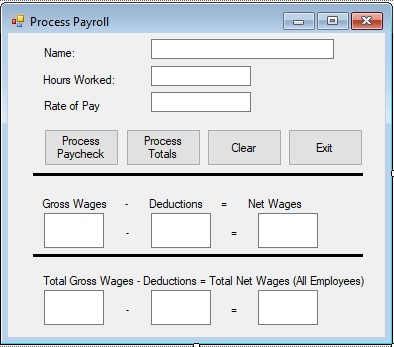
Use btnProcessPay for Process Paycheck button.
Use btnProcessTot for Process Totals button.
Use btnClear for Clear button.
Use btnExit for Exit button.
Use txtName for Name textbox.
Use txtHours for Hours Worked
Use txtRate for Rate of Pay
Use txtGross Gross Wages textbox.
Use txtDed for Deductions textbox
Use txtNet for Net Wages textbox
Use txtTotGross for Total Gross Wages textbox
Use txtTotDed for Total Deductions textbox
Use txtTotNet for Total Net Wages (all employees)
The following steps are :
A. The focus must be in the txtName textbox when the application starts. txtName serves no other purpose than to receive focus.
B. The application will end the Exit button is clicked.
C. When the Clear button is clicked, all textboxes are cleared and the focus returns to txtName. Accumalation of employee data starts all over.
D. When the Process paycheck button is clicked, gross, deductions and net wages will be calculated and values will be placed in txtGross, txtDed and txtNet. Calculate these values using the following rules:
- Gross wages are computed as hours times rate for 40 hours or less
- The employee is paid time and one half (overtime) for hours over 40 hours (not 40 but over 40 hours)
- The only deduction is for tax
- No tax is deducted for gross wages under $200.00 (deduct tax when gross is $200.00 and over)
- The tax rate is 15% of the gross wages
E. When the Process Totals button is clicked, values will be placed in txtTotGross, txtTotDed and txtTotNet. These values are a summary of the gross, deductions and net wages for all employees that were entered into the program since the program started or the clear button was clicked.
- This button does not need to be clicked after each employees data is entered but will display for all employee data entered since the program started or the clear button was clicked.
Process Payroll Name Hours Worked Rate of Pay Process Paycheck Process Totals Clear Exit Gross Wages DeductionsNet Wages Total Gross Wages - Deductions Total Net Wages (All Employees) Process Payroll Name Hours Worked Rate of Pay Process Paycheck Process Totals Clear Exit Gross Wages DeductionsNet Wages Total Gross Wages - Deductions Total Net Wages (All Employees)
Step by Step Solution
There are 3 Steps involved in it

Get step-by-step solutions from verified subject matter experts
 Study Help