





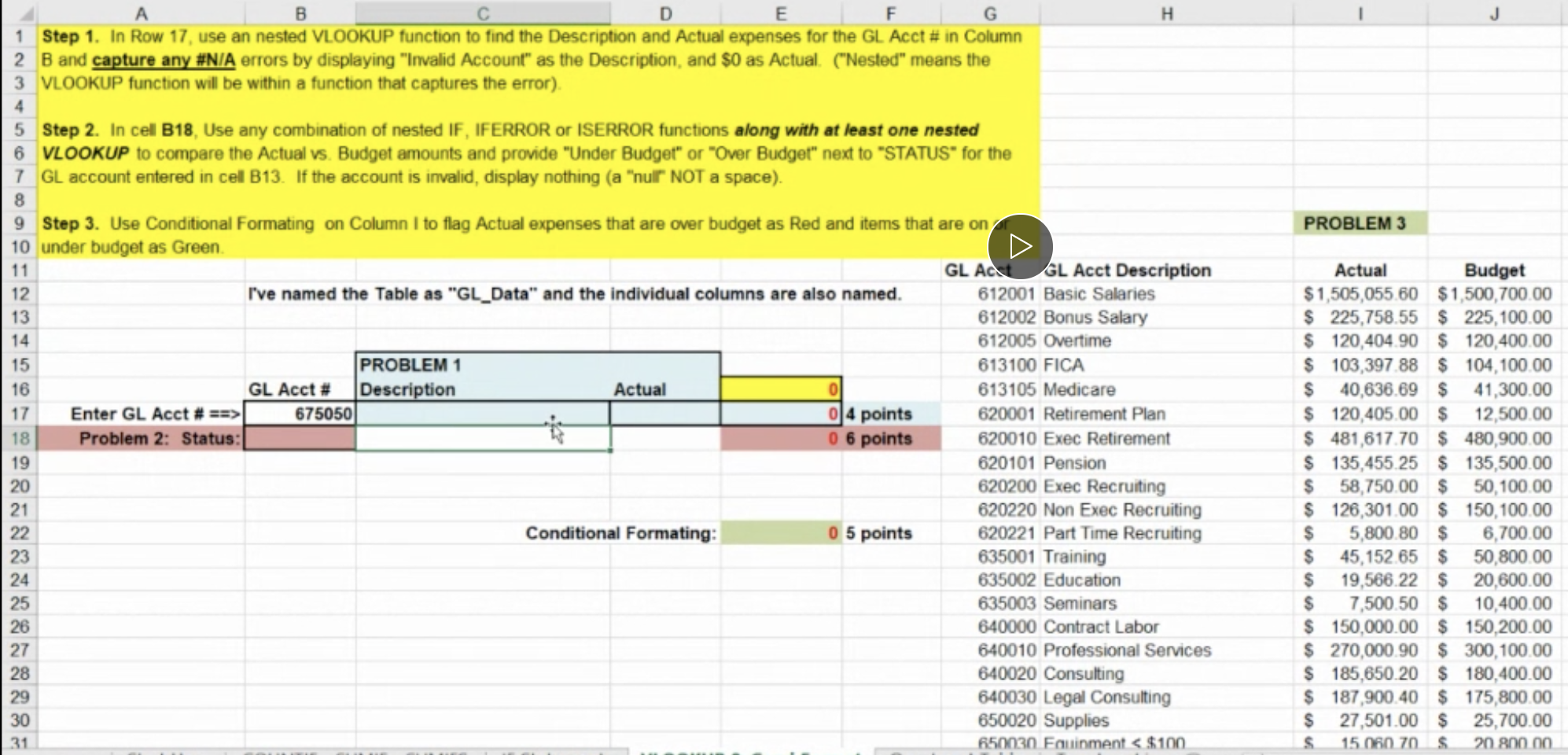
Question: B H E F G 1 Step 1. In Row 17, use an nested VLOOKUP function to find the Description and Actual expenses for the
B H E F G 1 Step 1. In Row 17, use an nested

B H E F G 1 Step 1. In Row 17, use an nested VLOOKUP function to find the Description and Actual expenses for the GL Acct # in Column 2 B and capture any #N/A errors by displaying "Invalid Account" as the Description, and $0 as Actual. ("Nested" means the 3 VLOOKUP function will be within a function that captures the error) 4 8 PROBLEM 3 D 0 5 Step 2. In cell B18. Use any combination of nested IF, IFERROR or ISERROR functions along with at least one nested 6 VLOOKUP to compare the Actual vs. Budget amounts and provide "Under Budget" or "Over Budget" next to "STATUS" for the 7 GL account entered in cell B13. If the account is invalid, display nothing (a "null NOT a space). 9 Step 3. Use Conditional Formating on Column I to flag Actual expenses that are over budget as Red and items that are on 10 under budget as Green 11 GL ACGL Acct Description 12 I've named the Table as "GL_Data" and the individual columns are also named. 612001 Basic Salaries 13 612002 Bonus Salary 14 612005 Overtime 15 PROBLEM 1 613100 FICA 16 GL Acct # Description Actual 613105 Medicare 17 Enter GL Acct # ==> 675050 04 points 620001 Retirement Plan 18 Problem 2: Status: 0 6 points 620010 Exec Retirement 19 620101 Pension 20 620200 Exec Recruiting 21 620220 Non Exec Recruiting 22 Conditional Formating: 0 5 points 620221 Part Time Recruiting 23 635001 Training 24 635002 Education 25 635003 Seminars 26 640000 Contract Labor 27 640010 Professional Services 28 640020 Consulting 29 640030 Legal Consulting 30 650020 Supplies 31 650030 Fouinment 675050 04 points 620001 Retirement Plan 18 Problem 2: Status: 0 6 points 620010 Exec Retirement 19 620101 Pension 20 620200 Exec Recruiting 21 620220 Non Exec Recruiting 22 Conditional Formating: 0 5 points 620221 Part Time Recruiting 23 635001 Training 24 635002 Education 25 635003 Seminars 26 640000 Contract Labor 27 640010 Professional Services 28 640020 Consulting 29 640030 Legal Consulting 30 650020 Supplies 31 650030 Fouinment

Step by Step Solution

There are 3 Steps involved in it

1 Expert Approved Answer
Step: 1 Unlock blur-text-image

Question Has Been Solved by an Expert!

Get step-by-step solutions from verified subject matter experts

Step: 2 Unlock
Step: 3 Unlock

Students Have Also Explored These Related General Management Questions!