







Question: Could you please help me to get the API services for creating Healthcare service with angular 5.. here is the file details --- Please help
Could you please help me to get the API services for creating Healthcare service with angular 5..
here is the file details ---
Please help on creating API service for Healthcare service project.
git hub repository details with all files and package --
HTTPS ---
https://github.com/biswas1989/Health-care-service-angular-5.git
git hub cli ---
gh repo clone biswas1989/Health-care-service-angular-5
SSH --
Query is ---
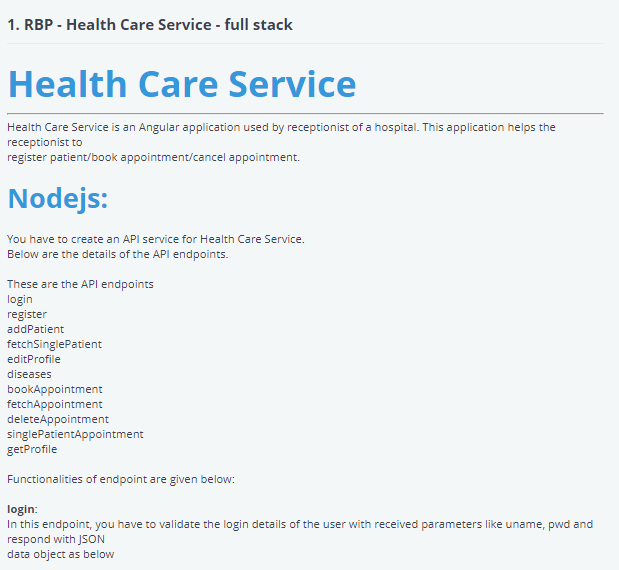
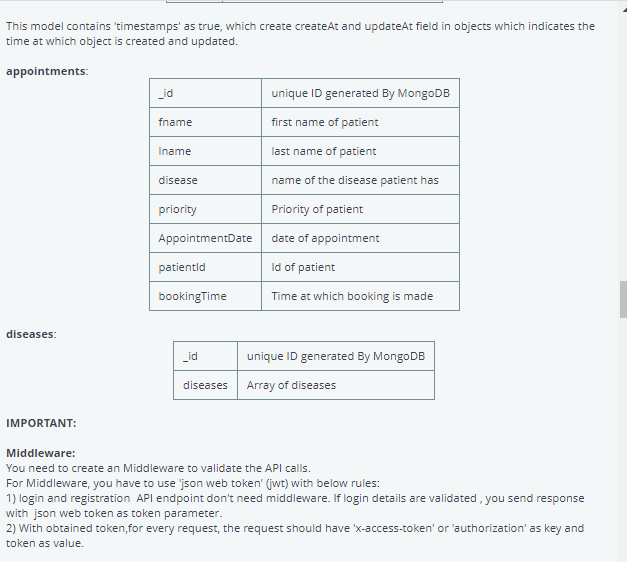
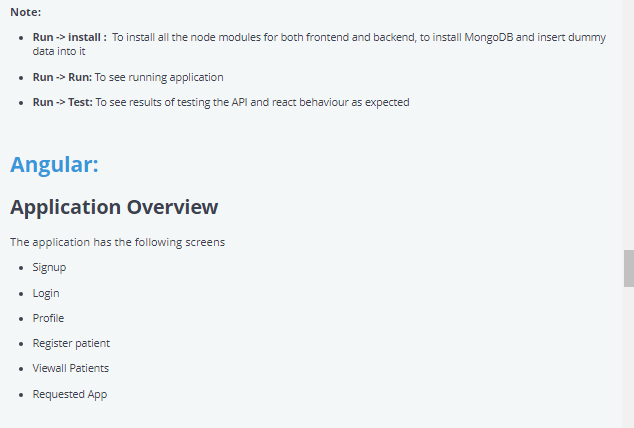
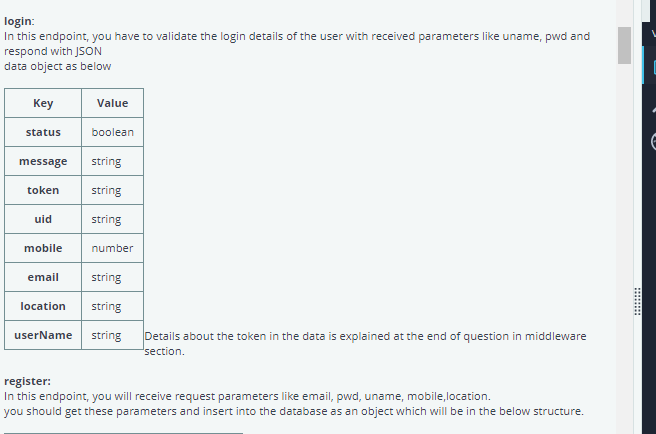
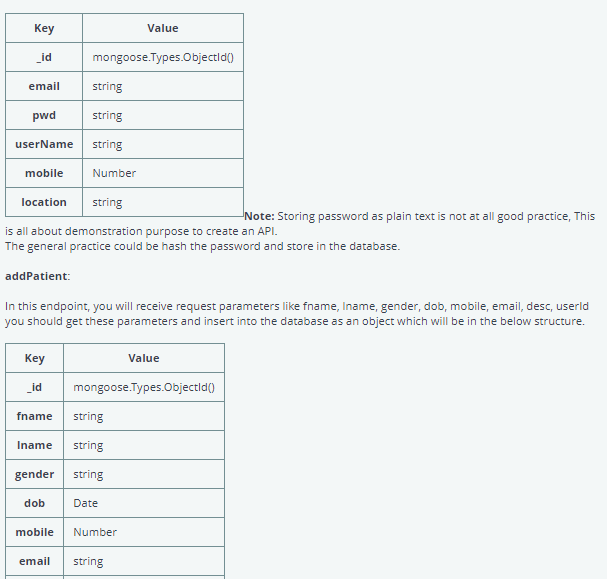
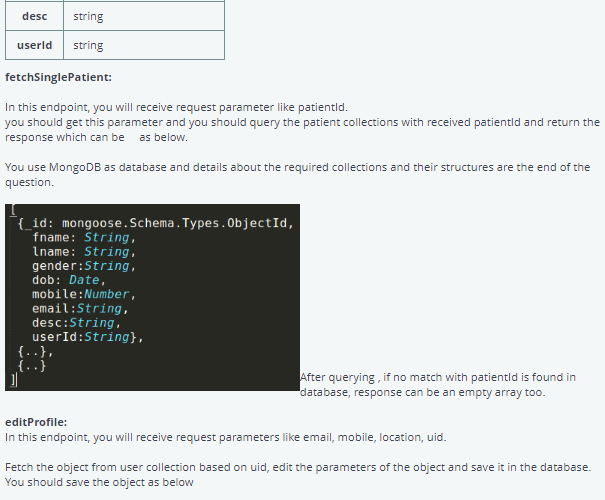
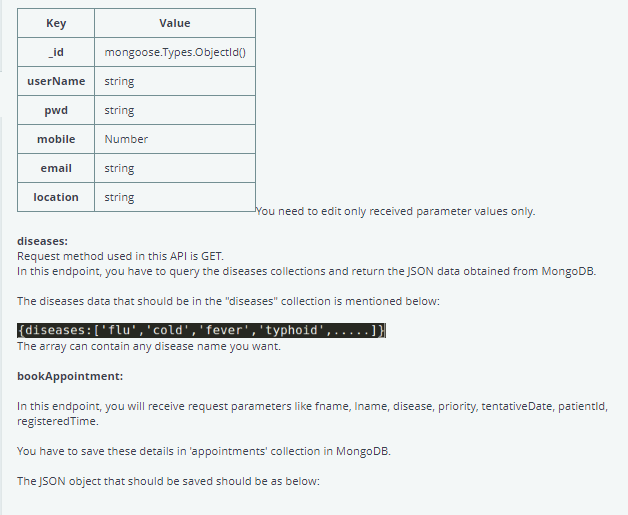
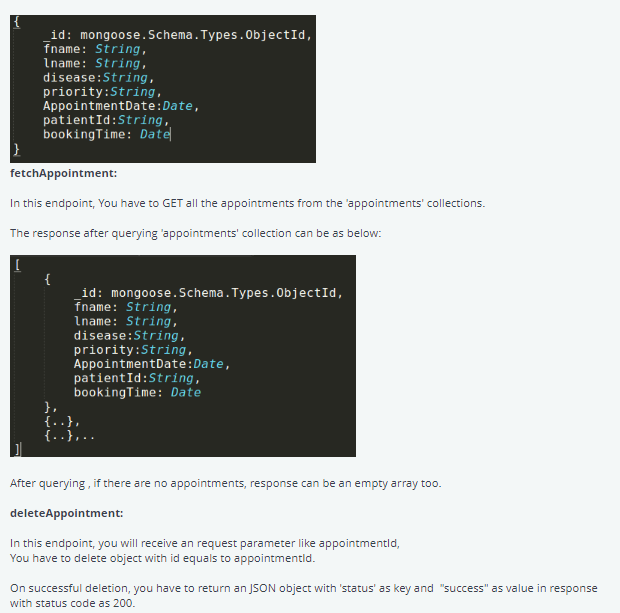
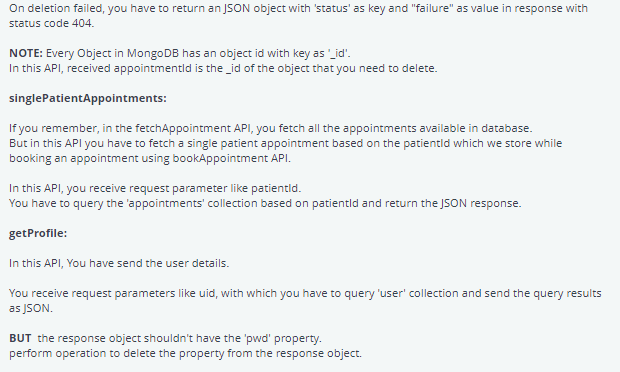
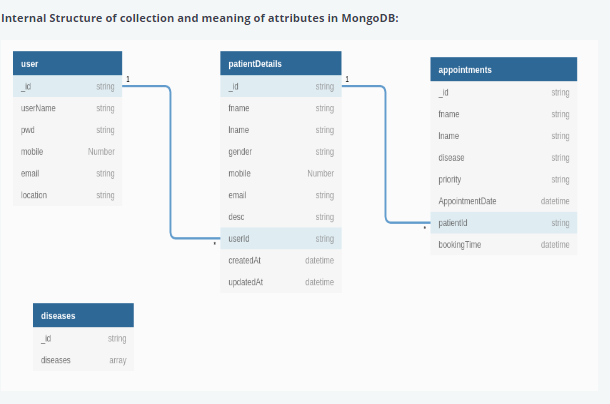
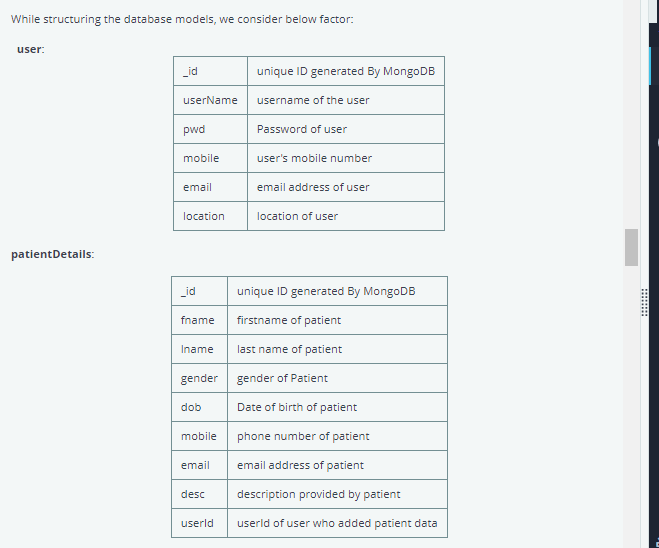
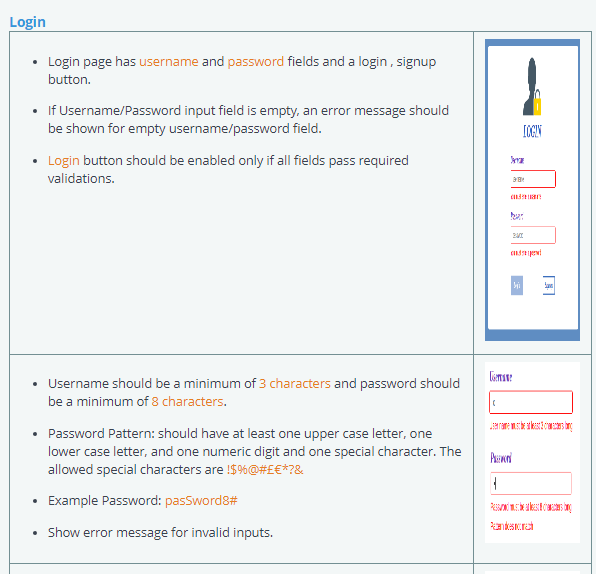
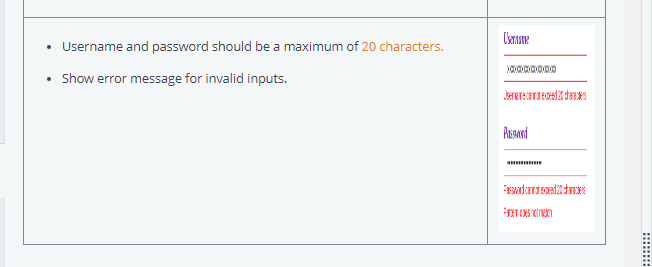
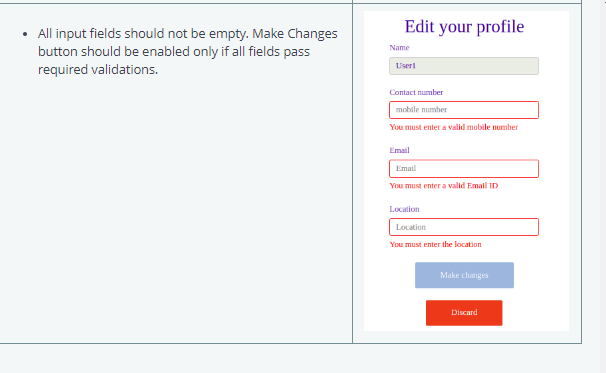
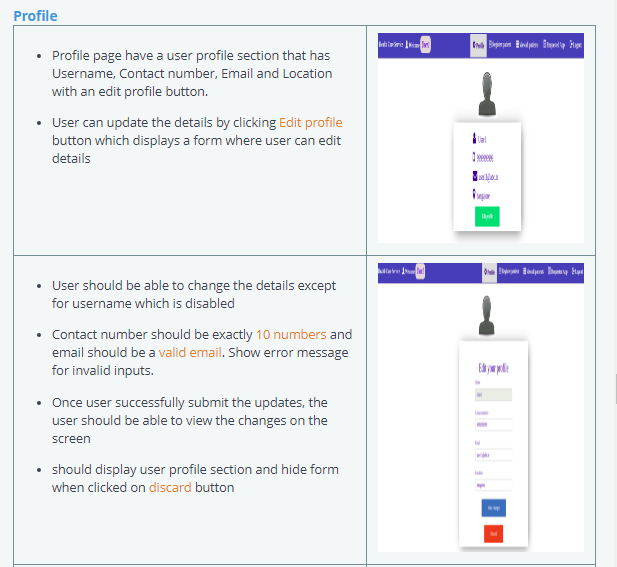
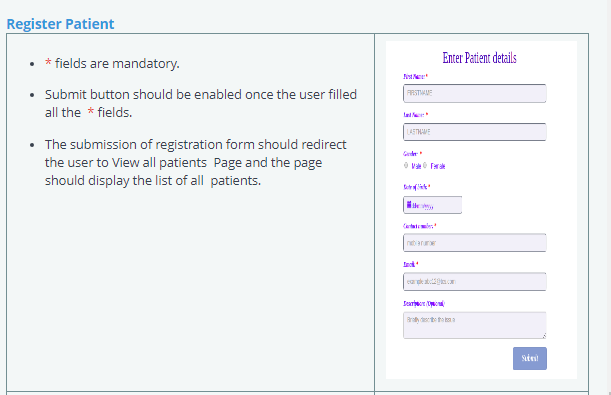
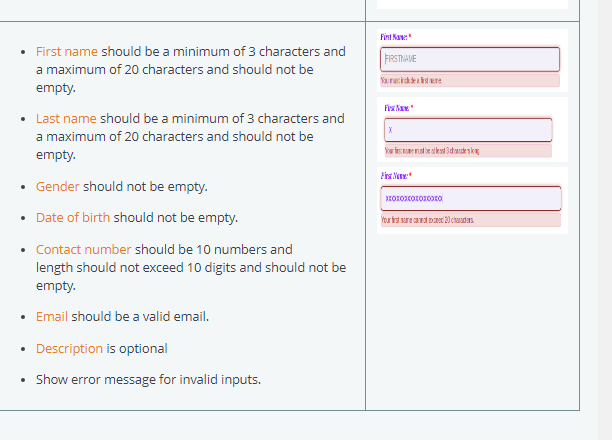
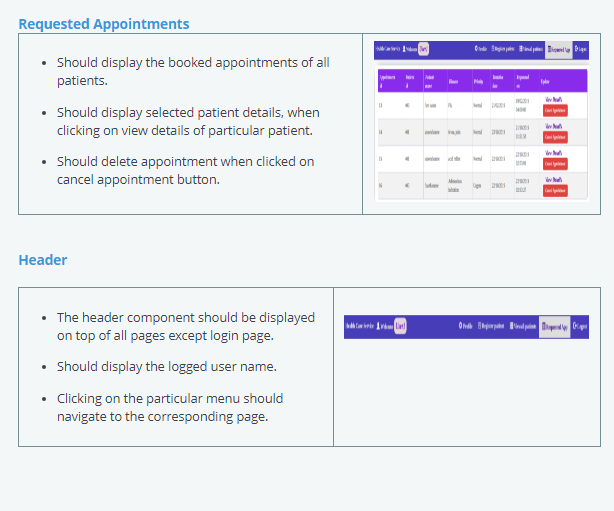
1. RBP - Health Care Service - full stack Health Care Service Health Care Service is an Angular application used by receptionist of a hospital. This application helps the receptionist to register patient/book appointment/cancel appointment. Nodejs: You have to create an API service for Health Care Service. Below are the details of the API endpoints. These are the API endpoints login register addPatient fetchSinglePatient editProfile diseases bookAppointment fetchAppointment deleteAppointment singlePatientAppointment getProfile Functionalities of endpoint are given below: login: In this endpoint, you have to validate the login details of the user with received parameters like uname, pwd and respond with JSON data object as belowThis model contains "timestamps' as true, which create createAt and updateAt field in objects which indicates the time at which object is created and updated. appointments: Lid unique ID generated By MongoDB fname first name of patient Iname last name of patient disease name of the disease patient has priority Priority of patient AppointmentDate date of appointment patientld Id of patient booking Time Time at which booking is made diseases: Lid unique ID generated By MongoDB diseases Array of diseases IMPORTANT: Middleware: You need to create an Middleware to validate the API calls. For Middleware, you have to use 'json web token' (jwt) with below rules: 1) login and registration API endpoint don't need middleware. If login details are validated , you send response with json web token as token parameter. 2) With obtained token, for every request, the request should have 'x-access-token' or "authorization' as key and token as value.Note: . Run -> install : To install all the node modules for both frontend and backend, to install MongoDB and insert dummy data into it . Run -> Run: To see running application . Run -> Test: To see results of testing the API and react behaviour as expected Angular: Application Overview The application has the following screens . Signup . Login . Profile . Register patient . Viewall Patients . Requested Applogin: In this endpoint, you have to validate the login details of the user with received parameters like uname, pwd and respond with JSON data object as below Key Value status boolean message string token string uid string mobile number email string location string userName string Details about the token in the data is explained at the end of question in middleware section. register: In this endpoint, you will receive request parameters like email, pwd, uname, mobile, location. you should get these parameters and insert into the database as an object which will be in the below structure.m n m \" Note: Storing password as plain text is not at all good pra ctice, This is all about demonstration purpose to create an API. The general practice could be hash the password and store in the database. add Patient: In this endpoint, you will receive request parameters like fname, lnam e, gender, dobr mobile, email, des c, userld you should get these parameters and insert into the database as an object which will be in the below structure. \" \" mongooserpesDbjectld @ n m @ desc string userld string fetchSinglePatient: In this endpoint, you will receive request parameter like patientld. you should get this parameter and you should query the patient collections with received patientld and return the response which can be as below. You use MongoDB as database and details about the required collections and their structures are the end of the question. { id: mongoose . Schema . Types . ObjectId, fname: String, Iname: String. gender :String, dob: Date, mobile : Number, email : String, desc:String, userId :String}, After querying , if no match with patientld is found in database, response can be an empty array too. editProfile: In this endpoint, you will receive request parameters like email, mobile, location, uid. Fetch the object from user collection based on uid, edit the parameters of the object and save it in the database. You should save the object as belowKey Value id mongoose.Types.Objectld() userName string pwd string mobile Number email string location string You need to edit only received parameter values only. diseases: Request method used in this API is GET. In this endpoint, you have to query the diseases collections and return the JSON data obtained from MongoDB. The diseases data that should be in the "diseases" collection is mentioned below: {diseases : ['flu' , 'cold' , 'fever' , 'typhoid', . . . . . The array can contain any disease name you want. bookAppointment: In this endpoint, you will receive request parameters like fname, Iname, disease, priority, tentativeDate, patientld, registeredTime. You have to save these details in 'appointments' collection in MongoDB. The JSON object that should be saved should be as below:id: mongoose . Schema . Types . ObjectId, fname: String, Iname: String, disease: String, priority :String, AppointmentDate : Date, patientId : String, bookingTime: Date fetchAppointment: In this endpoint, You have to GET all the appointments from the "appointments' collections. The response after querying "appointments' collection can be as below: id: mongoose . Schema . Types . ObjectId, fname: String, Iname: String, disease : String, priority :String, AppointmentDate : Date, patientId : String, bookingTime: Date {. . ). .. After querying , if there are no appointments, response can be an empty array too. deleteAppointment: In this endpoint, you will receive an request parameter like appointmentld, You have to delete object with id equals to appointmentld. On successful deletion, you have to return an JSON object with 'status' as key and "success" as value in response with status code as 200.On deletion failed, you have to return an JSON object with 'status' as key and "failure" as value in response with status code 404. NOTE: Every Object in MongoDB has an object id with key as '_id'. In this API, received appointmentld is the _id of the object that you need to delete. singlePatientAppointments: If you remember, in the fetchAppointment API, you fetch all the appointments available in database. But in this API you have to fetch a single patient appointment based on the patientld which we store while booking an appointment using bookAppointment API. In this API, you receive request parameter like patientld. You have to query the 'appointments' collection based on patientld and return the JSON response. getProfile: In this API, You have send the user details. You receive request parameters like uid, with which you have to query "user' collection and send the query results as SON. BUT the response object shouldn't have the 'pwd' property. perform operation to delete the property from the response object.Internal Structure of collection and meaning of attributes in MongoDB: user patientDetails appointments string Id string Id string userName string fname string fname string pwd string Iname string Iname string mobile Number gender string disease string email string mobile Number priority string location string email string AppointmentDate datetime desc string patientld string userld string booking Time datetime createdAt datetime updatedAt datetime diseases string diseases arrayWhile structuring the database models, we consider below factor: user: Lid unique ID generated By MongoDB userName username of the user pwd Password of user mobile user's mobile number email email address of user location location of user patientDetails: id unique ID generated By MongoDB fname firstname of patient Iname last name of patient gender gender of Patient dob Date of birth of patient mobile phone number of patient email email address of patient desc description provided by patient userld userld of user who added patient dataLogin . Login page has username and password fields and a login , signup button. . If Username/Password input field is empty, an error message should be shown for empty username/password field. . Login button should be enabled only if all fields pass required validations. bii . Username should be a minimum of 3 characters and password should be a minimum of 8 characters. . Password Pattern: should have at least one upper case letter, one lower case letter, and one numeric digit and one special character. The allowed special characters are !$9%@#EE*?& . Example Password: password8# . Show error message for invalid inputs.\f. All input fields should not be empty. Make Changes Edit your profile button should be enabled only if all fields pass Name required validations. Userl Contact number mobile number You must enter a valid mobile number Email Email You must enter a valid Emall ID Location Location You must enter the location Make changes DiscardProle - Prole page have a user prole section that has Username. Contact number. Email and Location with an edit profile button. User can update the details by clicking Edit prole button which displays a form where user can edit details User should be able to change the details except for username which is disabled Contact number should be exactly 1 D numbers and email should be a valid email. Show error message for invalid inputs. Dnce user successfully submit the updates. the user should be able to 1.iiew the changes on the screen should display user prole section and hide form when clicked on discard button Register Patient . * fields are mandatory. Enter Patient details . Submit button should be enabled once the user filled FIRSTHAVE all the * fields. TETHAVE . The submission of registration form should redirect the user to View all patients Page and the page should display the list of all patients.\fRequested Appointm ents - Should display the booked appointmenis of all patients. Should display selected patient details. I.rIiIheri clicking on View details of particular patient. Should delete appointment when clicked on cancel appointment button. Header - The header component should be displayed on top of all pages except login page. - Should display the logged user name. - Clicking on the particular menu should navigate to the corresponding page
Step by Step Solution
There are 3 Steps involved in it

Get step-by-step solutions from verified subject matter experts
 Study Help