







Question: Here is the server code: #include #include #include #include #include #include #include #include #include #include #include command.h void checkError(int status) { if (status printf(socket error(%d):
 Here is the server code:
#include
#include
#include
#include
#include
#include
#include
#include
#include
#include
#include "command.h"
void checkError(int status)
{
if (status
printf("socket error(%d): [%s] ",getpid(),strerror(errno));
exit(-1);
}
}
void handleNewConnection(int chatSocket);
int main(int argc,char* argv[])
{
// Create a socket
int sid = socket(PF_INET,SOCK_STREAM,0);
// setup our address -- will listen on 8080 --
struct sockaddr_in addr;
addr.sin_family = AF_INET;
addr.sin_port = htons(8080);
addr.sin_addr.s_addr = INADDR_ANY;
//pairs the newly created socket with the requested address.
int status = bind(sid,(struct sockaddr*)&addr,sizeof(addr));
checkError(status);
// listen on that socket for "Let's talk" message. No more than 10 pending at once
status = listen(sid,10);
checkError(status);
while(1) {
struct sockaddr_in client;
socklen_t clientSize;
int chatSocket = accept(sid,(struct sockaddr*)&client,&clientSize);
checkError(chatSocket);
printf("We accepted a socket: %d ",chatSocket);
pid_t child = fork();
if (child == 0) {
close(sid);
handleNewConnection(chatSocket);
close(chatSocket);
return -1; /* Report that I died voluntarily */
} else if (child > 0) {
printf("Created a child: %d ",child);
close(chatSocket);
int status = 0;
pid_t deadChild; // reap the dead children (as long as we find some)
do {
deadChild = waitpid(0,&status,WNOHANG);checkError(deadChild);
if (deadChild > 0)
printf("Reaped %d ",deadChild);
} while (deadChild > 0);
}
}
return 0;
}
void handleNewConnection(int chatSocket)
{
// This is the child process.
int done = 0;
do {
Command c;
int status = recv(chatSocket,&c,sizeof(Command),0);checkError(status);
c.code = ntohl(c.code);
switch(c.code){
case CC_LS: {
Payload p;
char* msg = makeFileList(".");
p.code = htonl(PL_TXT);
p.length = htonl(strlen(msg)+1);
status = send(chatSocket,&p,sizeof(Payload),0);checkError(status);
int rem = strlen(msg)+1,sent = 0;
while (rem != 0) {
status = send(chatSocket,msg+sent,rem,0);
rem -= status;
sent += status;
}
free(msg);
}break;
case CC_GET: { // send the named file back to client
Payload p;
int fileSize = getFileSize(c.arg);
p.code = htonl(PL_FILE);
p.length = htonl(fileSize);
status = send(chatSocket,&p,sizeof(Payload),0);checkError(status);
sendFileOverSocket(c.arg,chatSocket);
printf("File [%s] sent ",c.arg);
}break;
case CC_PUT: {// save locally a named file sent by the client
Payload p;
status = recv(chatSocket,&p,sizeof(p),0);checkError(status);
p.code = ntohl(p.code);
p.length = ntohl(p.length);
receiveFileOverSocket(chatSocket,c.arg,".upload",p.length);
printf("File [%s] received ",c.arg);
}break;
case CC_EXIT:
done = 1;
break;
}
} while (!done);
}
Here is the client code:
#include
#include
#include
#include
#include
#include
#include
#include
#include
#include
#include "command.h"
void checkError(int status,int line) {
if (status
printf("socket error(%d)-%d: [%s] ",getpid(),line,strerror(errno));
exit(-1);
}
}
void doLSCommand(int sid);
void doExitCommand(int sid);
void doGETCommand(int sid);
void doPUTCommand(int sid);
int main(int argc,char* argv[]) {
// Create a socket
int sid = socket(PF_INET,SOCK_STREAM,0);
struct sockaddr_in srv;
struct hostent *server = gethostbyname("localhost");
srv.sin_family = AF_INET;
srv.sin_port = htons(8080);
memcpy(&srv.sin_addr.s_addr,server->h_addr,server->h_length);
int status = connect(sid,(struct sockaddr*)&srv,sizeof(srv));
checkError(status,__LINE__);
int done = 0;
do {
char opcode[32];
scanf("%s",opcode);
if (strncmp(opcode,"ls",2) == 0) {
doLSCommand(sid);
} else if (strncmp(opcode,"get",3)==0) {
doGETCommand(sid);
} else if (strncmp(opcode,"put",3)==0) {
doPUTCommand(sid);
} else if (strncmp(opcode,"exit",4) == 0) {
doExitCommand(sid);
done = 1;
}
} while(!done);
return 0;
}
void doLSCommand(int sid) {
Command c;
Payload p;
int status;
c.code = htonl(CC_LS);
c.arg[0] = 0;
status = send(sid,&c,sizeof(c),0);checkError(status,__LINE__);
status = recv(sid,&p,sizeof(p),0);checkError(status,__LINE__);
p.code = ntohl(p.code);
p.length = ntohl(p.length);
int rec = 0,rem = p.length;
char* buf = malloc(sizeof(char)*p.length);
while (rem != 0) {
int nbrecv = recv(sid,buf+rec,rem,0);checkError(status,__LINE__);
rec += nbrecv;
rem -= nbrecv;
}
if(p.code == PL_TXT)
printf("Got: [ %s] ",buf);
else {
printf("Unexpected payload: %d ",p.code);
}
free(buf);
}
void doGETCommand(int sid) {
Command c;
Payload p;
int status;
c.code = htonl(CC_GET);
printf("Give a filename:");
char fName[256];
scanf("%s",fName);
strncpy(c.arg,fName,255);
c.arg[255] = 0;
status = send(sid,&c,sizeof(c),0);checkError(status,__LINE__);
status = recv(sid,&p,sizeof(p),0);checkError(status,__LINE__);
p.code = ntohl(p.code);
p.length = ntohl(p.length);
receiveFileOverSocket(sid,c.arg,".download",p.length);
printf("transfer done ");
}
void doPUTCommand(int sid) {
Command c;
Payload p;
int status;
c.code = htonl(CC_PUT);
printf("Give a local filename:");
char fName[256];
scanf("%s",fName);
strncpy(c.arg,fName,255);
c.arg[255] = 0;
status = send(sid,&c,sizeof(c),0);checkError(status,__LINE__);
int fs = getFileSize(c.arg);
p.code = ntohl(PL_FILE);
p.length = ntohl(fs);
status = send(sid,&p,sizeof(p),0);checkError(status,__LINE__);
sendFileOverSocket(c.arg,sid);
printf("transfer done ");
}
void doExitCommand(int sid) {
Command c;
Payload p;
int status;
c.code = htonl(CC_EXIT);
c.arg[0] = 0;
status = send(sid,&c,sizeof(c),0);checkError(status,__LINE__);
}
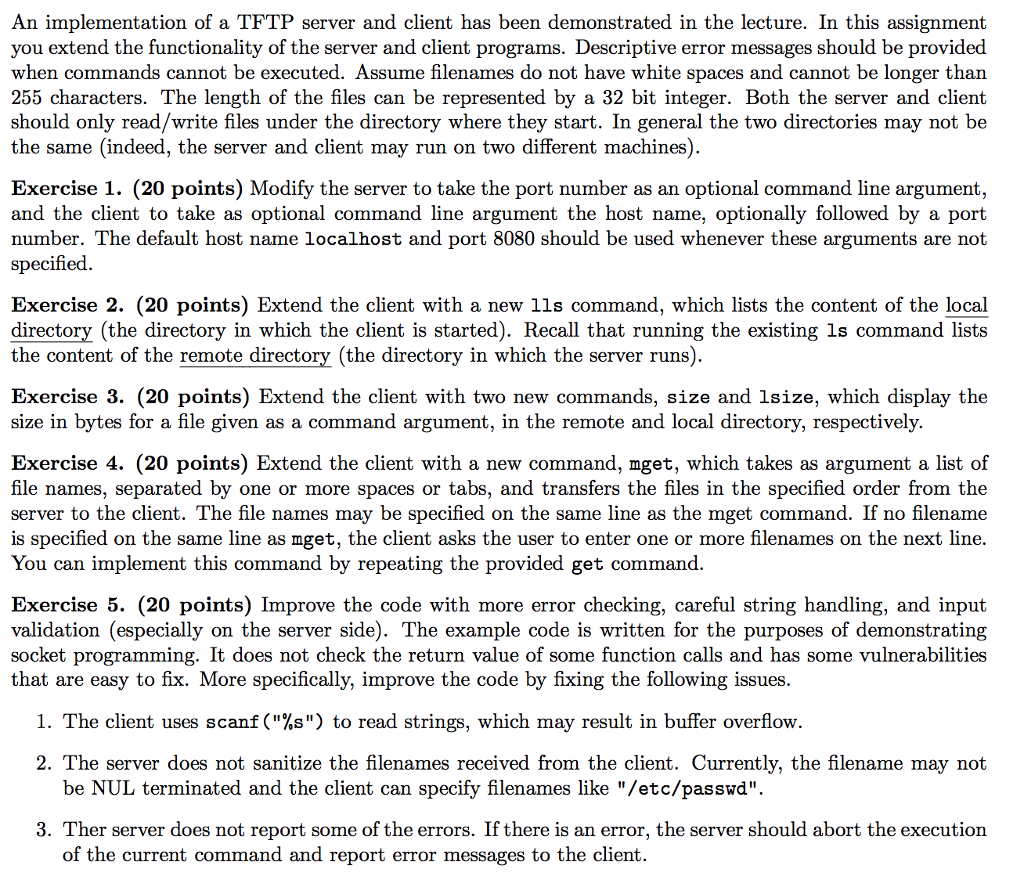
An implementation of a TFTP server and client has been demonstrated in the lecture. In this assignment you extend the functionality of the server and client programs. Descriptive error messages should be provided when commands cannot be executed. Assume filenames do not have white spaces and cannot be longer than 255 characters. The length of the files can be represented by a 32 bit integer. Both the server and client should only read/write files under the directory where they start. In general the two directories may not be the same (indeed, the server and client may run on two different machines) Exercise 1. (20 points) Modify the server to take the port number as an optional command line argument and the client to take as optional command line argument the host name, optionally followed by a port number. The default host name localhost and port 8080 should be used whenever these arguments are not specified Exercise 2. (20 points) Extend the client with a new 1ls command, which lists the content of the local directory (the directory in which the client is started). Recall that running the existing ls command lists the content of the remote directory (the directorv in which the server runs) Exercise 3. (20 points) Extend the client with two new commands, size and lsize, which display the size in bytes for a file given as a command argument, in the remote and local directory, respectively. Exercise 4. (20 points) Extend the client with a new command, mget, which takes as argument a list of file names, separated by one or more spaces or tabs, and transfers the files in the specified order from the server to the client. The file names may be specified on the same line as the mget command. If no filename is specified on the same line as mget, the client asks the user to enter one or more filenames on the next line. You can implement this command by repeating the provided get command Exercise 5. (20 points) Improve the code with more error checking, careful string handling, and input validation (especially on the server side). The example code is written for the purposes of demonstrating socket programming. It does not check the return value of some function calls and has some vulnerabilities that are easy to fix. More specifically, improve the code by fixing the following issues I. The client uses scanf("%s") to read strings, which may result in buffer overflow. 2. The server does not sanitize the filenames received from the client. Currently, the filename may not be NUL terminated and the client can specify filenames like "/etc/passwd" 3. Ther server does not report some of the errors. If there is an error, the server should abort the execution of the current command and report error messages to the client. An implementation of a TFTP server and client has been demonstrated in the lecture. In this assignment you extend the functionality of the server and client programs. Descriptive error messages should be provided when commands cannot be executed. Assume filenames do not have white spaces and cannot be longer than 255 characters. The length of the files can be represented by a 32 bit integer. Both the server and client should only read/write files under the directory where they start. In general the two directories may not be the same (indeed, the server and client may run on two different machines) Exercise 1. (20 points) Modify the server to take the port number as an optional command line argument and the client to take as optional command line argument the host name, optionally followed by a port number. The default host name localhost and port 8080 should be used whenever these arguments are not specified Exercise 2. (20 points) Extend the client with a new 1ls command, which lists the content of the local directory (the directory in which the client is started). Recall that running the existing ls command lists the content of the remote directory (the directorv in which the server runs) Exercise 3. (20 points) Extend the client with two new commands, size and lsize, which display the size in bytes for a file given as a command argument, in the remote and local directory, respectively. Exercise 4. (20 points) Extend the client with a new command, mget, which takes as argument a list of file names, separated by one or more spaces or tabs, and transfers the files in the specified order from the server to the client. The file names may be specified on the same line as the mget command. If no filename is specified on the same line as mget, the client asks the user to enter one or more filenames on the next line. You can implement this command by repeating the provided get command Exercise 5. (20 points) Improve the code with more error checking, careful string handling, and input validation (especially on the server side). The example code is written for the purposes of demonstrating socket programming. It does not check the return value of some function calls and has some vulnerabilities that are easy to fix. More specifically, improve the code by fixing the following issues I. The client uses scanf("%s") to read strings, which may result in buffer overflow. 2. The server does not sanitize the filenames received from the client. Currently, the filename may not be NUL terminated and the client can specify filenames like "/etc/passwd" 3. Ther server does not report some of the errors. If there is an error, the server should abort the execution of the current command and report error messages to the client
Step by Step Solution
There are 3 Steps involved in it

Get step-by-step solutions from verified subject matter experts
 Study Help