







Question: How to set radio button, checkbox, edittext, button and scroll list on Jframe properly without them completely covering the entire screen? I am using Netbeans
How to set radio button, checkbox, edittext, button and scroll list on Jframe properly without them completely covering the entire screen? I am using Netbeans as my IDE...
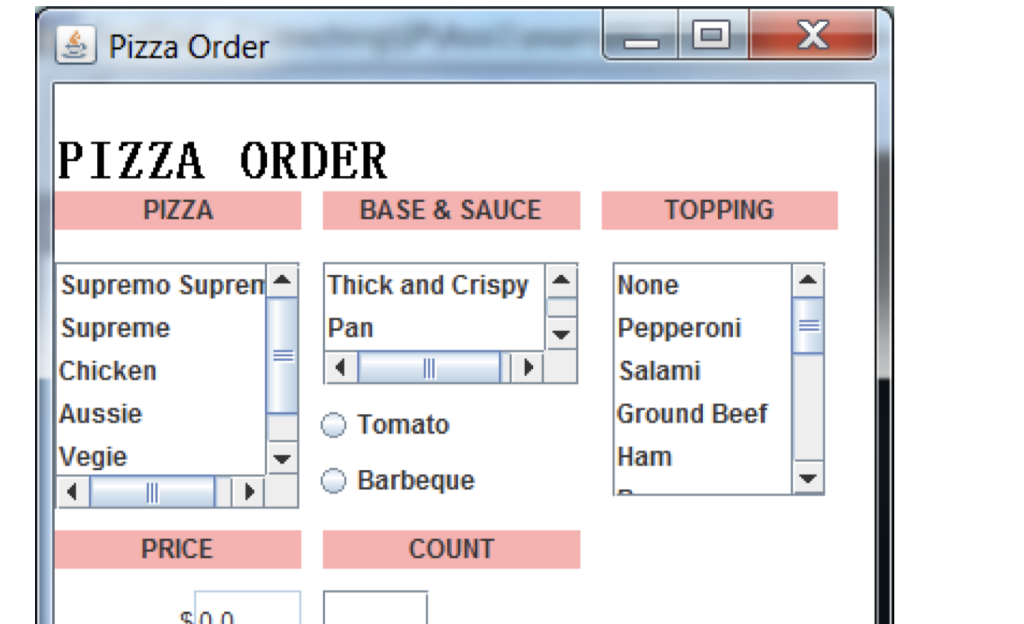
I am trying to reproduce the design in the first image but I am struggling to place the elements mentioned above properly on the Java frame (Jframe).
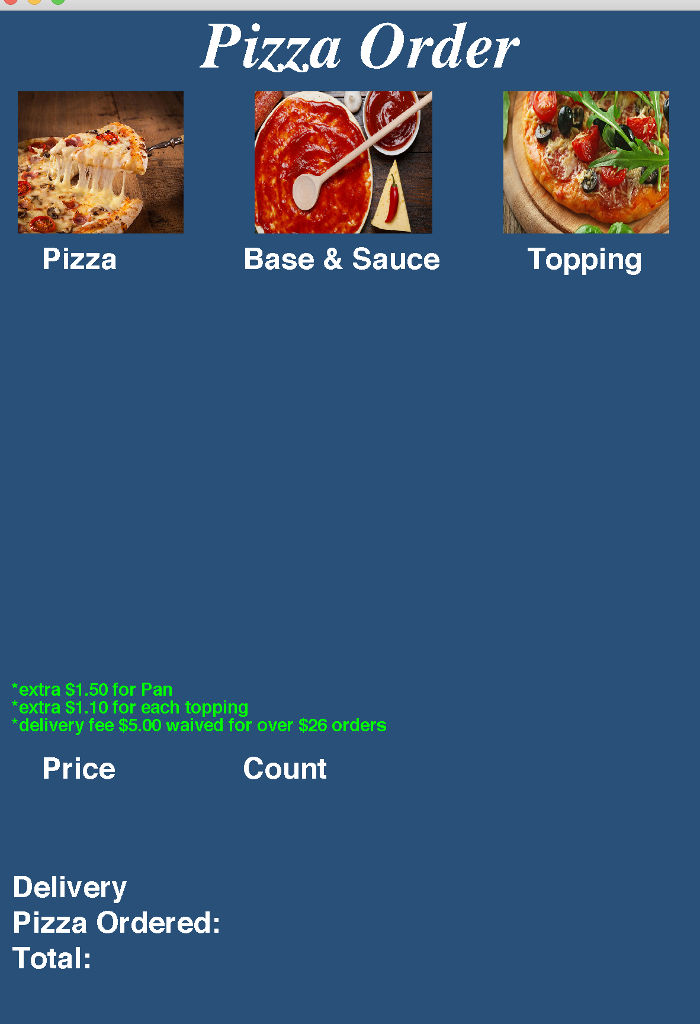
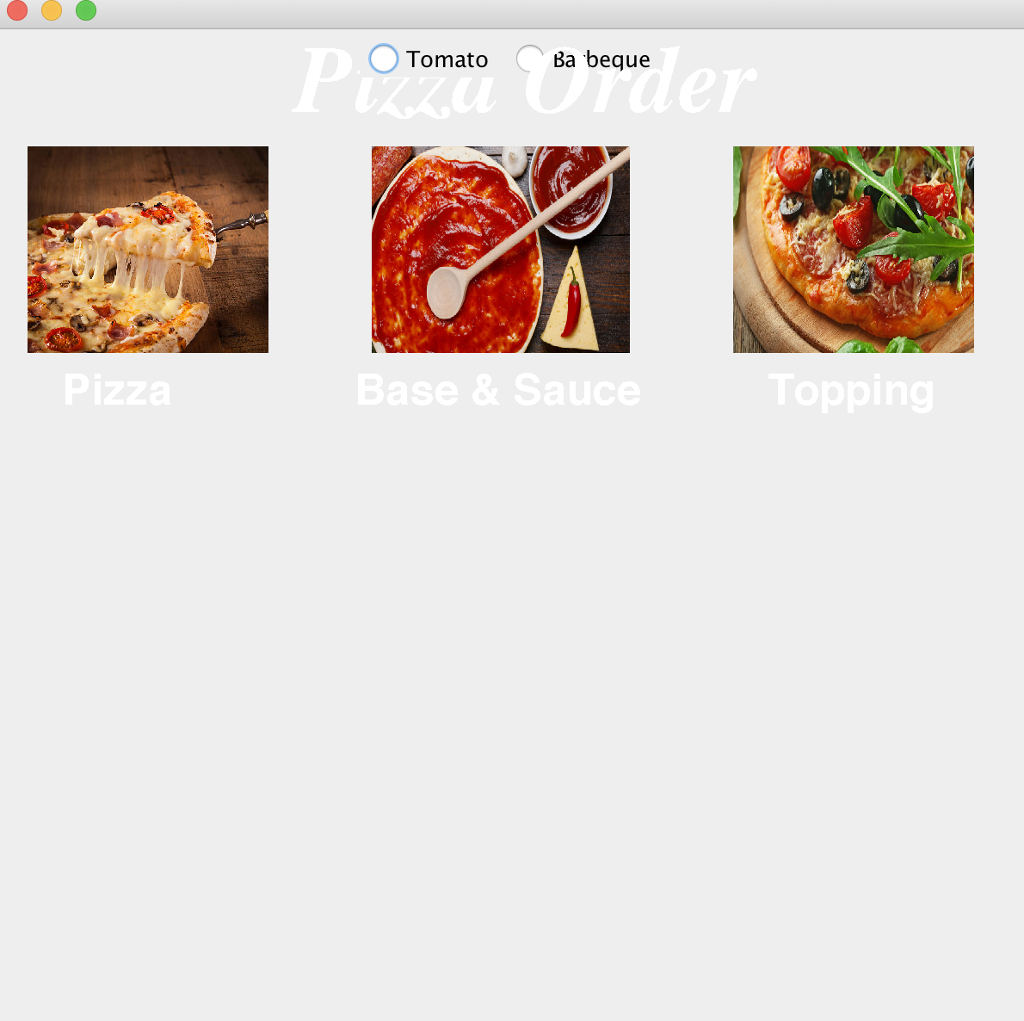
The first image is what I am trying to reproduce, second image is what I have gotten so far (I am reproducing the first image in my own way), and the third image is an example of what happens when I add any of those elements onto the Jframe. I have commented out the elements appearance in the code as I didn't want you wonderful helpers to get confused :)
//Code
package pizzaorder2;
import javax.swing.*; import java.awt.*; import java.awt.event.ActionListener; import java.awt.event.KeyEvent; import java.awt.FlowLayout; import javax.swing.SwingUtilities; import javax.swing.JRadioButton;
/** * * @author supriyamayuri */ public class PizzaOrder2 extends JFrame { @Override public void paint(Graphics g) { super.paint(g); g.setColor(Color.WHITE); g.setFont(new Font("Serif", Font.BOLD + Font.ITALIC, 55)); g.drawString("Pizza Order", 175, 70); Image imagepizza = new ImageIcon("/Users/supriyamayuri/NetBeansProjects/DrawGraphics/src/piz.jpg").getImage(); g.drawImage(imagepizza, 20, 90, 140, 120, this); Image imagesauce = new ImageIcon("/Users/supriyamayuri/NetBeansProjects/DrawGraphics/src/sauce.jpg").getImage(); g.drawImage(imagesauce, 220, 90, 150, 120, this); Image imagetopping = new ImageIcon("/Users/supriyamayuri/NetBeansProjects/DrawGraphics/src/top.jpg").getImage(); g.drawImage(imagetopping, 430, 90, 140, 120, this); g.setColor(Color.WHITE); g.setFont(new Font("Helvetica", Font.BOLD, 25)); g.drawString("Pizza", 40, 240); g.setColor(Color.WHITE); g.setFont(new Font("Helvetica", Font.BOLD, 25)); g.drawString("Base & Sauce", 210, 240); g.setColor(Color.WHITE); g.setFont(new Font("Helvetica", Font.BOLD, 25)); g.drawString("Topping", 450, 240); g.setColor(Color.GREEN); g.setFont(new Font("Helvetica", Font.BOLD, 15)); g.drawString("*extra $1.50 for Pan",15, 600); g.setColor(Color.GREEN); g.setFont(new Font("Helvetica", Font.BOLD, 15)); g.drawString("*extra $1.10 for each topping",15, 615); g.setColor(Color.GREEN); g.setFont(new Font("Helvetica", Font.BOLD, 15)); g.drawString("*delivery fee $5.00 waived for over $26 orders",15, 630); g.setColor(Color.WHITE); g.setFont(new Font("Helvetica", Font.BOLD, 25)); g.drawString("Price",40, 670); g.setColor(Color.WHITE); g.setFont(new Font("Helvetica", Font.BOLD, 25)); g.drawString("Count",210, 670); g.setColor(Color.WHITE); g.setFont(new Font("Helvetica", Font.BOLD, 25)); g.drawString("Delivery",15, 770); g.setColor(Color.WHITE); g.setFont(new Font("Helvetica", Font.BOLD, 25)); g.drawString("Pizza Ordered:",15, 800); g.setColor(Color.WHITE); g.setFont(new Font("Helvetica", Font.BOLD, 25)); g.drawString("Total:",15, 830); } public static void main(String[] args) { JFrame frame = new PizzaOrder2(); String[] pizza = {"Supremo Supreme", "Supreme", "Chicken", "Aussie", "Vegie", "Hawaiian"}; String[] base = {"Thin and Crispy", "Pan", "Cheese filled crust"}; String[] topping = {"None", "Pepperoni", "Salami", "Ham", "Bacon", "Chicken", "Onion"}; //Checkbox JCheckBox delivery; delivery = new JCheckBox(); JPanel checkPanel = new JPanel(); //checkPanel.add(delivery); //Edit text JTextField price = new JTextField(15); JTextField count = new JTextField(15); JTextField total = new JTextField(25); //frame.add(price); //Button JButton clearoder = new JButton("Clear Order"); JButton order = new JButton("Order"); order.setPreferredSize(new Dimension(10, 10)); //frame.add(order); // frame.add(cleaorder); new PizzaOrder2().setVisible(true); //Scrolllist JList list = new JList(pizza); JPanel panel = new JPanel(); JScrollPane scrollPane = new JScrollPane(list); scrollPane.setPreferredSize(new Dimension(200,100)); //panel.add(scrollPane); JList list1 = new JList(base); JPanel panel1 = new JPanel(); JScrollPane scrollPane1 = new JScrollPane(list1); scrollPane.setPreferredSize(new Dimension(200,100)); // panel1.add(scrollPane1); JList list2 = new JList(topping); JPanel panel2 = new JPanel(); JScrollPane scrollPane2 = new JScrollPane(list2); scrollPane.setPreferredSize(new Dimension(200,100)); //panel2.add(scrollPane2); //Radio Button JRadioButton tomato = new JRadioButton("Tomato"); JRadioButton barbeque = new JRadioButton("Barbeque"); ButtonGroup group = new ButtonGroup(); group.add(tomato); group.add(barbeque); //frame.add(tomato); //frame.add(barbeque);
frame.setSize(600, 900); frame.getContentPane().setBackground(new Color(40, 80, 120)); frame.setDefaultCloseOperation(JFrame.EXIT_ON_CLOSE); frame.setVisible(true); } }
Pizza Order PIZZA ORDER PIZZA BASE & SAUCETOPPING Supremo Supre Supreme Chicken Aussie egie Thick and Crispy None Pepperoni Salami Ground Beef Ham Pan Tomato Barbeque PRICE COUNT Pizza Order PIZZA ORDER PIZZA BASE & SAUCETOPPING Supremo Supre Supreme Chicken Aussie egie Thick and Crispy None Pepperoni Salami Ground Beef Ham Pan Tomato Barbeque PRICE COUNT
Step by Step Solution
There are 3 Steps involved in it

Get step-by-step solutions from verified subject matter experts
 Study Help