







Question: import java.util.Scanner; public class BingoTest { // Test 1 // Should say Player0 Player1 at the bottom private static String test1 = 2/Users/harry_jiao/Downloads/Assignment 3/BingoTest.java 1
import java.util.Scanner;
public class BingoTest {
// Test 1
// Should say "Player0 Player1" at the bottom
private static String test1 = "2/Users/harry_jiao/Downloads/Assignment 3/BingoTest.java 1 1 2 3 4 5 6 7 8 9 10 11 12 13 14 15 16 17 18 19 20 21 22 23 24 25 1 1 2 3 4 5 6 7 8 9 10 11 12 13 14 15 16 17 18 19 20 21 22 23 24 25 5 1 2 3 4 5";
// Test 2
// Should say "Player0" at the bottom
private static String test2 = "2 1 10 30 45 66 82 3 25 11 63 78 22 4 13 46 90 5 23 12 6 85 1 88 67 2 44 1 11 31 46 67 83 4 26 12 64 79 23 5 14 47 90 6 24 13 7 86 2 89 68 3 45 9 10 11 30 46 45 66 47 90 82";
// Test 3
// Should say "Player2 Player3" at the bottom
private static String test3 = "4 1 10 30 45 66 82 3 25 11 63 78 22 4 13 46 90 5 23 12 6 85 1 88 67 2 44 1 11 31 46 67 83 4 26 12 64 79 23 5 14 47 90 6 24 13 7 86 2 89 68 3 45 1 1 3 5 7 9 11 13 15 17 19 21 23 25 27 29 31 33 35 37 39 41 43 45 47 49 1 2 4 6 8 10 12 14 16 19 20 22 24 26 28 30 32 34 36 38 40 42 44 46 48 50 16 11 21 22 32 9 10 17 25 44 13 12 14 20 15 16 19";
// Test 4
// Should say "Player0 Player3" at the bottom
private static String test4 = "4 1 10 30 45 66 82 3 25 11 63 78 22 4 13 46 90 5 23 12 6 85 49 88 67 2 44 1 11 31 46 67 83 4 26 12 64 79 23 5 14 47 90 6 24 13 7 86 2 88 68 3 45 1 1 3 5 7 9 11 13 15 17 19 21 23 25 27 29 31 33 35 37 39 41 43 45 47 49 1 2 4 6 8 10 12 14 16 19 20 22 24 26 28 30 32 34 36 38 40 42 44 46 48 49 11 44 41 88 42 48 46 43 67 47 2 49";
// Test 5
// Should say "Player0 Player3" at the bottom
private static String test5 = "4 2 10 30 45 66 82 3 25 11 63 78 22 4 13 46 90 5 23 12 6 85 49 88 67 2 44 3 6 9 12 15 82 85 5 11 30 1 7 15 10 4 2 8 14 77 38 60 65 17 29 40 1 11 31 46 67 83 4 26 12 64 79 23 5 14 47 90 6 24 13 7 86 2 88 68 3 45 1 1 3 5 7 9 11 13 15 17 19 21 23 25 27 29 31 33 35 37 39 41 43 45 47 49 1 2 4 6 8 10 12 14 16 19 20 22 24 26 28 30 32 34 36 38 40 42 44 46 48 49 11 44 41 88 42 48 46 43 67 47 2 49";
// Test 6
// Should say "Player0" at the bottom
private static String test6 = "4 2 10 30 45 66 82 3 25 11 63 78 22 4 13 46 90 5 23 12 6 85 49 88 67 2 44 3 6 9 12 15 82 85 5 11 30 1 7 15 10 4 2 8 14 77 38 60 65 17 29 40 1 11 31 46 67 83 4 26 12 64 79 23 5 14 47 90 6 24 13 7 86 2 88 68 3 45 1 1 3 5 7 9 11 13 15 17 19 21 23 25 27 29 31 33 35 37 39 41 43 45 47 49 1 2 4 6 8 10 12 14 16 19 20 22 24 26 28 30 32 34 36 38 40 42 44 46 48 49 9 22 1 7 13 46 15 10 90 4";
// Test 7
// Should say "Player2" at the bottom
private static String test7 = "3 2 10 30 45 66 82 3 25 11 63 78 22 4 13 46 90 5 23 12 6 85 49 88 67 2 44 3 6 9 12 15 82 85 5 11 30 1 7 15 10 4 2 8 14 77 38 60 65 17 29 40 2 11 31 46 67 83 4 26 12 64 79 23 5 14 47 90 6 24 13 7 86 2 88 68 3 45 1 3 5 7 9 11 13 15 17 19 21 23 25 27 29 31 33 35 37 39 41 43 44 47 49 1 2 4 6 8 10 12 14 16 19 20 22 24 26 28 30 32 34 36 38 40 42 44 46 48 49 5 12 14 16 20 19";
public static void main(String[] args){
// To run one of the above tests You can replace System.in with the test variable ie:
// Scanner scan = new Scanner(test1);
// Be sure to only have one scanner object at a time
// Otherwise you can still use the console to enter data
Scanner scan = new Scanner(test1);
System.out.println("Enter how many players there are");
Player[] players = new Player[scan.nextInt()];
for(int p = 0; p
System.out.println("How many cards does player " + p + " have?");
Card[] cards = new Card[scan.nextInt()];
for(int c = 0; c
System.out.println("Please enter 25 numbers for card " + c + " of player " + p);
int[][] numbers = new int[5][5];
for(int i = 0; i
for(int j = 0; j
numbers[i][j] = scan.nextInt();
}
}
cards[c] = new Card(numbers);
}
players[p] = new Player("Player" + p, cards);
}
Bingo bingo = new Bingo(players);
System.out.println("Please enter how many numbers will be called");
int[] calledNums = new int[scan.nextInt()];
System.out.println("Please enter " + calledNums.length + " numbers to be called in order");
for(int i = 0; i 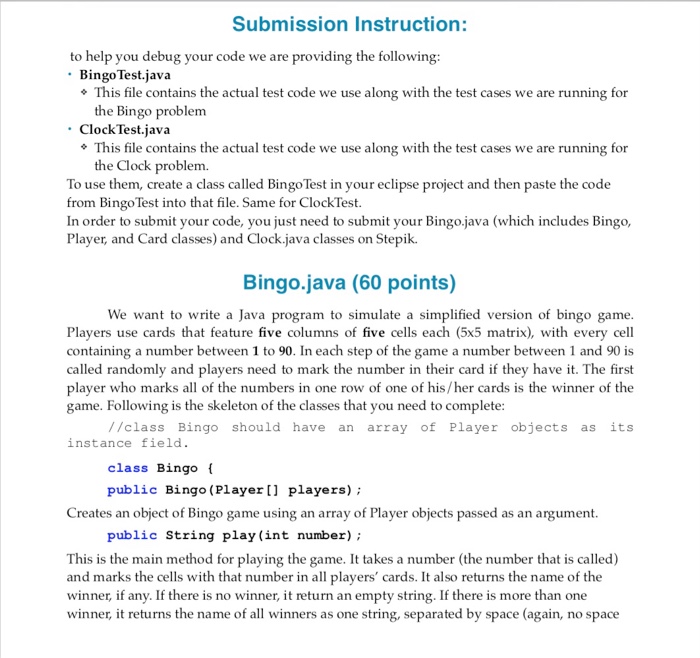
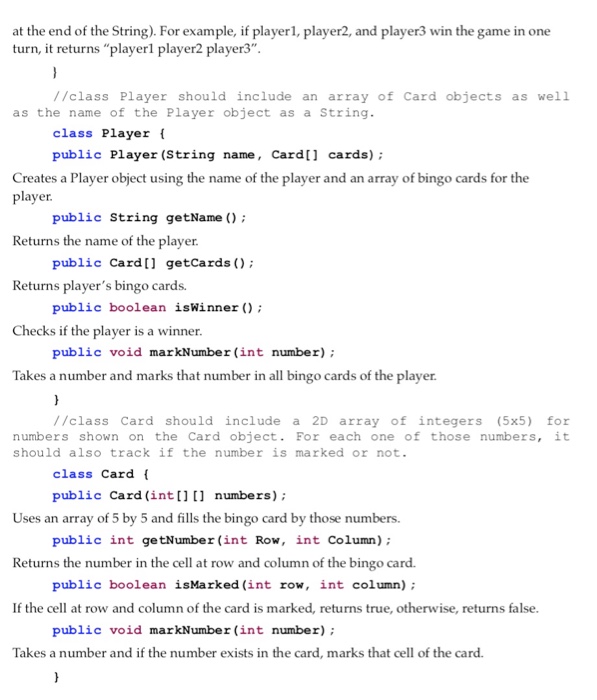
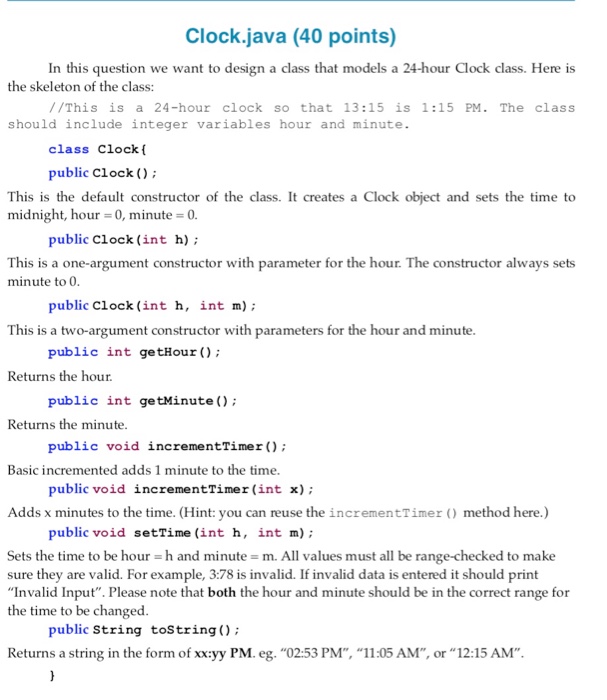
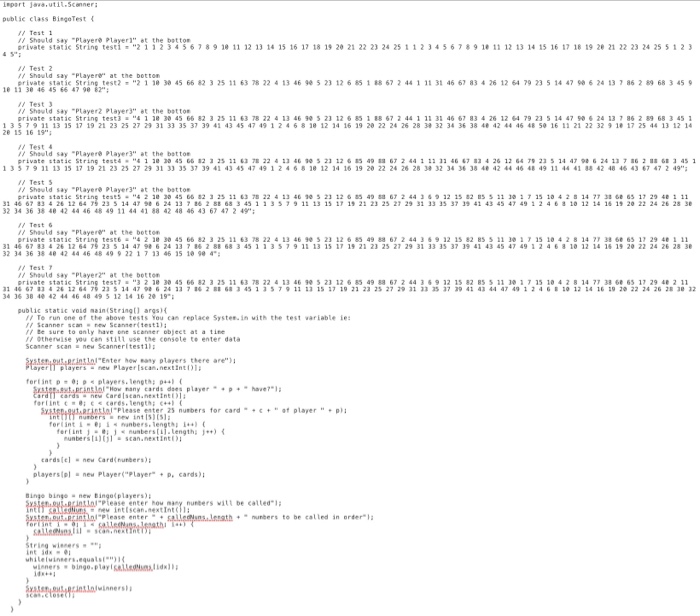
Submission Instruction: to help you debug your code we are providing the following BingoTest.java * This file contains the actual test code we use along with the test cases we are running for the Bingo problem Clock Test.java *This file contains the actual test code we use along with the test cases we are running for the Clock problem. To use them, create a class called Bingo Test in your eclipse project and then paste the code from Bingo Test into that file. Same for ClockTest. In order to submit your code, you just need to submit your Bingo.java (which includes Bingo, Player, and Card classes) and Clock.java classes on Stepik. Bingo.java (60 points) We want to write a Java program to simulate a simplified version of bingo game. Players use cards that feature five columns of five cells each (5x5 matrix), with every cell containing a number between 1 to 90. In each step of the game a number between 1 and 90 is called randomly and plavers need to mark the number in their card if they have it. The first player who marks all of the numbers in one row of one of his/her cards is the winner of the game. Following is the skeleton of the classes that you need to complete: //class Bingo should have an array of Player objects as its instance field class Bingo ( public Bingo (Player players) Creates an object of Bingo game using an array of Player objects passed as an argument public String play (int number) This is the main method for playing the game. It takes a number (the number that is called) and marks the cells with that number in all players' cards. It also returns the name of the winner, if any. If there is no winner, it return an empty string. If there is more than one winner, it returns the name of all winners as one string, separated by space (again, no space Submission Instruction: to help you debug your code we are providing the following BingoTest.java * This file contains the actual test code we use along with the test cases we are running for the Bingo problem Clock Test.java *This file contains the actual test code we use along with the test cases we are running for the Clock problem. To use them, create a class called Bingo Test in your eclipse project and then paste the code from Bingo Test into that file. Same for ClockTest. In order to submit your code, you just need to submit your Bingo.java (which includes Bingo, Player, and Card classes) and Clock.java classes on Stepik. Bingo.java (60 points) We want to write a Java program to simulate a simplified version of bingo game. Players use cards that feature five columns of five cells each (5x5 matrix), with every cell containing a number between 1 to 90. In each step of the game a number between 1 and 90 is called randomly and plavers need to mark the number in their card if they have it. The first player who marks all of the numbers in one row of one of his/her cards is the winner of the game. Following is the skeleton of the classes that you need to complete: //class Bingo should have an array of Player objects as its instance field class Bingo ( public Bingo (Player players) Creates an object of Bingo game using an array of Player objects passed as an argument public String play (int number) This is the main method for playing the game. It takes a number (the number that is called) and marks the cells with that number in all players' cards. It also returns the name of the winner, if any. If there is no winner, it return an empty string. If there is more than one winner, it returns the name of all winners as one string, separated by space (again, no space calledNums[i] = scan.nextInt();
}
String winners = "";
int idx = 0;
while(winners.equals("")){
winners = bingo.play(calledNums[idx]);
idx++;
}
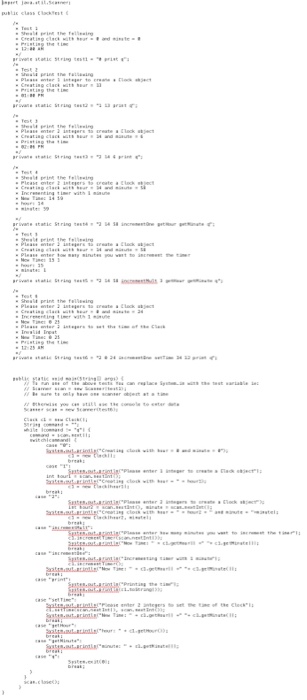
import java.util.Scanner;
public class ClockTest {
/*
* Test 1
* Should print the following
* Creating clock with hour = 0 and minute = 0
* Printing the time
* 12:00 AM
*/
private static String test1 = "0 print q";
/*
* Test 2
* Should print the following
* Please enter 1 integer to create a Clock object
* Creating clock with hour = 13
* Printing the time
* 01:00 PM
*/
private static String test2 = "1 13 print q";
/*
* Test 3
* Should print the following
* Please enter 2 integers to create a Clock object
* Creating clock with hour = 14 and minute = 6
* Printing the time
* 02:06 PM
*/
private static String test3 = "2 14 6 print q";
/*
* Test 4
* Should print the following
* Please enter 2 integers to create a Clock object
* Creating clock with hour = 14 and minute = 58
* Incrementing timer with 1 minute
* New Time: 14 59
* hour: 14
* minute: 59
*/
private static String test4 = "2 14 58 incrementOne getHour getMinute q";
/*
* Test 5
* Should print the following
* Please enter 2 integers to create a Clock object
* Creating clock with hour = 14 and minute = 58
* Please enter how many minutes you want to increment the timer
* New Time: 15 1
* hour: 15
* minute: 1
*/
private static String test5 = "2 14 58 incrementMult 3 getHour getMinute q";
/*
* Test 6
* Should print the following
* Please enter 2 integers to create a Clock object
* Creating clock with hour = 0 and minute = 24
* Incrementing timer with 1 minute
* New Time: 0 25
* Please enter 2 integers to set the time of the Clock
* Invalid Input
* New Time: 0 25
* Printing the time
* 12:25 AM
*/
private static String test6 = "2 0 24 incrementOne setTime 34 12 print q";
public static void main(String[] args) {
// To run one of the above tests You can replace System.in with the test variable ie:
// Scanner scan = new Scanner(test1);
// Be sure to only have one scanner object at a time
// Otherwise you can still use the console to enter data
Scanner scan = new Scanner(test6);
Clock c1 = new Clock();
String command = "";
while (command != "q") {
command = scan.next();
switch(command) {
case "0":
System.out.println("Creating clock with hour = 0 and minute = 0");
c1 = new Clock();
break;
case "1":
System.out.println("Please enter 1 integer to create a Clock object");
int hour1 = scan.nextInt();
System.out.println("Creating clock with hour = " + hour1);
c1 = new Clock(hour1);
break;
case "2":
System.out.println("Please enter 2 integers to create a Clock object");
int hour2 = scan.nextInt(), minute = scan.nextInt();
System.out.println("Creating clock with hour = " + hour2 + " and minute = "+minute);
c1 = new Clock(hour2, minute);
break;
case "incrementMult":
System.out.println("Please enter how many minutes you want to increment the timer");
c1.incrementTimer(scan.nextInt());
System.out.println("New Time: " + c1.getHour() +" "+ c1.getMinute());
break;
case "incrementOne":
System.out.println("Incrementing timer with 1 minute");
c1.incrementTimer();
System.out.println("New Time: " + c1.getHour() +" "+ c1.getMinute());
break;
case "print":
System.out.println("Printing the time");
System.out.println(c1.toString());
break;
case "setTime":
System.out.println("Please enter 2 integers to set the time of the Clock");
c1.setTime(scan.nextInt(), scan.nextInt());
System.out.println("New Time: " + c1.getHour() +" "+ c1.getMinute());
break;
case "getHour":
System.out.println("hour: " + c1.getHour());
break;
case "getMinute":
System.out.println("minute: " + c1.getMinute());
break;
case "q":
System.exit(0);
break;
Step by Step Solution
There are 3 Steps involved in it
1 Expert Approved Answer
Step: 1 Unlock

Question Has Been Solved by an Expert!
Get step-by-step solutions from verified subject matter experts
Step: 2 Unlock
Step: 3 Unlock
 Study Help