







Question: In Java, modify the following code arrow.java to rotate about any arbitrary point: // Arrow.java: Arrow rotated through 120 degrees about the logical // origin
In Java, modify the following code arrow.java to rotate about any arbitrary point:
// Arrow.java: Arrow rotated through 120 degrees about the logical // origin O, which is the center of the canvas. import java.awt.*; import java.awt.event.*; public class Arrow extends Frame { public static void main(String[] args) {new Arrow();} Arrow() { super("Arrow rotated through 120 degrees about origin"); addWindowListener(new WindowAdapter() { public void windowClosing(WindowEvent e) {System.exit(0);} }); setSize(500, 300); add("Center", new CvArrow()); setVisible(true); } } class CvArrow extends Canvas { int centerX, centerY, currentX, currentY; float pixelSize, rWidth = 100.0F, rHeight = 100.0F; void initgr() { Dimension d = getSize(); int maxX = d.width - 1, maxY = d.height - 1; pixelSize = Math.max(rWidth / maxX, rHeight / maxY); centerX = maxX / 2; centerY = maxY / 2; } int iX(float x) {return Math.round(centerX + x / pixelSize);} int iY(float y) {return Math.round(centerY - y / pixelSize);} void moveTo(float x, float y) {currentX = iX(x); currentY = iY(y);} void lineTo(Graphics g, float x, float y) { int x1 = iX(x), y1 = iY(y); g.drawLine(currentX, currentY, x1, y1); currentX = x1; currentY = y1; } void drawArrow(Graphics g, float[] x, float[] y) { moveTo(x[0], y[0]); lineTo(g, x[1], y[1]); lineTo(g, x[2], y[2]); lineTo(g, x[3], y[3]); lineTo(g, x[1], y[1]); } public void paint(Graphics g) { float r = 40.0F; float[] x = {r, r, r - 2, r + 2}, y = {-7, 7, 0, 0}; initgr(); // Show coordinate axes: moveTo(30, 0); lineTo(g, 0, 0); lineTo(g, 0, 30); // Show initial arrow: drawArrow(g, x, y); float phi = (float) (2 * Math.PI / 3), c = (float) Math.cos(phi), s = (float) Math.sin(phi), r11 = c, r12 = s, r21 = -s, r22 = c; for (int j = 0; j Original Output 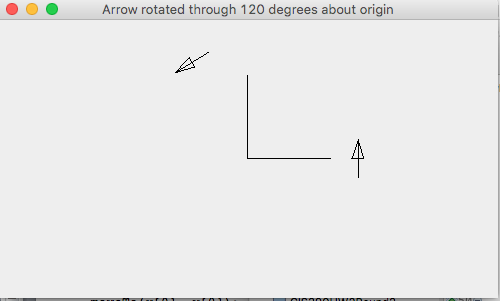
Please provide screenshots of the output. Thanks.
Arrow rotated through 120 degrees about origin Arrow rotated through 120 degrees about origin Step by Step Solution
There are 3 Steps involved in it
1 Expert Approved Answer
Step: 1 Unlock

Question Has Been Solved by an Expert!
Get step-by-step solutions from verified subject matter experts
Step: 2 Unlock
Step: 3 Unlock
 Study Help