







Question: main.cpp code #include #include #include ItemToPurchase.h #include ShoppingCart.h using namespace std; void AddItem(ShoppingCart &cart) { ItemToPurchase addItem; string addItemName; string addItemDescription; int addItemPrice; int addItemQuantity;
 main.cpp code
#include
#include
#include "ItemToPurchase.h"
#include "ShoppingCart.h"
using namespace std;
void AddItem(ShoppingCart &cart) {
ItemToPurchase addItem;
string addItemName;
string addItemDescription;
int addItemPrice;
int addItemQuantity;
cout
cout
cin.ignore();
getline(cin, addItemName);
addItem.SetName(addItemName);
cout
getline(cin, addItemDescription);
addItem.SetDescription(addItemDescription);
cout
cin >> addItemPrice;
addItem.SetPrice(addItemPrice);
cout
cin >> addItemQuantity;
addItem.SetQuantity(addItemQuantity);
cart.AddItem(addItem);
}
void RemoveItem(ShoppingCart &cart) {
string removeItem;
cout
cout
cin.ignore();
getline(cin, removeItem);
cart.RemoveItem(removeItem);
}
void ChangeItemQuantity(ShoppingCart &cart) {
string changeQuantityItem;
int changeQuantityNumber;
cout
cout
cin.ignore();
getline(cin, changeQuantityItem);
cout
cin >> changeQuantityNumber;
cart.UpdateQuantity(changeQuantityItem, changeQuantityNumber);
}
void OutputItemsDescriptions(ShoppingCart cart, string customerName, string todaysDate) {
cout
cout
cout
cart.PrintDescriptions();
}
void OutputShoppingCart(ShoppingCart cart, string customerName, string todaysDate) {
cout
cout
cout
cart.PrintTotal();
}
void PrintMenu(ShoppingCart cart) {
string customerName;
string todaysDate;
char userOption = '1';
cout
getline(cin, customerName);
cout
getline(cin, todaysDate);
cout
cout
do {
cout
do {
cout
cin >> userOption;
if (cin.fail()) {
cin.clear();
cin.ignore(' ', 1000);
return;
}
} while (userOption != 'a' && userOption != 'd' && userOption != 'c' && userOption != 'i' && userOption != 'o' && userOption != 'q');
if (userOption == 'a') {
AddItem(cart);
}
else if (userOption == 'd') {
RemoveItem(cart);
}
else if (userOption == 'c') {
ChangeItemQuantity(cart);
}
else if (userOption == 'i') {
OutputItemsDescriptions(cart, customerName, todaysDate);
}
else if (userOption == 'o') {
OutputShoppingCart(cart, customerName, todaysDate);
}
} while (userOption != 'q');
}
int main() {
ShoppingCart cart;
PrintMenu(cart);
return 0;
}
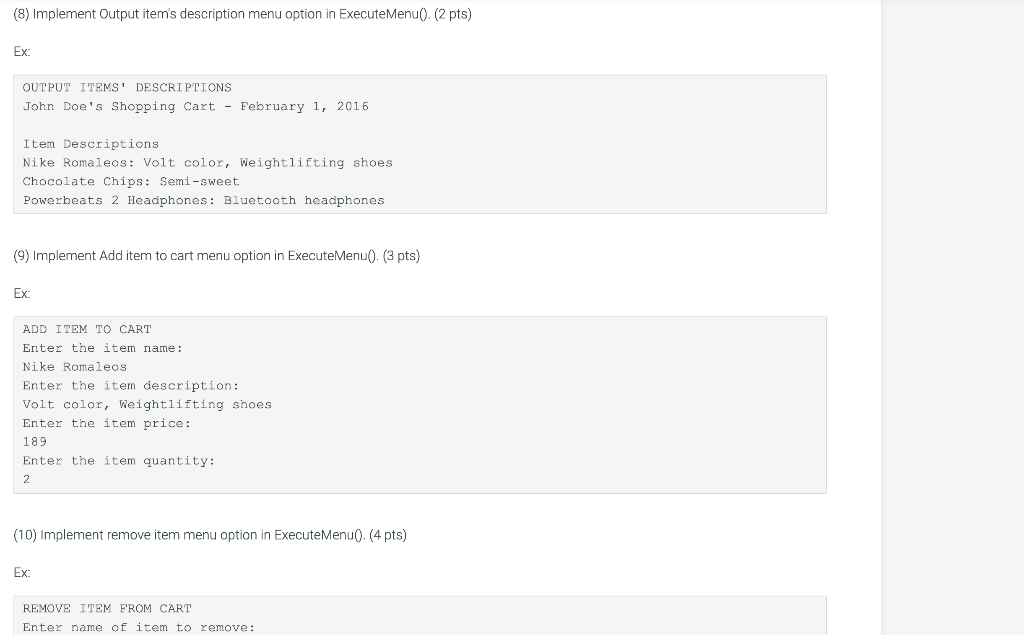
in C++ pls
UPDATE SHOPPING CART.H
#pragma once //Include header files #include
using namespace std;
//declare class class ShoppingCart { //declare data members private: string customerName; string currentDate; vector
public: //Declare member functions ShoppingCart(); ShoppingCart(string name, string date); string GetCustomerName(); string GetDate(); void AddItem(ItemToPurchase item); void RemoveItem(string itemName); void ModifyItem(ItemToPurchase item); int GetNumItemsInCart(); int GetCostOfCart(); void PrintTotal(); void PrintDescriptions(); };
Need help from 6-11 pls, need to learn where i am going wrong, thank you
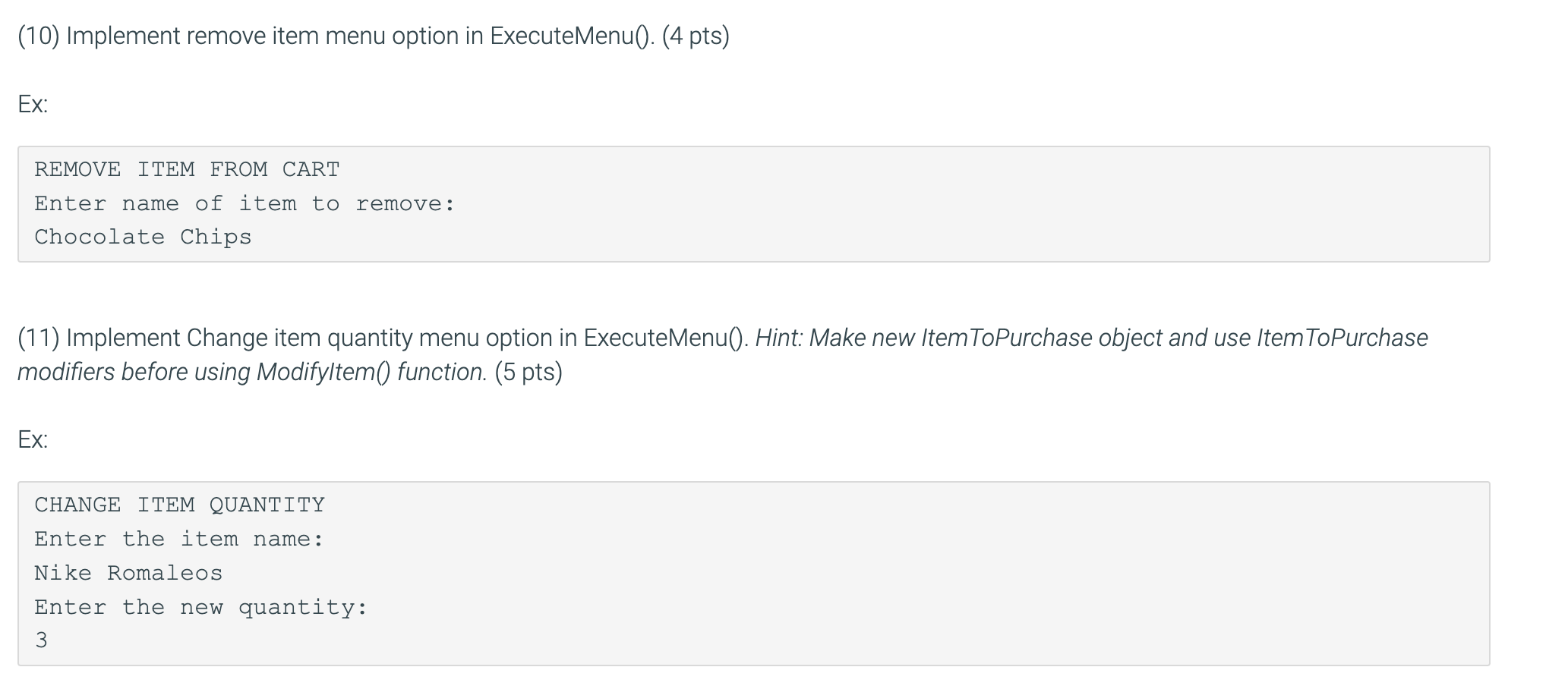
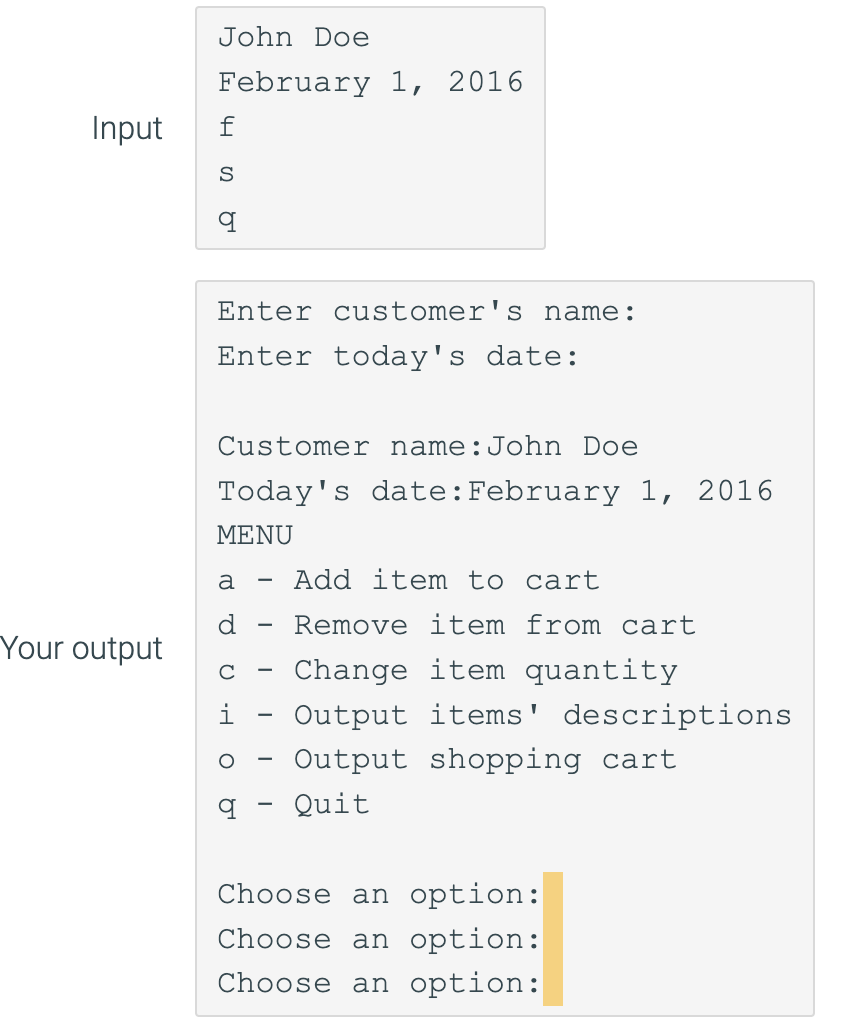
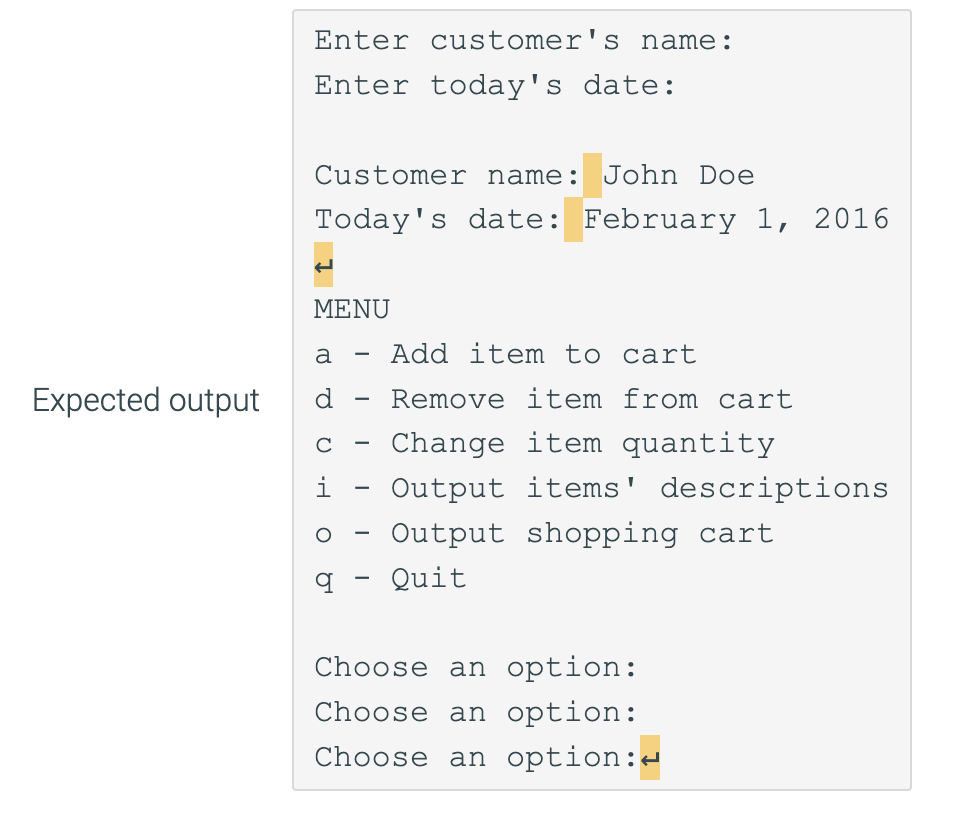
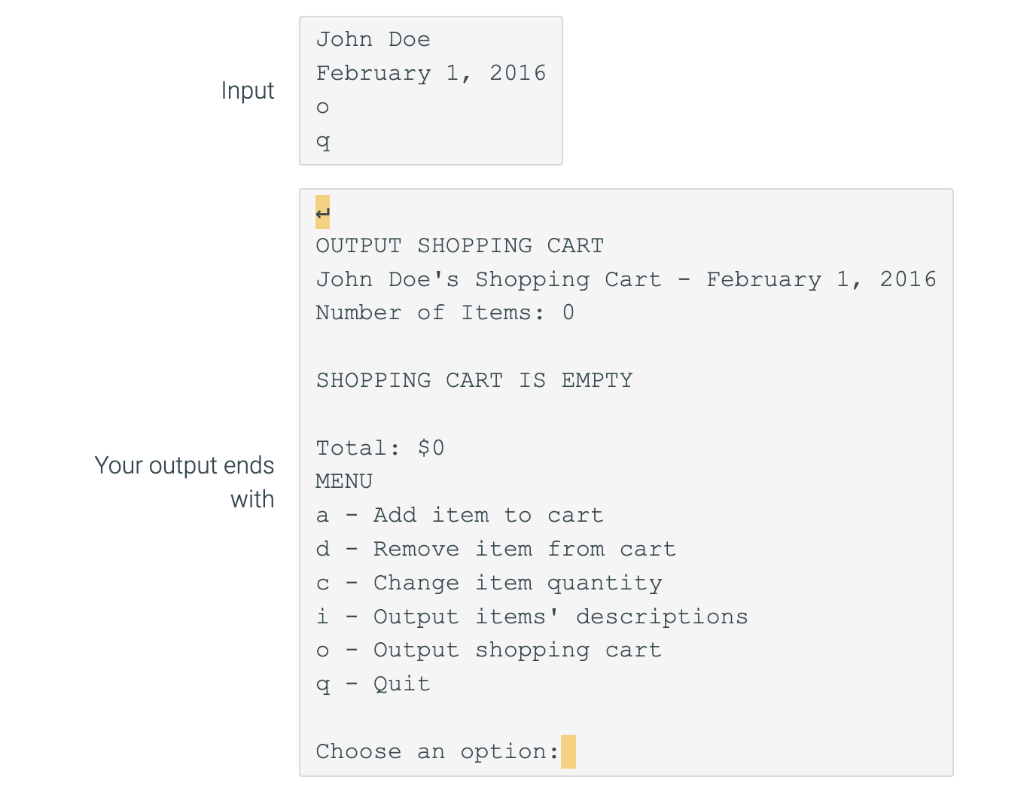
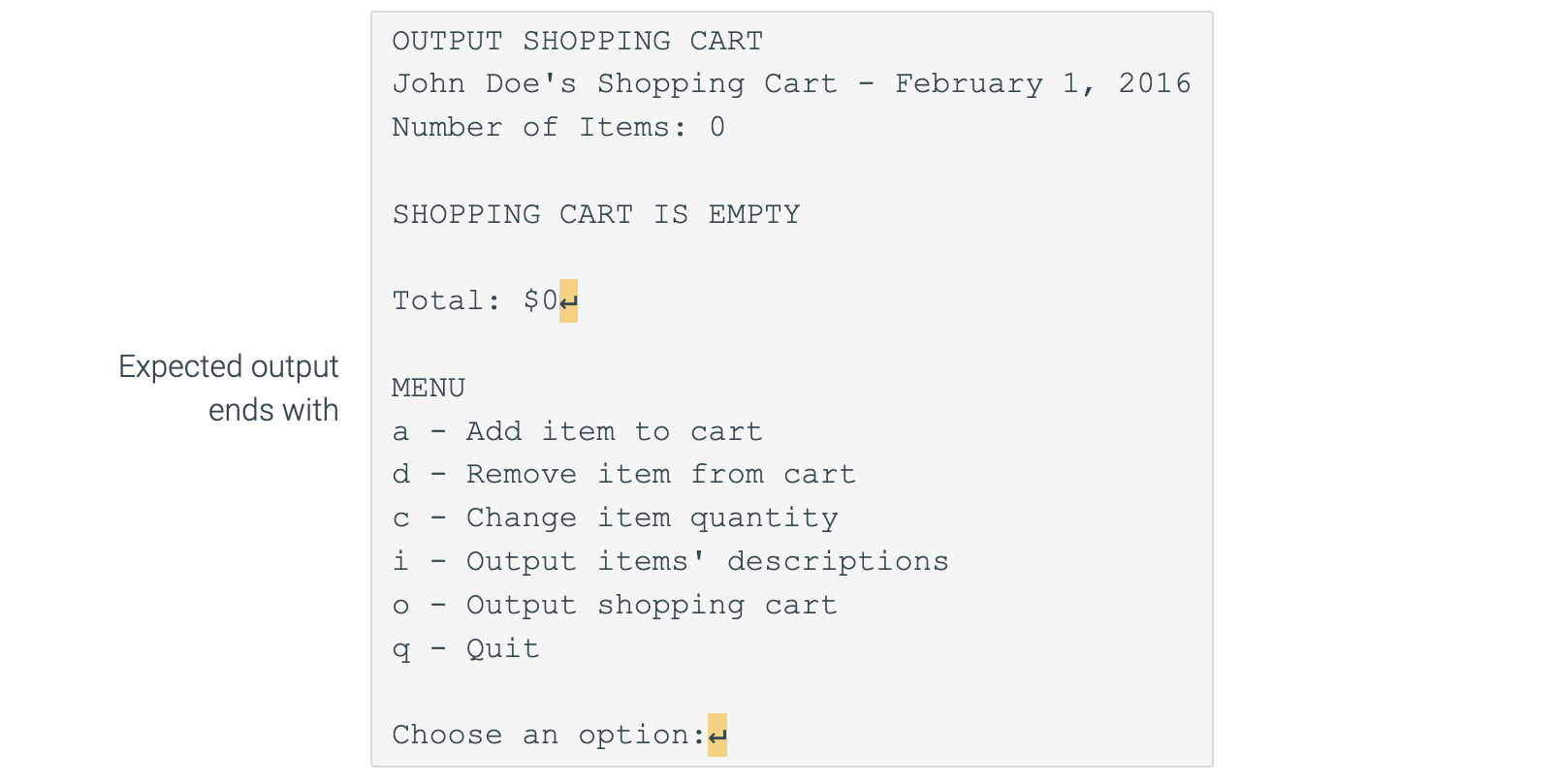
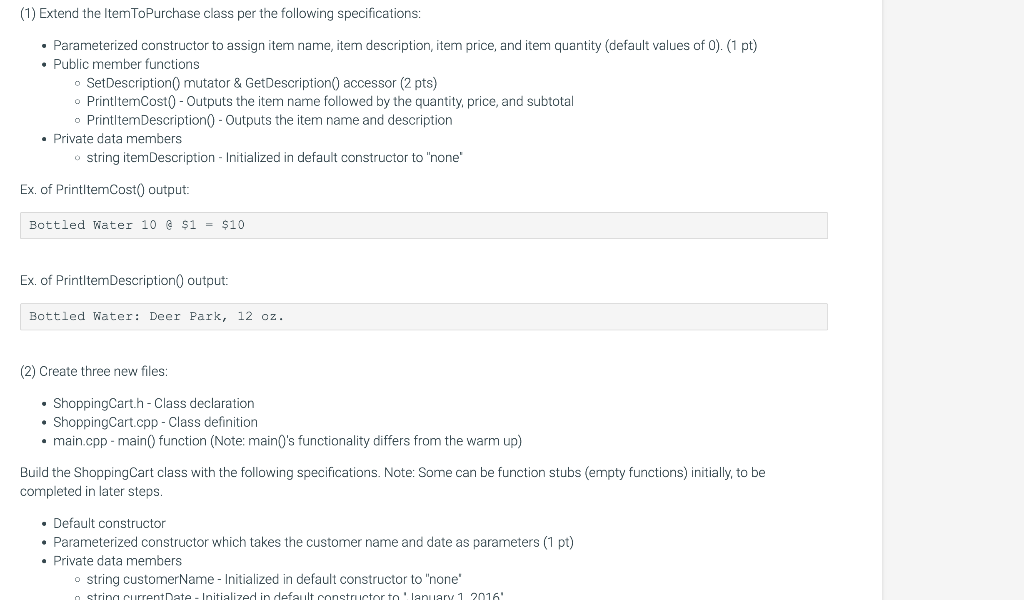
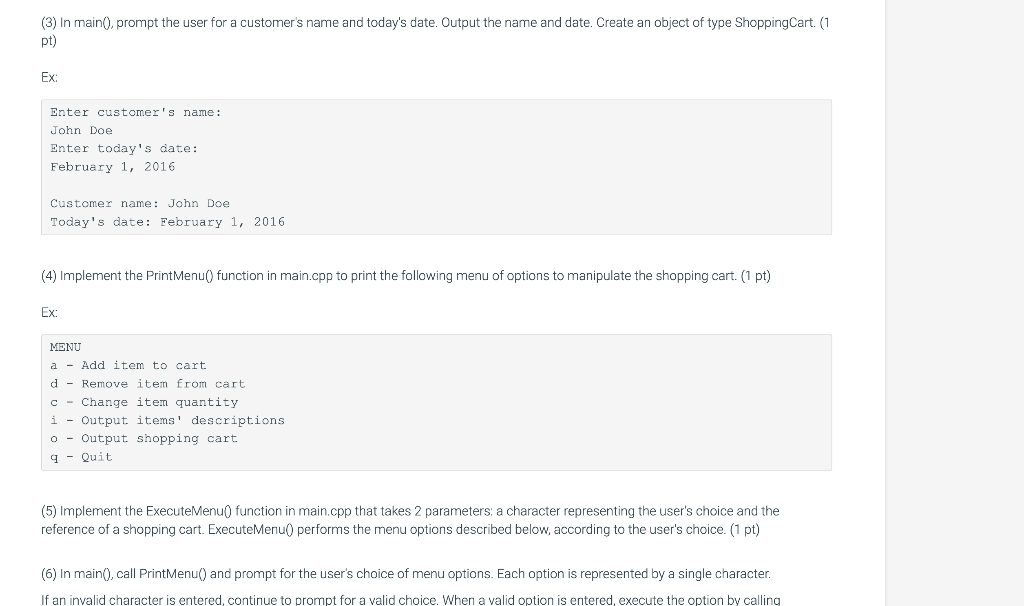
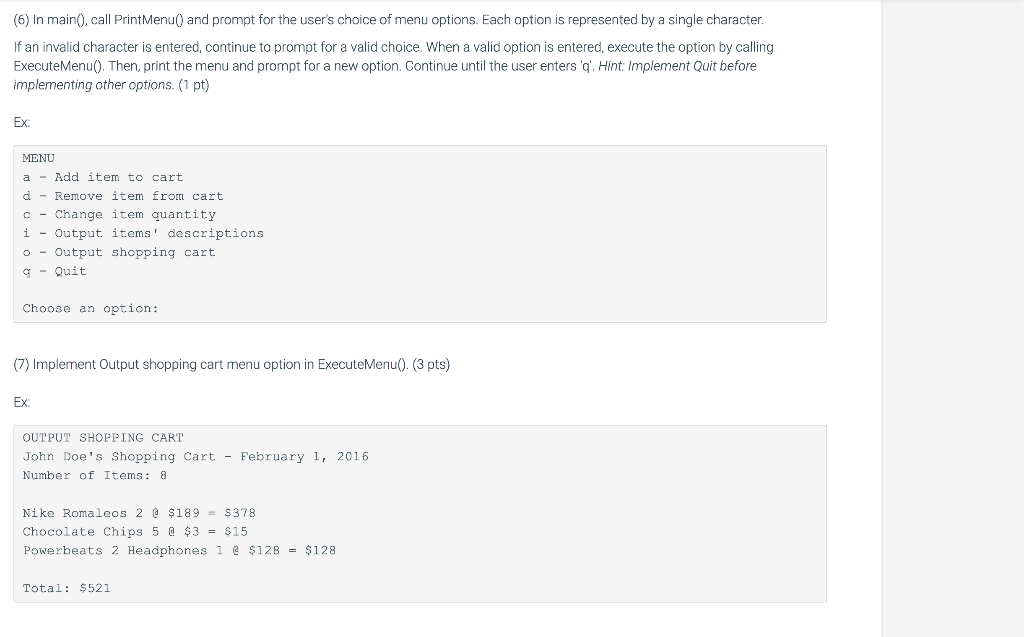
(11) Implement Change item quantity menu option in ExecuteMenu(). Hint: Make new ItemToPurchase object and use ItemToPurchase modifiers before using Modifyltem0 function. (5 pts) Ex: CHANGE ITEM QUANTITY Enter the item name: Nike Romaleos Enter the new quantity: 3 Enter customer's name: Enter today's date: Customer name:John Doe Today's date: February 1, 2016 MENU a - Add item to cart d - Remove item from cart c - Change item quantity i - Output items' descriptions - - Output shopping cart q - Quit Choose an option: Choose an option: Choose an option: Enter customer's name: Enter today's date: Customer name: John Doe Today's date: February 1, 2016 MENU a - Add item to cart Expected output d - Remove item from cart c - Change item quantity i - Output items' descriptions - - Output shopping cart q - Quit Choose an option: Choose an option: Choose an option: OUTPUT SHOPPING CART John Doe's Shopping Cart - February 1, 2016 Number of Items: 0 SHOPPING CART IS EMPTY Total: $0 MENU a - Add item to cart d - Remove item from cart c - Change item quantity i - Output items' descriptions - - Output shopping cart q - Quit Choose an option: OUTPUT SHOPPING CART John Doe's Shopping Cart - February 1, 2016 Number of Items: 0 SHOPPING CART IS EMPTY Total: $0 MENU a - Add item to cart d - Remove item from cart c - Change item quantity i - Output items' descriptions o - Output shopping cart q - Quit Choose an option: (1) Extend the ItemToPurchase class per the following specifications: - Parameterized constructor to assign item name, item description, item price, and item quantity (default values of 0 ). (1 pt) - Public member functions - SetDescription0 mutator \& GetDescription() accessor (2 pts) - PrintltemCost 0 - Outputs the item name followed by the quantity, price, and subtotal - PrintltemDescription0 - Outputs the item name and description - Private data members o string itemDescription - Initialized in default constructor to "none" Ex. of PrintltemCost() output: Bottled Water 10 \& $1=$10 Ex. of PrintltemDescription0 output: Bottled Water: Deer Park, 12 oz. (2) Create three new files: - ShoppingCart.h-Class declaration - ShoppingCart.cpp - Class definition - main.cpp - main() function (Note: main0's functionality differs from the warm up) Build the ShoppingCart class with the following specifications. Note: Some can be function stubs (empty functions) initially, to be completed in later steps. - Default constructor - Parameterized constructor which takes the customer name and date as parameters (1 pt) - Private data members - string customerName - Initialized in default constructor to "none" (3) In main(), prompt the user for a customer's name and today's date. Output the name and date. Create an object of type ShoppingCart. (1 pt) Ex: Enter customer's name: John Doe Enter today's date: February 1, 2016 Customer name: John Doe Today's date: February 1, 2016 (4) Implement the PrintMenu() function in main.cpp to print the following menu of options to manipulate the shopping cart. (1 pt) Ex: MENU a - Add item to cart d - Remove item from cart c - Change item quantity i - Output items' descriptions - - Output shopping cart q - Quit (5) Implement the ExecuteMenu0 function in main.cpp that takes 2 parameters: a character representing the user's choice and the reference of a shopping cart. ExecuteMenu0 performs the menu options described below, according to the user's choice. (1 pt) (6) In main(), call PrintMenu() and prompt for the user's choice of menu options. Each option is represented by a single character. If an invalid character is entered, continue to prompt for a valid choice. When a valid option is entered, execute the option by calling (6) In main(), call PrintMenu() and prompt for the user's choice of menu options. Each option is represented by a single character. If an invalid character is entered, continue to prompt for a valid choice. When a valid option is entered, execute the option by calling ExecuteMenu(). Then, print the menu and prompt for a new option. Continue until the user enters ' q '. Hint: Implement Quit before implementing other options. (1 pt) Ex: MENU a - Add item to cart d - Remove item from cart c - Change item quantity i - Output items' descriptions - - Output shopping cart q - Quit Choose an option: (7) Implement Output shopping cart menu option in ExecuteMenu(). (3 pts) Ex: OUTPUT SHOPPING CART John Doe's Shopping Cart - February 1, 2016 Number of Items: 8 Nike Romaleos 2@$189=$378 Chocolate Chips 5[[$3=$15 Powerbeats 2 Headphones 1 \& $128=$128 Total: $521 (8) Implement Output item's description menu option in ExecuteMenu(). (2 pts) Ex: OUTPUT ITEMS' DESCRIPTIONS John Doe's Shopping Cart - February 1, 2016 Itern Descriptions Nike Romaleos: Volt color, Weightlifting shoes Chocolate Chips: Semi-sweet. Powerbeats 2 Headphones: Bluetooth headphones (9) Implement Add item to cart menu option in ExecuteMenu(). (3 pts) Ex: ADD ITEM TO CART Enter the item name: Nike Romaleos Enter the item description: Volt color, Weightlifting shoes Enter the item price: 189 Enter the item quantity: 2 (10) Implement remove item menu option in ExecuteMenu(). (4 pts) Ex: REMOVE ITEM FROM CARR Enter name of item to remove
Step by Step Solution
There are 3 Steps involved in it

Get step-by-step solutions from verified subject matter experts
 Study Help