







Question: Matlab solution You may find the find() function useful Function Name: calcium Inputs: 1. (char) The name of a text file to read Outputs: 1.
Matlab solution
You may find the find() function useful 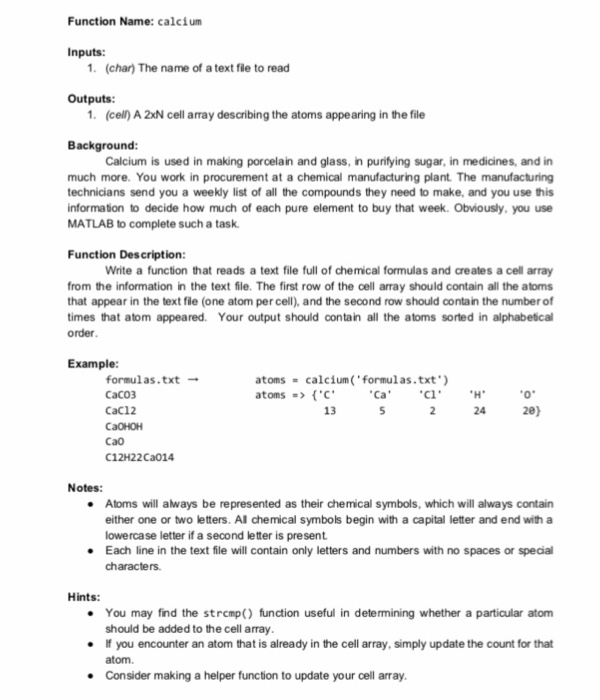
Function Name: calcium Inputs: 1. (char) The name of a text file to read Outputs: 1. (cell) A 2xN cell array describing the atoms appearing in the file Background Calcium is used in making porcelain and glass, in purifying sugar, in medicines, and in much more. You work in procurement at a chemical manufacturing plant. The manufacturing technicians send you a weekly list of all the compounds they need to make, and you use this informaton to decide how much of each pure element to buy that week. Obviously, you use MATLAB to complete such a task Function Description: Write a function that reads a text file full of chemical formulas and creates a cell array from the information in the text file. The first row of the cell array should contain all the atoms that appear in the text file (one atom per cell), and the second row should contain the number of times that atom appeared. Your output should contain all the atoms sorted in alphabescal order Example: formulas.txt-- CaCO3 CaC12 atoms # calcium(.formulas.txt.) atoms => {'C. Ca 13 24 20) Ca0 C12H22Ca014 Notes: . Atoms will always be represented as their chemical symbols, which will always contain either one or two letters. Al chemical symbols begin with a capital letter and end with a lowercase letter if a second letter is present Each line in the text file will contain only letters and numbers with no spaces or special characters. Hints: . You may find the stremp) function useful in determining whether a particular atom should be added to the cell array . If you encounter an atom that is already in the cell array, simply update the count for that atom. Consider making a helper function to update your cell array
Step by Step Solution
There are 3 Steps involved in it

Get step-by-step solutions from verified subject matter experts
 Study Help