







Question: NEED HELP WITH QUESTION 3: my code: //initialize delay between light changes int timer = 100; void setup() { //use a for loop to initialize
NEED HELP WITH QUESTION 3:
my code:
//initialize delay between light changes
int timer = 100;
void setup()
{
//use a for loop to initialize each pin as an output
for(int thisPin = 2; thisPin
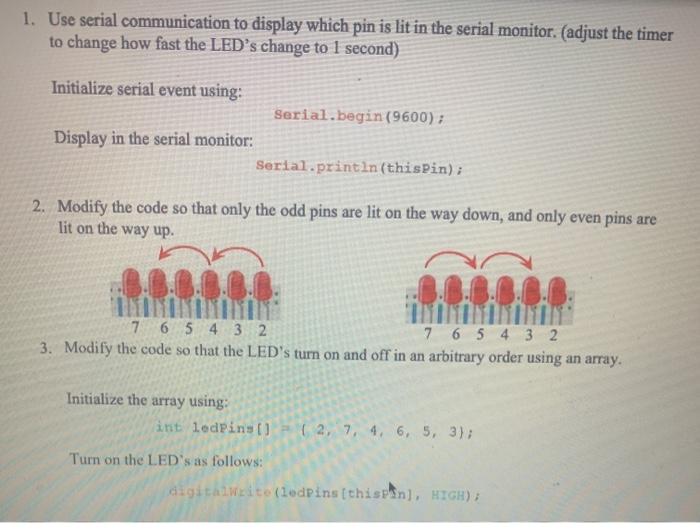
1. Use serial communication to display which pin is lit in the serial monitor. (adjust the timer to change how fast the LED's change to 1 second) Initialize serial event using: Serial.begin(9600); Display in the serial monitor: Serial.println(thisPin); 2. Modify the code so that only the odd pins are lit on the way down, and only even pins are lit on the way up. 7 6 5 4 3 2 7 6 5 4 3 2 3. Modify the code so that the LED's turn on and off in an arbitrary order using an array. Initialize the array using: int ledPins () (2, 7, 4, 6, 5, 3); Turn on the LED's as follows: digitalWrito (ledPins(thispin), HIGH) {
pinMode(thisPin, OUTPUT);
Serial.begin(9600);
Serial.println(thisPin);
}
}
void loop()
{
//loop from the lowest pin to the highest
for(int thisPin = 2; thisPin
{
if(thisPin % 2 == 0) //If the pin is even
digitalWrite(thisPin, HIGH);
delay(timer); // Wait for 1000 millisecond(s)
digitalWrite(thisPin, LOW);
}
//loop from the highest pin to the lowest
for(int thisPin=7; thisPin>=2; thisPin--)
{
if(thisPin % 2 == 1) //If the pin is odd
//turn the pin on
digitalWrite(thisPin, HIGH);
delay(timer);
//turn the pin off
digitalWrite(thisPin, LOW);
}
}
Step by Step Solution
There are 3 Steps involved in it
1 Expert Approved Answer
Step: 1 Unlock

Question Has Been Solved by an Expert!
Get step-by-step solutions from verified subject matter experts
Step: 2 Unlock
Step: 3 Unlock
 Study Help