







Question: Part A: Team Roster RosterTest.java is available with this assignment via Desire2Learn. Write a TeamRoster class so all the test cases in RosterTest perform correctly.
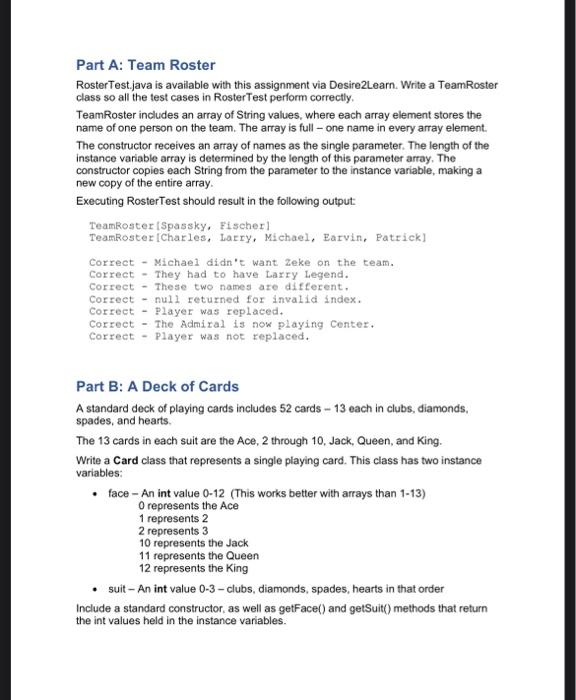
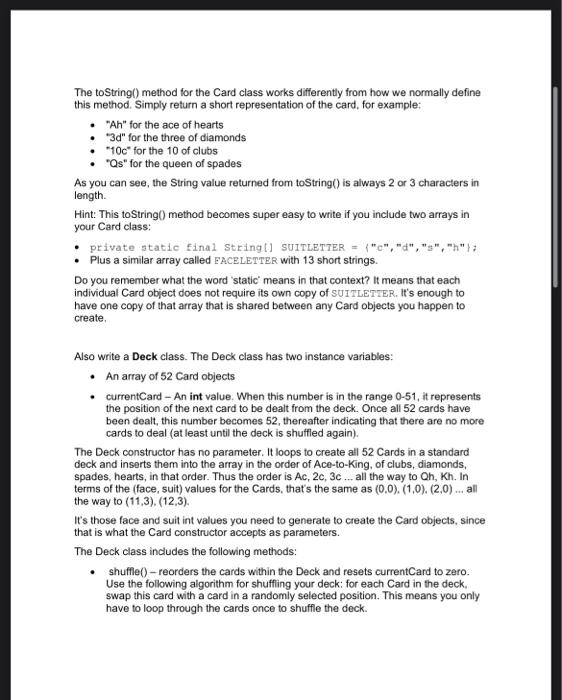
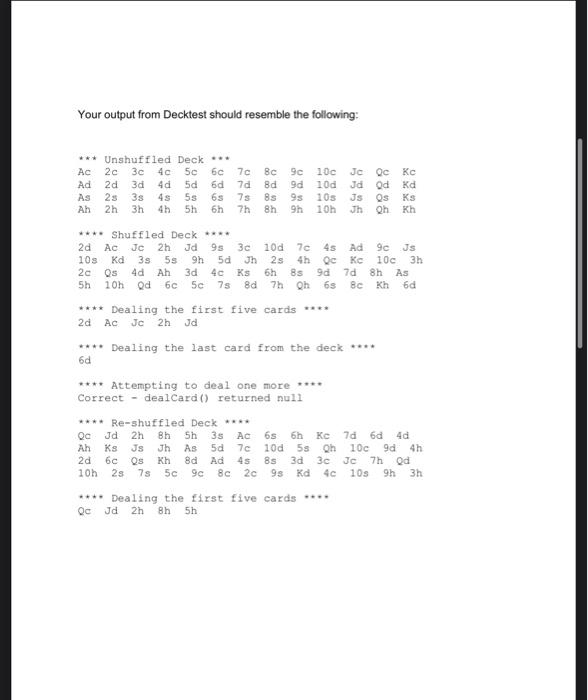
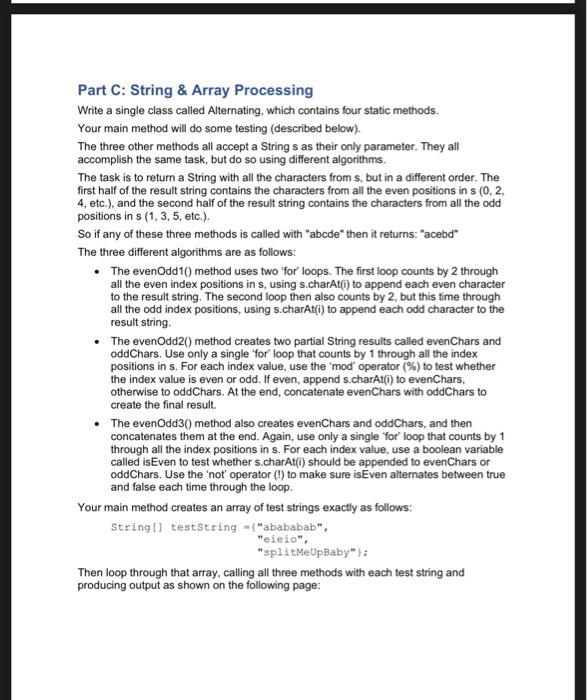
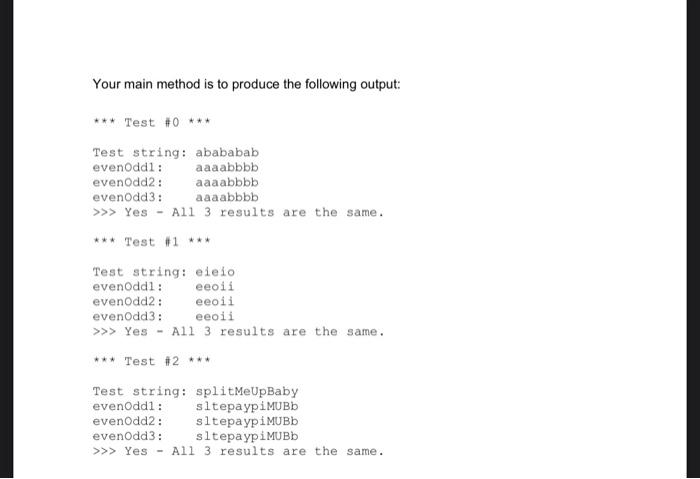
Part A: Team Roster RosterTest.java is available with this assignment via Desire2Learn. Write a TeamRoster class so all the test cases in RosterTest perform correctly. TeamRoster includes an array of String values, where each array element stores the name of one person on the team. The array is full - one name in every array element. The constructor receives an array of names as the single parameter. The length of the instance variable array is determined by the length of this parameter array. The constructor copies each String from the parameter to the instance variable, making a new copy of the entire array. Executing RosterTest should result in the following output: Teamkoster [Spassky, Fischer] TeamRoster[Charles, Larry, Michael, Earvin, Pattick] Correct - Michael didn't want zeke on the team. Correct - They had to have Larry Legend. Correct - These two names are different, Correet - null returned for invalid index. Correct - Player was replaced. Correet - The Admiral is now playing Center. Correet - Player was not replaced. Part B: A Deck of Cards A standard deck of playing cards includes 52 cards - 13 each in clubs, diamonds, spades, and hearts. The 13 cards in each suit are the Ace, 2 through 10, Jack, Queen, and King. Write a Card class that represents a single playing card. This class has two instance variables: - face - An int value 0-12 (This works better with arrays than 1-13) 0 represents the Ace 1 represents 2 2 represents 3 10 represents the Jack 11 represents the Queen 12 represents the King - suit - An int value 0-3 - clubs, diamonds, spades, hearts in that order Include a standard constructor, as well as getFace() and getSuit() methods that return the int values held in the instance variables. The toString() method for the Card class works differently from how we normally define this method. Simply return a short representation of the card, for example: - "Ah" for the ace of hearts - " 3d " for the three of diamonds - "10c" for the 10 of clubs - "Qs" for the queen of spades As you can see, the String value returned from toString() is always 2 or 3 characters in length. Hint: This toString() method becomes super easy to write if you include two arrays in your Card class: - private static final Stringl] SUITLETTER = {"cm,"d","s",h"= - Plus a similar array called EACELETTER with 13 short strings. Do you remember what the word 'static' means in that context? It means that each individual Card object does not require its own copy of SUITLETIER. It's enough to have one copy of that array that is shared between any Card objects you happen to create. Also write a Deck class. The Deck class has two instance variables: - An array of 52 Card objects - currentCard - An int value. When this number is in the range 0-51, it represents the position of the next card to be dealt from the deck. Once all 52 cards have been dealt, this number becomes 52 , thereafter indicating that there are no more cards to deal (at least until the deck is shuffled again). The Deck constructor has no parameter. It loops to create all 52 Cards in a standard deck and inserts them into the array in the order of Ace-to-King, of clubs, diamonds, spades, hearts, in that order. Thus the order is Ac, 2c,3c all the way to Qh,Kh. In terms of the (face, suit) values for the Cards, that's the same as (0,0),(1,0),(2,0) all the way to (11,3),(12,3). It's those face and suit int values you need to generate to create the Card objects, since that is what the Card constructor accepts as parameters. The Deck class includes the following methods: - shuffle()-reorders the cards within the Deck and resets currentCard to zero. Use the following algorithm for shuffling your deck: for each Card in the deck, swap this card with a card in a randomly selected position. This means you only have to loop through the cards once to shuffle the deck. Your output from Decktest should resemble the following: Part C: String \& Array Processing Write a single class called Alternating, which contains four static methods. Your main method will do some testing (described below). The three other methods all accept a String s as their only parameter. They all accomplish the same task, but do so using different algorithms. The task is to return a String with all the characters from s, but in a different order. The first half of the result string contains the characters from all the even positions in s(0,2, 4 , etc.), and the second half of the result string contains the characters from all the odd positions in s (1,3,5, etc.). So if any of these three methods is called with "abcde" then it returns: "acebd" The three different algorithms are as follows: - The evenOdd1() method uses two 'for' loops. The first loop counts by 2 through all the even index positions in s, using s.charAt(i) to append each even character to the result string. The second loop then also counts by 2 , but this time through all the odd index positions, using s.charAt(i) to append each odd character to the result string. - The evenOdd2() method creates two partial String results called evenChars and oddChars. Use only a single 'for' loop that counts by 1 through all the index positions in s. For each index value, use the 'mod' operator (%) to test whether the index value is even or odd. If even, append s.charAt(i) to evenChars, otherwise to oddChars. At the end, concatenate evenChars with oddChars to create the final result. - The evenOdd3() method also creates evenChars and oddChars, and then concatenates them at the end. Again, use only a single 'for' loop that counts by 1 through all the index positions in s. For each index value, use a boolean variable called isEven to test whether s.charAt(i) should be appended to evenChars or oddChars. Use the 'not' operator (I) to make sure isEven alternates between true and false each time through the loop. Your main method creates an array of test strings exactly as follows: String[]teststring={"abababab","eieio","splitMeUpBaby"}; Then loop through that array, calling all three methods with each test string and producing output as shown on the following page: Your main method is to produce the following output
Step by Step Solution
There are 3 Steps involved in it

Get step-by-step solutions from verified subject matter experts
 Study Help