Question: Project Description: You work in the Admissions Office for West Coast University, a mid-sized regional university in California. Your assistant entered a list of college
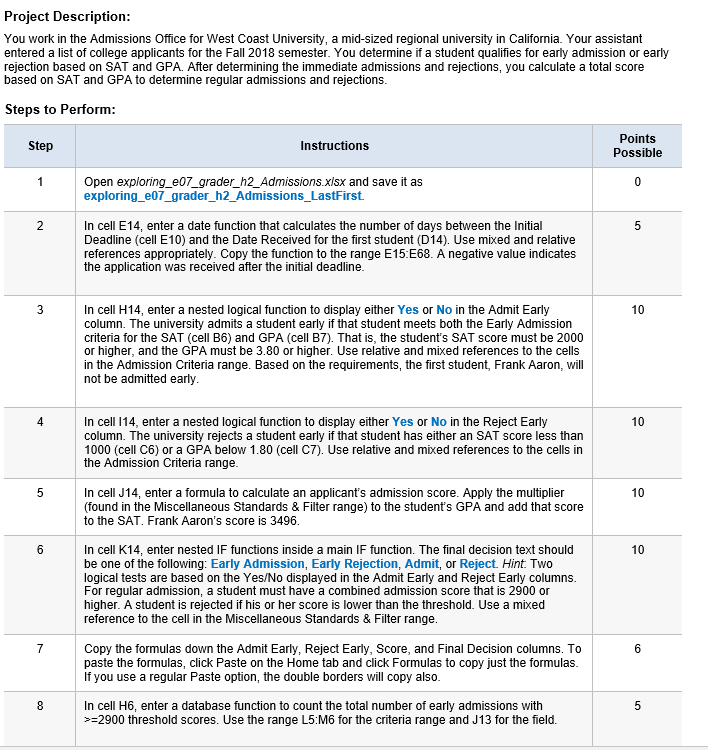
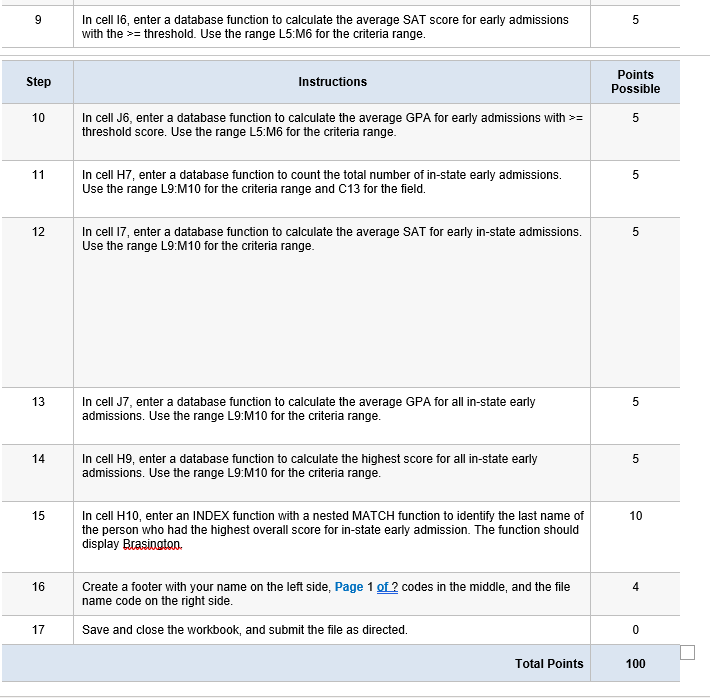
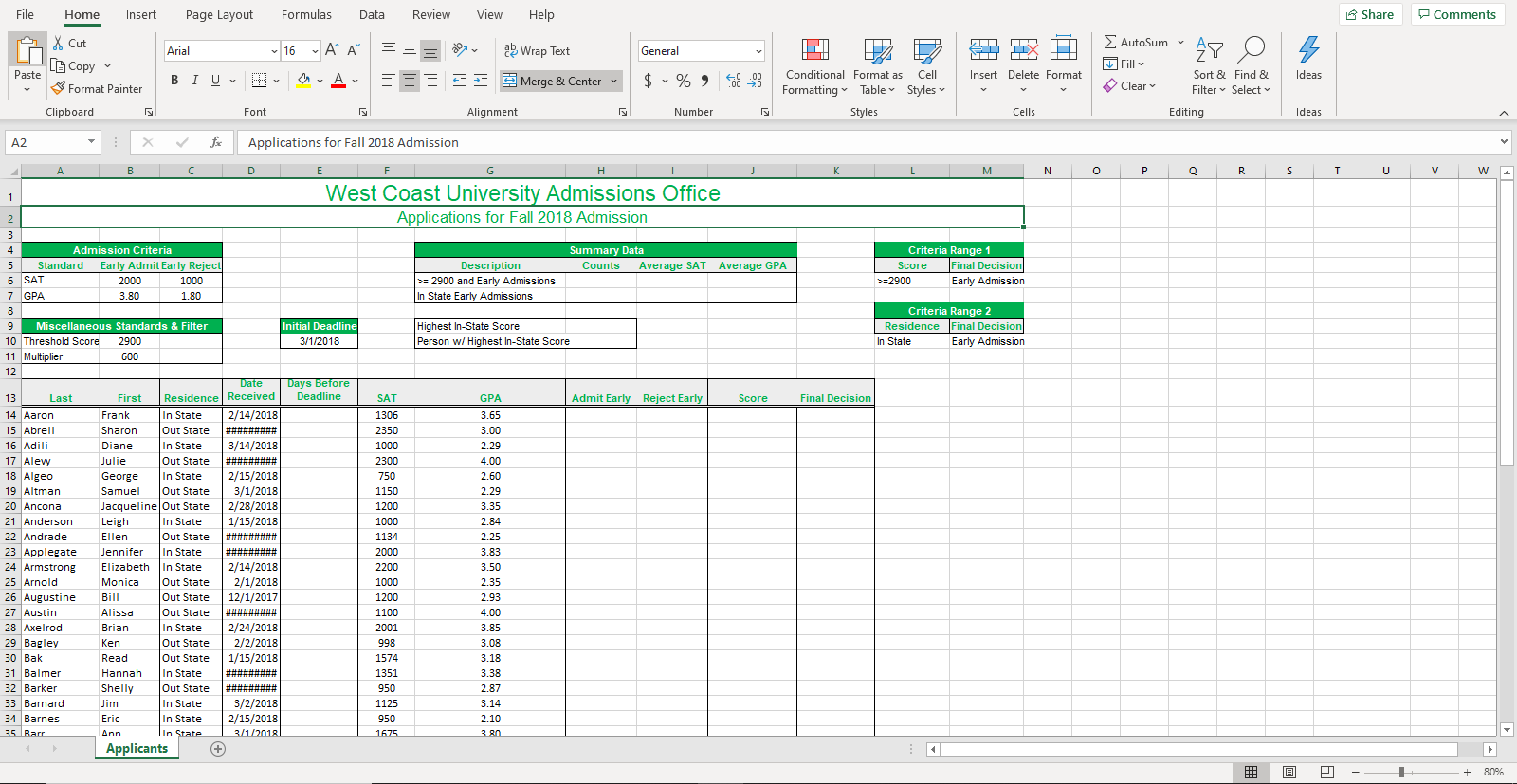
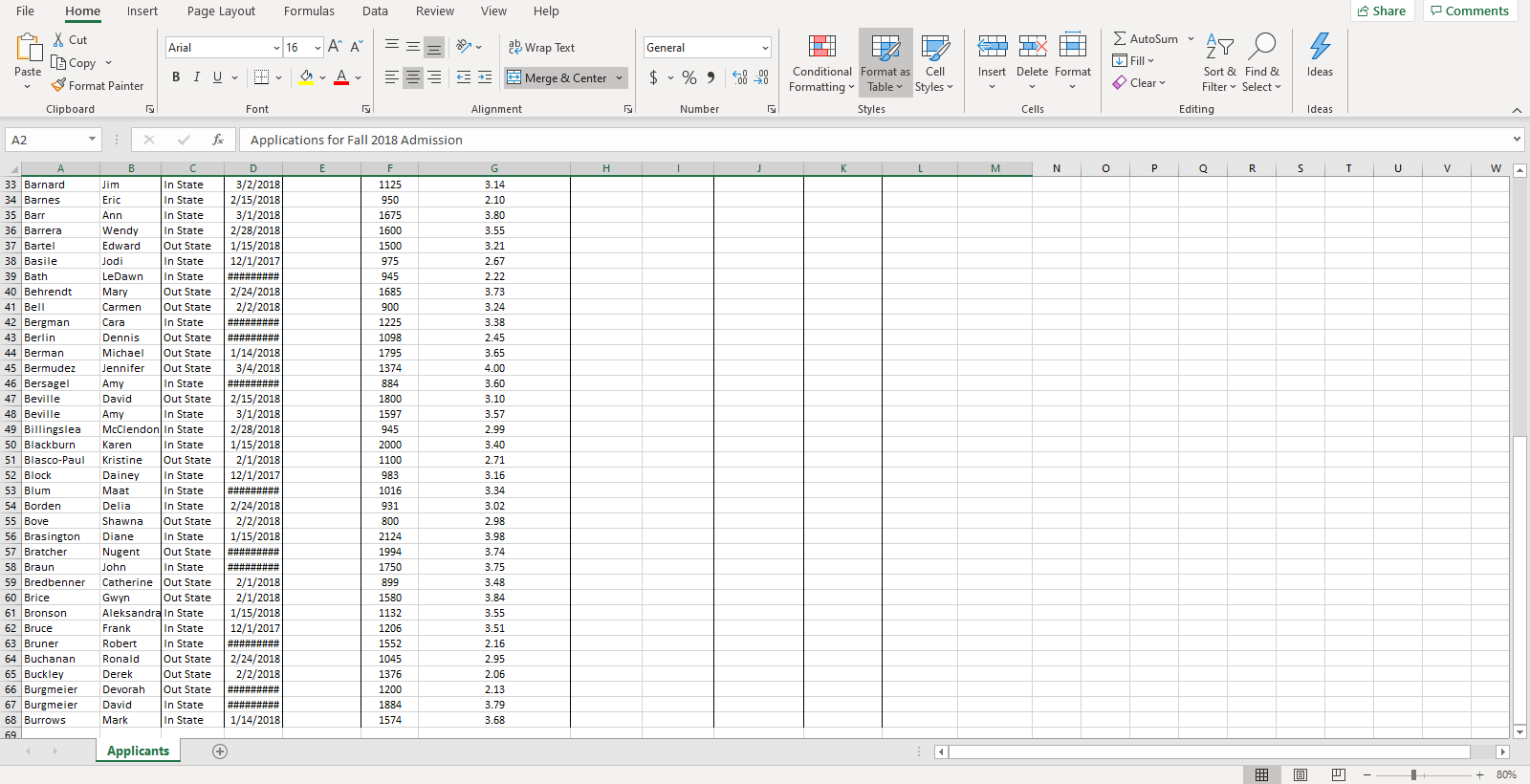
Project Description: You work in the Admissions Office for West Coast University, a mid-sized regional university in California. Your assistant entered a list of college applicants for the Fall 2018 semester. You determine if a student qualifies for early admission or early rejection based on SAT and GPA. After determining the immediate admissions and rejections, you calculate a total score based on SAT and GPA to determine regular admissions and rejections. Steps to Perform: Step Instructions Points Possible Open exploring_e07_grader_h2_Admissions.xlsx and save it as exploring_e07_grader_h2_Admissions_LastFirst. In cell E14, enter a date function that calculates the number of days between the initial Deadline (cell E10) and the Date Received for the first student (D14). Use mixed and relative references appropriately. Copy the function to the range E15:E68. A negative value indicates the application was received after the initial deadline. 10 In cell H14, enter a nested logical function to display either Yes or No in the Admit Early column. The university admits a student early if that student meets both the Early Admission criteria for the SAT (cell B6) and GPA (cell B7). That is, the student's SAT score must be 2000 or higher, and the GPA must be 3.80 or higher. Use relative and mixed references to the cells in the Admission Criteria range. Based on the requirements, the first student, Frank Aaron, will not be admitted early. In cell 114, enter a nested logical function to display either Yes or No in the Reject Early column. The university rejects a student early if that student has either an SAT score less than 1000 (cell C6) or a GPA below 1.80 (cell C7). Use relative and mixed references to the cells in the Admission Criteria range. In cell J14, enter a formula to calculate an applicant's admission score. Apply the multiplier (found in the Miscellaneous Standards & Filter range) to the student's GPA and add that score to the SAT. Frank Aaron's score is 3496. In cell K14, enter nested IF functions inside a main IF function. The final decision text should be one of the following: Early Admission, Early Rejection, Admit, or Reject. Hint. Two logical tests are based on the Yes/No displayed in the Admit Early and Reject Early columns. For regular admission, a student must have a combined admission score that is 2900 or higher. A student is rejected if his or her score is lower than the threshold. Use a mixed reference to the cell in the Miscellaneous Standards & Filter range. Copy the formulas down the Admit Early, Reject Early, Score, and Final Decision columns. To paste the formulas, click Paste on the Home tab and click Formulas to copy just the formulas. If you use a regular Paste option, the double borders will copy also. In cell H6, enter a database function to count the total number of early admissions with >=2900 threshold scores. Use the range L5.M6 for the criteria range and J13 for the field. 9 In cell 16, enter a database function to calculate the average SAT score for early admissions with the >= threshold. Use the range L5 M6 for the criteria range. Step Instructions Points Possible 10 In cell J6, enter a database function to calculate the average GPA for early admissions with >= threshold score. Use the range L5:M6 for the criteria range. 11 In cell H7, enter a database function to count the total number of in-state early admissions. Use the range L9:M10 for the criteria range and C13 for the field. 12 In cell 17, enter a database function to calculate the average SAT for early in-state admissions. Use the range L9:M10 for the criteria range. 13 In cell J7, enter a database function to calculate the average GPA for all in-state early admissions. Use the range L9:M10 for the criteria range. 14 In cell H9, enter a database function to calculate the highest score for all in-state early admissions. Use the range L9:M10 for the criteria range. 15 10 In cell H10, enter an INDEX function with a nested MATCH function to identify the last name of the person who had the highest overall score for in-state early admission. The function should display Bcasington 16 Create a footer with your name on the left side, Page 1 of? codes in the middle, and the file name code on the right side. Save and close the workbook, and submit the file as directed. Total Points 100 Insert Page Layout Formulas Data Review View Help Share Comments Home X Cut 4 Arial 16 LL A A == = D A X O MIT Copy a Wrap Text Merge & Center A General $ % 96828 % , 40.00 Number 2 B Conditional Format as Cell Formatting Table Styles Styles AutoSum" AY Fill Sort & Clear Filter Editing Ideas Find & Select Font Alignment Cells Ideas Paste Format Painter | BIU, P Clipboard A2 : X for | A B C M N O P Q R S T U V Applications for Fall 2018 Admission D E F West Coast University Admissions Office Applications for Fall 2018 Admission Summary Data Counts Average SAT Average GPA Admission Criteria 5 Standard Early Admit Early Reject 6 SAT 2000 1000 7 GPA 3.80 1.80 Description >= 2900 and Early Admissions In State Early Admissions Criteria Range 1 Score Final Decision >=2900 Early Admission 9 Miscellaneous Standards & Filter 10 Threshold Score 2900 11 Multiplier 600 Initial Deadline 3/1/2018 Highest In-State Score Person w/ Highest In-State Score Criteria Range 2 Residence Final Decision In State Early Admission 12 Days Before Deadline Admit Early Reject Early Score Final Decision GPA 3.65 3.00 2.29 4.00 2.60 2.29 3.35 2.84 2.25 13 Last 14 Aaron 15 Abrell 16 Adili 17 Alevy 18 Algeo 19 Altman 20 Ancona 21 Anderson 22 Andrade 23 Applegate 24 Armstrong 25 Arnold 26 Augustine 27 Austin 28 Axelrod 29 Bagley 30 Bak 31 Balmer 32 Barker 33 Barnard 34 Barnes 35. Barr Date First Residence Received Frank In State 2/14/2018 Sharon Out State ######### Diane In State 3/14/2018 Julie Out State ######### George In State 2/15/2018 Samuel Out State 3/1/2018 Jacqueline Out State 2/28/2018 Leigh In State 1/15/2018 Ellen Out State Jennifer In State ######### Elizabeth In State 2/14/2018 Monica Out State 2/1/2018 Bill Out State 12/1/2017 Alissa Out State #*****### Brian In State 2/24/2018 Ken Out State 2/2/2018 Read Out State 1/15/2018 Hannah In State Shelly Out State Jim In State 3/2/2018 Eric In State 2/15/2018 In State | 3/1/2018 Applicants SAT 1306 2350 1000 2300 750 1150 1200 1000 1134 2000 2200 1000 1200 1100 2001 998 1574 1351 950 1125 950 1675 3.83 3.50 2.35 2.93 4.00 3.85 3.08 3.18 3.38 2.87 3.14 2.10 3.80 Ann @ -- H - + 80% File Home Insert Page Layout Formulas Data Review View Help Share Comments a X cut Arial 16 A A = = = General A 12 P EX AutoSum" AY Fill O 2 Wrap Text Merge & Center Paste | BI U L6 Copy Format Painter Clipboard A | $ % , 8-20 Insert Delete Format Ideas Conditional Format as Cell Formatting Table Styles Sort & Filter Clear Find & Select Font Alignment Number Styles Cells Editing Ideas A2 - x for Applications for Fall 2018 Admission H M N O P Q R S T U V w DE 3/2/2018 2/15/2018 3/1/2018 2/28/2018 1/15/2018 12/1/2017 ######### 2/24/2018 2/2/2018 3.14 2.10 3.80 3.55 3.21 2.67 Jodi NIR 3.24 3.38 2.45 A 33 Barnard 34 Barnes 35 Barr 36 Barrera 37 Bartel 38 Basile 39 Bath 40 Behrendt 41 Bell 42 Bergman 43 Berlin 44 Berman 45 Bermudez 46 Bersagel 47 Beville 48 Beville 49 Billingslea 50 Blackburn 51 Blasco-Paul 52 Block 53 Blum 54 Borden 55 Bove 56 Brasington 57 Bratcher 58 Braun 59 Bredbenner 60 Brice 61 Bronson 62 Bruce 63 Bruner 64 Buchanan 65 Buckley 66 Burgmeier 67 Burgmeier 68 Burrows 1125 950 1675 1600 1500 975 945 1685 900 1225 1098 1795 1374 884 1800 1597 945 2000 1100 983 1016 | 1/14/2018 3/4/2018 B C Jim In State Eric In State Ann In State Wendy In State Edward Out State In State LeDawn In State Mary Out State Carmen Out State Cara In State Dennis Out State Michael Out State Jennifer Out State Amy In State David Out State Amy In State McClendon in State Karen In State Kristine Out State Dainey In State Maat In State Delia In State Shawna Out State Diane In State Nugent Out State John In State Catherine Out State Gwyn Out State Aleksandra In State Frank In State Robert In State Ronald Out State Derek lout State Devorah Out State David In State Mark in State 2/15/2018 3/1/2018 2/28/2018 1/15/2018 2/1/2018 12/1/2017 3.65 4.00 3.60 3.10 3.57 2.99 3.40 2.71 2/24/2018 2/2/2018 1/15/2018 ######### ######### 2/1/2018 2/1/2018 1/15/2018 12/1/2017 800 2124 1994 1750 ooooooooooooo 899 1580 1132 1206 1552 1045 1376 1200 2/24/2018 2/2/2018 ######### ######### 1/14/2018 3.55 3.51 2.16 2.95 2.06 2.13 3.79 3.68 1884 1574 69 Applicants - + 80% Project Description: You work in the Admissions Office for West Coast University, a mid-sized regional university in California. Your assistant entered a list of college applicants for the Fall 2018 semester. You determine if a student qualifies for early admission or early rejection based on SAT and GPA. After determining the immediate admissions and rejections, you calculate a total score based on SAT and GPA to determine regular admissions and rejections. Steps to Perform: Step Instructions Points Possible Open exploring_e07_grader_h2_Admissions.xlsx and save it as exploring_e07_grader_h2_Admissions_LastFirst. In cell E14, enter a date function that calculates the number of days between the initial Deadline (cell E10) and the Date Received for the first student (D14). Use mixed and relative references appropriately. Copy the function to the range E15:E68. A negative value indicates the application was received after the initial deadline. 10 In cell H14, enter a nested logical function to display either Yes or No in the Admit Early column. The university admits a student early if that student meets both the Early Admission criteria for the SAT (cell B6) and GPA (cell B7). That is, the student's SAT score must be 2000 or higher, and the GPA must be 3.80 or higher. Use relative and mixed references to the cells in the Admission Criteria range. Based on the requirements, the first student, Frank Aaron, will not be admitted early. In cell 114, enter a nested logical function to display either Yes or No in the Reject Early column. The university rejects a student early if that student has either an SAT score less than 1000 (cell C6) or a GPA below 1.80 (cell C7). Use relative and mixed references to the cells in the Admission Criteria range. In cell J14, enter a formula to calculate an applicant's admission score. Apply the multiplier (found in the Miscellaneous Standards & Filter range) to the student's GPA and add that score to the SAT. Frank Aaron's score is 3496. In cell K14, enter nested IF functions inside a main IF function. The final decision text should be one of the following: Early Admission, Early Rejection, Admit, or Reject. Hint. Two logical tests are based on the Yes/No displayed in the Admit Early and Reject Early columns. For regular admission, a student must have a combined admission score that is 2900 or higher. A student is rejected if his or her score is lower than the threshold. Use a mixed reference to the cell in the Miscellaneous Standards & Filter range. Copy the formulas down the Admit Early, Reject Early, Score, and Final Decision columns. To paste the formulas, click Paste on the Home tab and click Formulas to copy just the formulas. If you use a regular Paste option, the double borders will copy also. In cell H6, enter a database function to count the total number of early admissions with >=2900 threshold scores. Use the range L5.M6 for the criteria range and J13 for the field. 9 In cell 16, enter a database function to calculate the average SAT score for early admissions with the >= threshold. Use the range L5 M6 for the criteria range. Step Instructions Points Possible 10 In cell J6, enter a database function to calculate the average GPA for early admissions with >= threshold score. Use the range L5:M6 for the criteria range. 11 In cell H7, enter a database function to count the total number of in-state early admissions. Use the range L9:M10 for the criteria range and C13 for the field. 12 In cell 17, enter a database function to calculate the average SAT for early in-state admissions. Use the range L9:M10 for the criteria range. 13 In cell J7, enter a database function to calculate the average GPA for all in-state early admissions. Use the range L9:M10 for the criteria range. 14 In cell H9, enter a database function to calculate the highest score for all in-state early admissions. Use the range L9:M10 for the criteria range. 15 10 In cell H10, enter an INDEX function with a nested MATCH function to identify the last name of the person who had the highest overall score for in-state early admission. The function should display Bcasington 16 Create a footer with your name on the left side, Page 1 of? codes in the middle, and the file name code on the right side. Save and close the workbook, and submit the file as directed. Total Points 100 Insert Page Layout Formulas Data Review View Help Share Comments Home X Cut 4 Arial 16 LL A A == = D A X O MIT Copy a Wrap Text Merge & Center A General $ % 96828 % , 40.00 Number 2 B Conditional Format as Cell Formatting Table Styles Styles AutoSum" AY Fill Sort & Clear Filter Editing Ideas Find & Select Font Alignment Cells Ideas Paste Format Painter | BIU, P Clipboard A2 : X for | A B C M N O P Q R S T U V Applications for Fall 2018 Admission D E F West Coast University Admissions Office Applications for Fall 2018 Admission Summary Data Counts Average SAT Average GPA Admission Criteria 5 Standard Early Admit Early Reject 6 SAT 2000 1000 7 GPA 3.80 1.80 Description >= 2900 and Early Admissions In State Early Admissions Criteria Range 1 Score Final Decision >=2900 Early Admission 9 Miscellaneous Standards & Filter 10 Threshold Score 2900 11 Multiplier 600 Initial Deadline 3/1/2018 Highest In-State Score Person w/ Highest In-State Score Criteria Range 2 Residence Final Decision In State Early Admission 12 Days Before Deadline Admit Early Reject Early Score Final Decision GPA 3.65 3.00 2.29 4.00 2.60 2.29 3.35 2.84 2.25 13 Last 14 Aaron 15 Abrell 16 Adili 17 Alevy 18 Algeo 19 Altman 20 Ancona 21 Anderson 22 Andrade 23 Applegate 24 Armstrong 25 Arnold 26 Augustine 27 Austin 28 Axelrod 29 Bagley 30 Bak 31 Balmer 32 Barker 33 Barnard 34 Barnes 35. Barr Date First Residence Received Frank In State 2/14/2018 Sharon Out State ######### Diane In State 3/14/2018 Julie Out State ######### George In State 2/15/2018 Samuel Out State 3/1/2018 Jacqueline Out State 2/28/2018 Leigh In State 1/15/2018 Ellen Out State Jennifer In State ######### Elizabeth In State 2/14/2018 Monica Out State 2/1/2018 Bill Out State 12/1/2017 Alissa Out State #*****### Brian In State 2/24/2018 Ken Out State 2/2/2018 Read Out State 1/15/2018 Hannah In State Shelly Out State Jim In State 3/2/2018 Eric In State 2/15/2018 In State | 3/1/2018 Applicants SAT 1306 2350 1000 2300 750 1150 1200 1000 1134 2000 2200 1000 1200 1100 2001 998 1574 1351 950 1125 950 1675 3.83 3.50 2.35 2.93 4.00 3.85 3.08 3.18 3.38 2.87 3.14 2.10 3.80 Ann @ -- H - + 80% File Home Insert Page Layout Formulas Data Review View Help Share Comments a X cut Arial 16 A A = = = General A 12 P EX AutoSum" AY Fill O 2 Wrap Text Merge & Center Paste | BI U L6 Copy Format Painter Clipboard A | $ % , 8-20 Insert Delete Format Ideas Conditional Format as Cell Formatting Table Styles Sort & Filter Clear Find & Select Font Alignment Number Styles Cells Editing Ideas A2 - x for Applications for Fall 2018 Admission H M N O P Q R S T U V w DE 3/2/2018 2/15/2018 3/1/2018 2/28/2018 1/15/2018 12/1/2017 ######### 2/24/2018 2/2/2018 3.14 2.10 3.80 3.55 3.21 2.67 Jodi NIR 3.24 3.38 2.45 A 33 Barnard 34 Barnes 35 Barr 36 Barrera 37 Bartel 38 Basile 39 Bath 40 Behrendt 41 Bell 42 Bergman 43 Berlin 44 Berman 45 Bermudez 46 Bersagel 47 Beville 48 Beville 49 Billingslea 50 Blackburn 51 Blasco-Paul 52 Block 53 Blum 54 Borden 55 Bove 56 Brasington 57 Bratcher 58 Braun 59 Bredbenner 60 Brice 61 Bronson 62 Bruce 63 Bruner 64 Buchanan 65 Buckley 66 Burgmeier 67 Burgmeier 68 Burrows 1125 950 1675 1600 1500 975 945 1685 900 1225 1098 1795 1374 884 1800 1597 945 2000 1100 983 1016 | 1/14/2018 3/4/2018 B C Jim In State Eric In State Ann In State Wendy In State Edward Out State In State LeDawn In State Mary Out State Carmen Out State Cara In State Dennis Out State Michael Out State Jennifer Out State Amy In State David Out State Amy In State McClendon in State Karen In State Kristine Out State Dainey In State Maat In State Delia In State Shawna Out State Diane In State Nugent Out State John In State Catherine Out State Gwyn Out State Aleksandra In State Frank In State Robert In State Ronald Out State Derek lout State Devorah Out State David In State Mark in State 2/15/2018 3/1/2018 2/28/2018 1/15/2018 2/1/2018 12/1/2017 3.65 4.00 3.60 3.10 3.57 2.99 3.40 2.71 2/24/2018 2/2/2018 1/15/2018 ######### ######### 2/1/2018 2/1/2018 1/15/2018 12/1/2017 800 2124 1994 1750 ooooooooooooo 899 1580 1132 1206 1552 1045 1376 1200 2/24/2018 2/2/2018 ######### ######### 1/14/2018 3.55 3.51 2.16 2.95 2.06 2.13 3.79 3.68 1884 1574 69 Applicants - + 80%









 Study Help