







Question: Using Python Code: Study the code sample given below. This code allows the user to enter numbers from the keyboard as a string, converts that
Using Python Code:
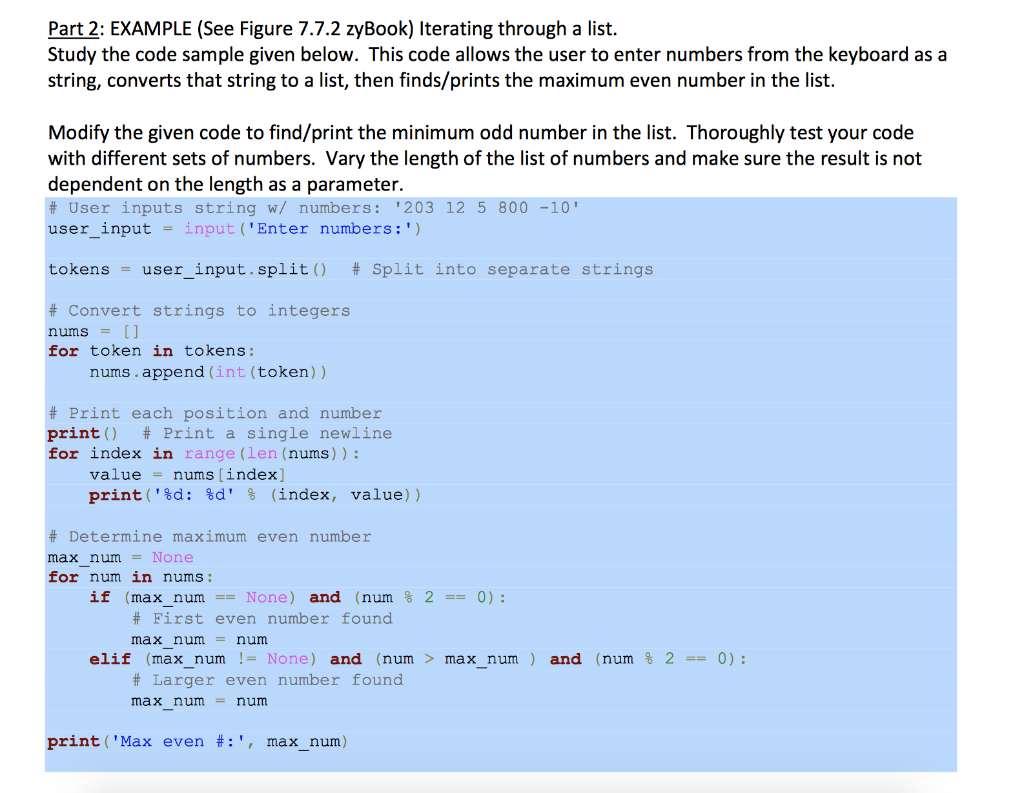
Study the code sample given below. This code allows the user to enter numbers from the keyboard as a string, converts that string to a list, then finds/prints the maximum even number in the list.
Modify the given code to find/print the minimum odd number in the list. Thoroughly test your code with different sets of numbers. Vary the length of the list of numbers and make sure the result is not dependent on the length as a parameter.
If you have any questions, please ask below. Thanks!
Part 2: EXAMPLE (See Figure 7.7.2 zyBook) Iterating through a list. Study the code sample given below. This code allows the user to enter numbers from the keyboard as a string, converts that string to a list, then finds/prints the maximum even number in the list. Modify the given code to find/print the minimum odd number in the list. Thoroughly test your code with different sets of numbers. Vary the length of the list of numbers and make sure the result is not dependent on the length as a parameter. # User inputs string w/ numbers: '203 12 5 800 -10' user input = input('Enter numbers:') tokens = user_input.split() # Split into separate strings # Convert strings to integers nums = [] for token in tokens: nums.append(int (token)) # Print each position and number print() # Print a single newline for index in range (len (nums)): value = nums [index] print('%d: %d' % (index, value)) # Determine maximum even number max_num = None for num in nums: if (max_num == None) and (num % 2 == 0): # First even number found max num = num elif (max num != None) and (num > max num) and (num % 2 == 0): # Larger even number found max num = num print ('Max even #:', max_num)
Step by Step Solution
There are 3 Steps involved in it

Get step-by-step solutions from verified subject matter experts
 Study Help