







Question: Write Code in Python def findNextOpr(txt): Takes a string and returns -1 if there is no operator in txt, otherwise returns the position of
Write Code in Python
def findNextOpr(txt):
"""
Takes a string and returns -1 if there is no operator in txt,
otherwise returns
the position of the leftmost operator. +, -, *, / are all the 4
operators
>>> findNextOpr(' 3* 4 - 5')
3
>>> findNextOpr('8 4 - 5')
6
>>> findNextOpr('89 4 5')
- 1
"""
if len(txt)
return "type error: findNextOpr"
# --- YOU CODE STARTS HERE
# --- CODE ENDS HERE
def isNumber(txt):
"""
Takes a string and returns True if txt is convertible to float,
False otherwise
>>> isNumber('1 2 3')
False
>>> isNumber('- 156.3')
False
>>> isNumber('29.99999999')
True
>>> isNumber(' 5.9999 ')
True
"""
if not isinstance(txt, str):
return "type error: isNumber"
if len(txt)==0:
return False
# --- YOU CODE STARTS HERE
# --- CODE ENDS HERE
def getNextNumber(expr, pos):
"""
expr is a given arithmetic formula of type string
pos is the start position in expr
1st returned value = the next number (None if N/A)
2nd returned value = the next operator (None if N/A)
3rd retruned value = the next operator position (None if N/A)
>>> getNextNumber('8 + 5 -2',0)
(8.0, '+', 3)
>>> getNextNumber('8 + 5 -2',4)
(5.0, '-', 13)
>>> getNextNumber('4.5 + 3.15 / 5',0)
(4.5, '+', 4)
>>> getNextNumber('4.5 + 3.15 / 5',10)
(None, '/', 19)
"""
if len(expr)==0 or not isinstance(expr, str) or pos
pos>=len(expr) or not isinstance(pos, int):
return None, None, "type error: getNextNumber"
# --- YOU CODE STARTS HERE
# --- CODE ENDS HERE
def exeOpr(num1, opr, num2):
#This function is just an utility function for calculator(expr). It is
skipping type check
if opr=="+":
return num1+num2
elif opr=="-":
return num1-num2
elif opr=="*":
return num1*num2
elif opr=="/":
return num1um2
else:
return "error in exeOpr"
def calculator(expr):
"""
Takes a string and returns the calculated result if the
arithmethic expression is value,
and error message otherwise
>>> calculator(" -4 +3 -2")
- 3.0
>>> calculator("-4 +3 -2 / 2")
- 2.0
>>> calculator("-4 +3 - 8 / 2")
- 5.0
>>> calculator(" -4 + 3 - 8 / 2")
- 5.0
>>> calculator("23 / 12 - 223 + 5.25 * 4 * 3423")
71661.91666666667
>>> calculator("2 - 3*4")
- 10.0
>>> calculator("4++ 3 +2")
'error message'
>>> calculator("4 3 +2")
'input error line B: calculator'
"""
if len(expr)
return "input error line A: calculator"
# Concatenate '0' at he beginning of the expression if it starts with
a negative number to get '-' when calling getNextNumber
# "-2.0 + 3 * 4.0
becomes "0-2.0 + 3 * 4.0
.
expr=expr.strip()
if expr[0]=="-":
expr = "0 " + expr
newNumber, newOpr, oprPos = getNextNumber(expr, 0)
# Initialization. Holding two modes for operator precedence:
"addition" and "multiplication"
if newNumber is None: #Line B
return "input error line B: calculator"
elif newOpr is None:
return newNumber
elif newOpr=="+" or newOpr=="-":
mode="add"
addResult=newNumber #value so far in the addition mode
elif newOpr=="*" or newOpr=="/":
mode="mul"
addResult=0
mulResult=newNumber #value so far in the mulplication mode
addLastOpr = "+"
pos=oprPos+1 #the new current position
opr=newOpr #the new current operator
#Calculation starts here, get next number-operator and perform case
analysis. Conpute values using exeOpr
while True:
# --- YOU CODE STARTS HERE
# --- CODE ENDS HERE
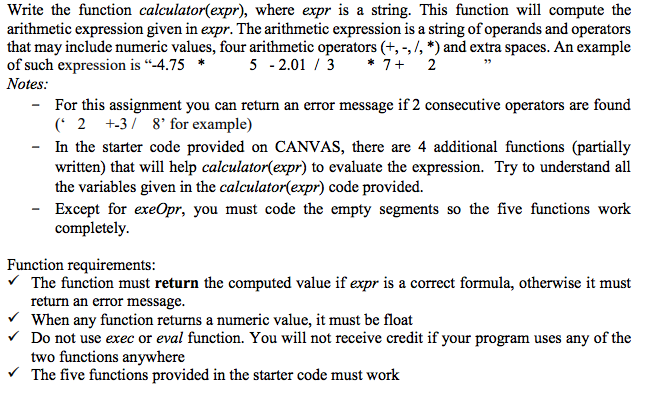
Write the function calculator(expr), where expr is a string. This function will compute the arithmetic expression given in expr. The arithmetic expression is a string of operands and operators that may include numeric values, four arithmetic operators (+,-,/, *) and extra spaces. An example of such expression is "-4.755 -2.01 3*7+ 2 Notes: For this assignment you can return an error message if 2 consecutive operators are found 2 +3/ 8' for example) - In the starter code provided on CANVAS, there are 4 additional functions (partially written) that will help calculator(expr) to evaluate the expression. Try to understand all the variables given in the calculator(expr) code provided. Except for exeOpr, you must code the empty segments so the five functions work completely. Function requirements: The function must return the computed value if expr is a correct formula, otherwise it must return an error message. VWhen any function returns a numeric value, it must be float Do not use exec or eval function. You will not receive credit if your program uses any of the two functions anywhere The five functions provided in the starter code must work
Step by Step Solution
There are 3 Steps involved in it

Get step-by-step solutions from verified subject matter experts
 Study Help