







Question: How do I find projected sales (I column) just for column B that have more than 1 child( example for children 1, 2, and 3
How do I find projected sales (I column) just for column B that have more than 1 child( example for children 1, 2, and 3 ? and leave 0 children blank
Provide steps.
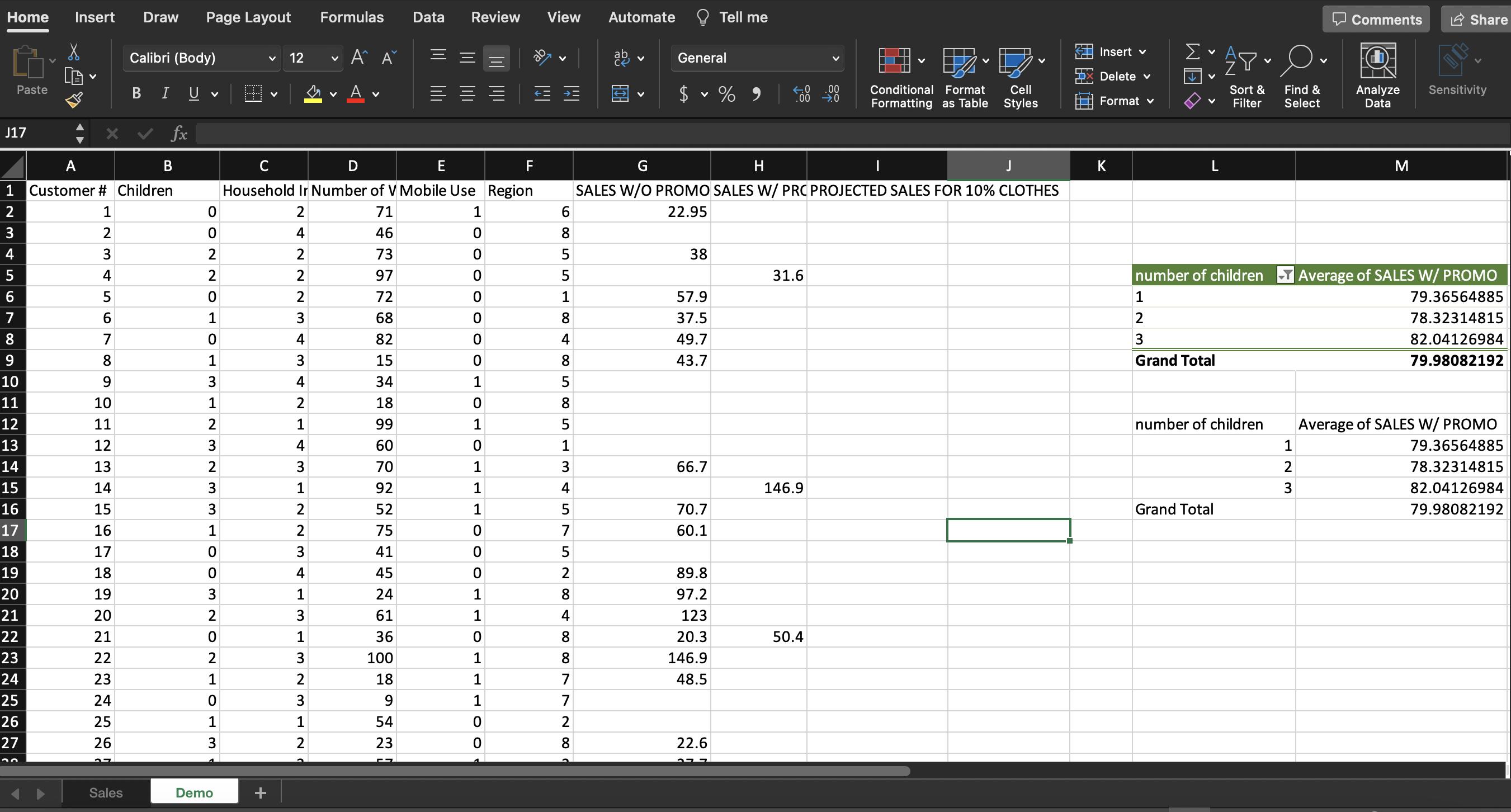
Tell me Home Insert Draw Page Layout Formulas Data Review View Automate G Paste Calibri (Body) V 12 V A A ab General BIU V A J17 fx A B D E F G 1 Customer # Children Household Ir Number of V Mobile Use Region Insert % .00 .00 0 Conditional Format Formatting as Table Cell Styles Delete Format v H J SALES W/O PROMO SALES W/ PRC PROJECTED SALES FOR 10% CLOTHES K AM V Y Sort & Filter V Find & Select Comments Share Analyze Data Sensitivity M number of children Average of SALES W/ PROMO 1 79.36564885 2 78.32314815 3 82.04126984 Grand Total 79.98082192 2 1 0 2 71 1 2 0 4 46 0 4 3 5 4 22 2 73 0 2 97 0 6855 22.95 8 38 5 31.6 6 5 0 2 72 0 1 57.9 8 69 6 1 3 68 0 8 37.5 7 0 4 82 0 4 49.7 9 8 1 3 15 0 10 9 3 4 34 1 85 43.7 11 10 1 2 18 0 8 12 11 2 1 99 1 5 13 12 3 4 60 0 1 14 13 2 3 70 1 3 66.7 15 14 3 1 92 1 4 146.9 16 15 3 2 52 1 5 70.7 Grand Total 17 16 1 2 75 0 7 60.1 18 17 0 3 41 0 5 19 18 0 4 45 0 2 89.8 20 19 3 1 24 1 8 97.2 21 20 2 3 61 1 4 123 22 21 0 1 36 0 8 20.3 50.4 23 22 2 3 100 1 00 8 146.9 24 23 1 2 18 1 7 48.5 25 24 0 3 9 1 7 26 25 1 1 54 0 2 27 26 3 2 23 0 8 22.6 30 Sales Demo number of children Average of SALES W/ PROMO 1 79.36564885 2 78.32314815 3 82.04126984 79.98082192
Step by Step Solution
There are 3 Steps involved in it

Get step-by-step solutions from verified subject matter experts
 Study Help