



Question: I made the image smaller so hopefully, that makes it less blurry but I am on desktop and the image is fine. If it does
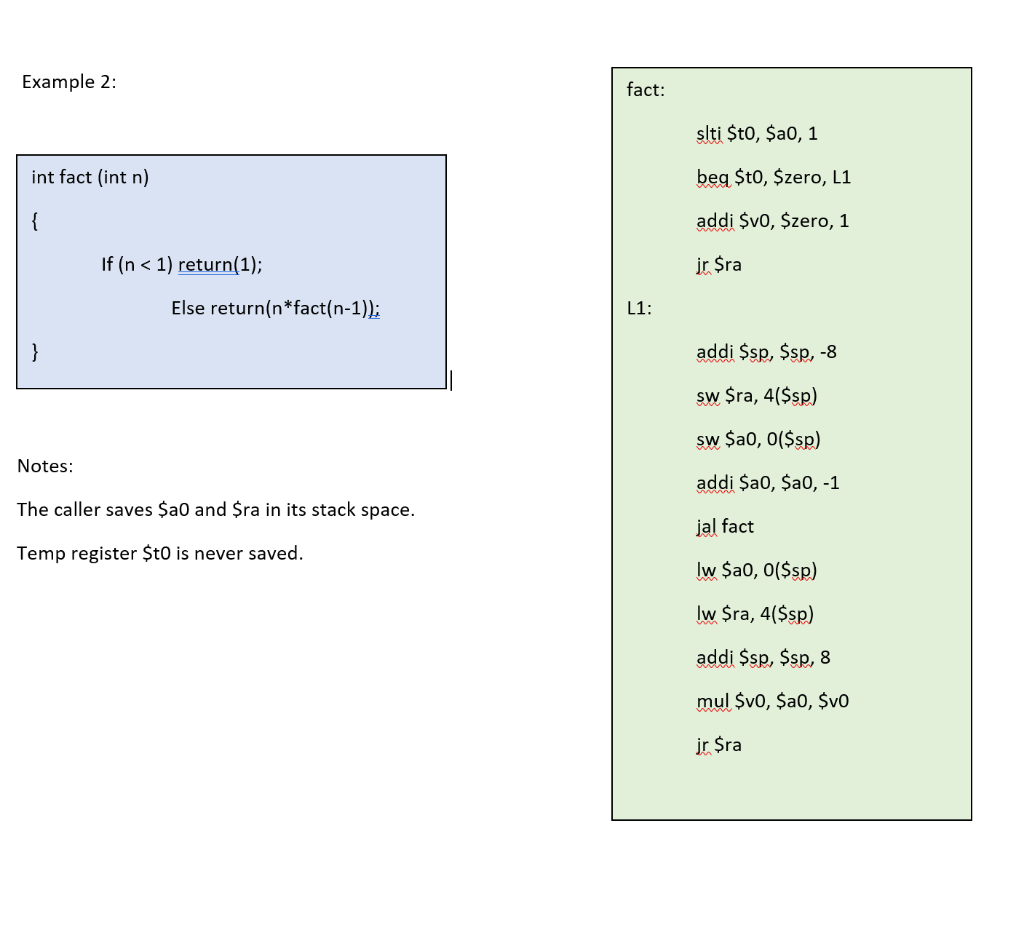
I made the image smaller so hopefully, that makes it less blurry but I am on desktop and the image is fine. If it does not help, I wrote out the code:
In the blue box:
int fact (int n) { if (n
In the green box (Assembly Code):
fact: slti $t0, $a0, 1 beq $t0, $zero, L1 addi $v0, $zero, 1 jr $ra L1: addi $sp, $sp, -8 sw $ra, 4($sp) sw $a0, 0($sp) addi $a0, $a0, -1 jal fact lw $a0, 0($sp) lw $ra, 4($sp) addi $sp, $sp, 8 mul $v0, $a0, $v0 jr $ra
Basically in class, we went over how to convert the code in the blue box to assembly code and I am still confused about it.
I was wondering if someone could please explain the process of converting the code in the blue box to the assembly language in the green box. I am new to this so please explain every step.
Example 2: fact: slti $t0, $a0, 1 int fact (int n) beq $t0, $zero, L1 { addi $v0, $zero, 1 If (nStep by Step Solution
There are 3 Steps involved in it

Get step-by-step solutions from verified subject matter experts
 Study Help