







Question: Use metric (150) template for this exercise Step 1: Command: UMITS (enter) 0,0 (enter) 1500, 1500 (enter) Step 2: Command: Zoom (enter) ALL (enter)
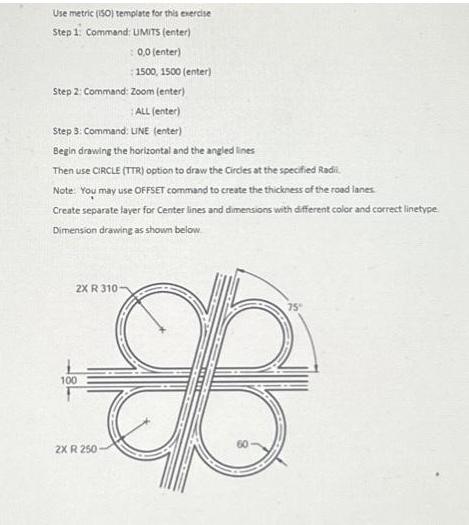
Use metric (150) template for this exercise Step 1: Command: UMITS (enter) 0,0 (enter) 1500, 1500 (enter) Step 2: Command: Zoom (enter) ALL (enter) Step 3: Command: LINE (enter) Begin drawing the horizontal and the angled lines Then use CIRCLE (TTR) option to draw the Circles at the specified Radi Note: You may use OFFSET command to create the thickness of the road lanes. Create separate layer for Center lines and dimensions with different color and correct linetype Dimension drawing as shown below 2X R 310 100 2X R 250
Step by Step Solution
3.36 Rating (162 Votes )
There are 3 Steps involved in it
Step 1 Command UMITS enter 100 enter 1500 1500 enter Step 2 ... View full answer

Get step-by-step solutions from verified subject matter experts
 Study Help