







Question: (a) Use either MINITAB or MegaStat or Excel's function = NORM.INV (RAND (),0,1) or Excel's Data Analysis > Random Numbers to generate 100 normally distributed
(a) Use either MINITAB or MegaStat or Excel's function = NORM.INV (RAND (),0,1) or Excel's Data Analysis > Random Numbers to generate 100 normally distributed random numbers with a mean of 0 and a standard deviation of 1.
(b) Make a histogram of your sample and assess its shape. Are there outliers?
(c) Calculate descriptive statistics. Are the sample mean and standard deviation close to their intended values?
(d) See if the first and third quartiles are approximately €“0.675 and +0.675, as they should be.
(e) Use a z test
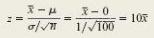
to compare the sample mean to the desired mean. Note: Use z instead of t because the hypothesized mean μ = 0 and standard deviation σ = 1 are known.
(f) What would happen if 100 statistics students performed similar experiments, assuming that the random number generator is working correctly?
=10T
Step by Step Solution
3.52 Rating (165 Votes )
There are 3 Steps involved in it
a Results will vary but should be close to the intended distribution in a chisquare test or ztest fo... View full answer

Get step-by-step solutions from verified subject matter experts
Document Format (1 attachment)

485-M-S-C-S-T (424).docx
120 KBs Word File
 Study Help