







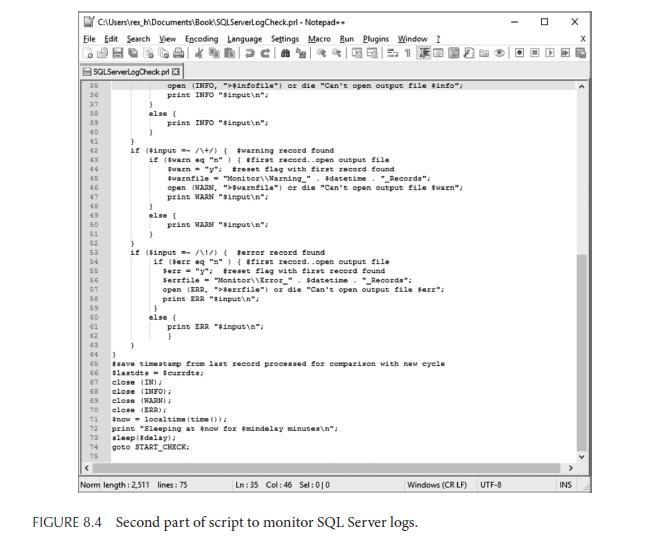
Question: What are the output files produced when this script runs? Where are they stored? Refer to the PERL script shown in Figures 8.3 and 8.4.
What are the output files produced when this script runs? Where are they stored?
Refer to the PERL script shown in Figures 8.3 and 8.4.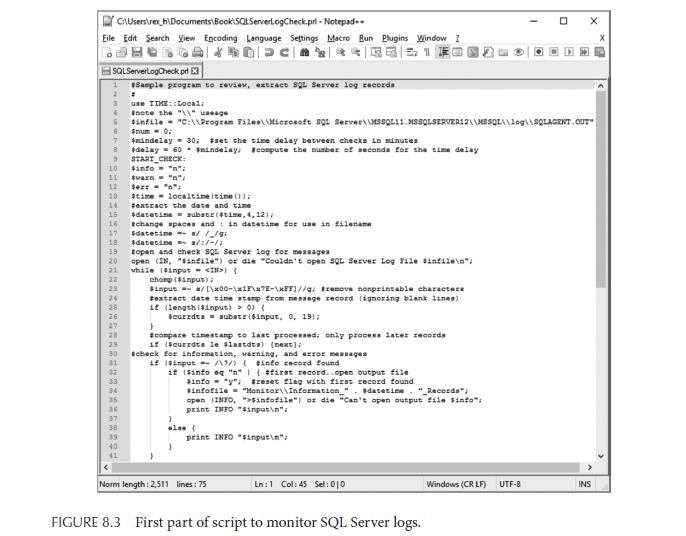
C:\Users ex h\Documents\Book SQLServerLogCheck.prl - Notepad++ Eile Edit Search View Encoding Language Settings Macro Bun Plugins Window I Dac SQLServerLogCheck pri Sample program to review, extract SQL Server log records 1 2 3 G 6 8 9 10 11 12 18 19 20 21 22 13 localtime (time()); 14 #extract the date and time 16 #datetime substr (#time, 4, 12); 16 #change spaces and in datetime for use in filename 17 23 24 28 26 27 20 29 30 35 36 41 # use TIME::Local; #note the "\"usage #infile "C:\\Program Files\\Microsoft SQL Server\\MSSQL11 MSSQLSERVER12\\MSSQL\\log\\SQLAGENT OUT $num - 0: smindelay = 30; #set the time delay between checks in minutes #delay= 60 smindelay, #compute the number of seconds for the time delay START CHECK: #info= "n": #varn = ""; Sex = ""; stime $datetimes/ /_/9; #datetime= 3/:/-/ topen and check SQL Server log for messages open (N, "sinfile") or die "Couldn't open SQL Server Log File sinfile "/ while ($input ) { chomp ($input); Sinput= /[\x00-\x1F\x7E-\xFF)//g/ trenove nonprintable characters #extract date time stamp from message record (ignoring blank lines) if (length (input) > 0) { Scurrdts = substr($input, 0, 19); } scompare timestamp to last processed; only process later records if ($currdts le slastdts) (next); #check for information, warning, and error messages if ($input =/\9/) ( #info record found if (sinfo eq "n") ( #first record..open output file sinfo = "y"; #reset flag with first record found #infofile="Monitor\\Information_"datetime. "_Records"; open (INFO, ">$infofile") or die "Can't open output file sinfo"; print INFO "$input "; } ale ( print Norm length: 2,511 lines: 75 "sinput "; Ln: 1 Col: 45 Sel: 010 FIGURE 8.3 First part of script to monitor SQL Server logs. Windows (CRLF) X UTF-8 INS
Step by Step Solution
3.50 Rating (160 Votes )
There are 3 Steps involved in it
Two files are created th... View full answer

Get step-by-step solutions from verified subject matter experts
 Study Help