







Question: This problem is a continuation of Problem 5-1. a. Write a program to enter customer order amounts into the database and to have the system
This problem is a continuation of Problem 5-1.
a. Write a “program” to enter customer order amounts into the database and to have the system either warn the user if the new order places the customer over his or her credit limit or advise the user if the credit limit is not exceeded.
b. Test the program developed in (a) by entering the amounts of customer order business event data (use a variety of order amounts and different customers so that you test all possible combinations of variables involved in the credit-checking algorithm). (The number of order business event data will be indicated by your instructor.) Obtain hard copy evidence of the results of your testing.
Data from problem 5-1
Before starting this problem, you should consult the customer master data record layout in Figure 5.2.
Using the database software indicated by your instructor:
a. Create the “structure” for the records in the customer data. Use Figure 5.2 as a general guide to the data elements to be included in the customer records. However, observe the following specific requirements:
(1) For the customer address, use five separate fields, one each for street address, additional address information (e.g., apartment number), city, state, and ZIP code.
(2) Provide for three additional data elements that are not shown in Figure 5.2 (because they normally would be accessed from other files)—open sales orders, back orders, and accounts receivable balance.
b. If the software package supports a function to design input screens, create the screen format to be used for entering customer data.
c. Create example customer records and enter them into the database. Use a variety of names, street addresses, states, ZIP codes, open sales order amounts, accounts receivable balances, and credit limits. (The number of records will be indicated by your instructor.)
d. Obtain a printout of the database records.
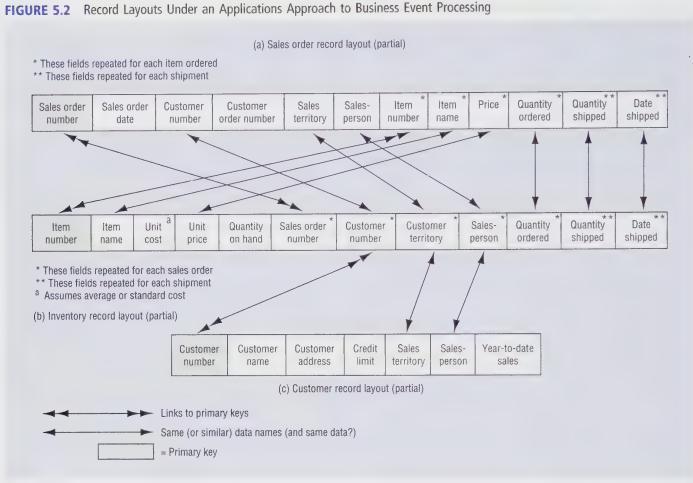
FIGURE 5.2 Record Layouts Under an Applications Approach to Business Event Processing These fields repeated for each item ordered ** These fields repeated for each shipment (a) Sales order record layout (partial) Sales order number Sales order date Customer number Customer order number Sales territory Sales- Item Item person number name Price Quantity Quantity ordered shipped shipped Date Item number Item name Unit cost Unit price Quantity on hand Sales order number Customer Customer Sales- Quantity Quantity number territory person ordered Date shipped shipped These fields repeated for each sales order **These fields repeated for each shipment Assumes average or standard cost (b) Inventory record layout (partial) Customer number Customer name: Customer Credit Sales Sales- address limit territory person Year-to-date sales (c) Customer record layout (partial) Links to primary keys Same (or similar) data names (and same data?) Primary key
Step by Step Solution
3.47 Rating (170 Votes )
There are 3 Steps involved in it

Get step-by-step solutions from verified subject matter experts
 Study Help