







Question: If necessary, create a new project named TryThis12 Project, and save it in the Cpp8Chap09 folder. Code the IPO charts shown in Figure 9-37. Enter
If necessary, create a new project named TryThis12 Project, and save it in the Cpp8\Chap09 folder. Code the IPO charts shown in Figure 9-37. Enter your C++ instructions into a source file named TryThis12.cpp. Also enter appropriate comments and any additional instructions required by the compiler. Display the Celsius temperature in fixed-point notation with no decimal places. Test the program using the following Fahrenheit temperatures: 32 and 212.
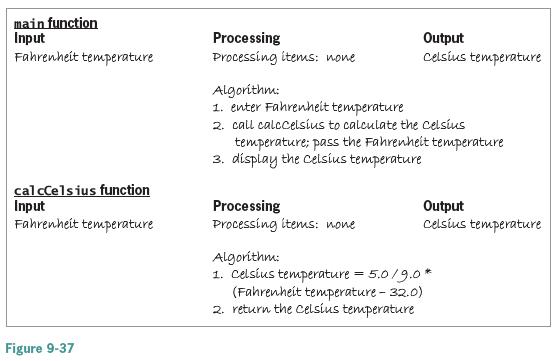
main function Input Fahrenheit temperature Processing Processing items: none Output Celsius temperature Algorithm: 1. enter Fahrenheit temperature 2. call calccelsius to calculate the celsius temperature; pass the Fahrenheit temperature 3. dispiay the celsus temperature cal cCelsius function Input Fahrenheit temperature Processing Processing items: none Output Celsius temperature Algorithm: 1. Celsius temperature = 5.0/9.O* (Fahrenheit temperature - 32.0) 2. return the Celsius temperature Figure 9-37
Step by Step Solution
3.22 Rating (166 Votes )
There are 3 Steps involved in it
TryThis12cpp converts Fahrenheit to Celsius Createdre... View full answer

Get step-by-step solutions from verified subject matter experts
 Study Help