







Question: In this exercise, you will modify the program from Lab 5-1. If necessary, create a new project named ModifyThis10 Project, and save it in the
In this exercise, you will modify the program from Lab 5-1. If necessary, create a new project named ModifyThis10 Project, and save it in the Cpp8\Chap05 folder. Enter the instructions shown earlier in Figure 5-23 into a new source file named ModifyThis10.cpp. Currently, the 20% rate is assigned to the rate variable only when the code variable contains either the character 1 or the character 3. Modify the selection structure so that codes 1 and 3 still get the 20% rate, but only when the sales amount is at least $20,000; otherwise, they should get the 15% rate. Test the program appropriately.
Figure 5-23
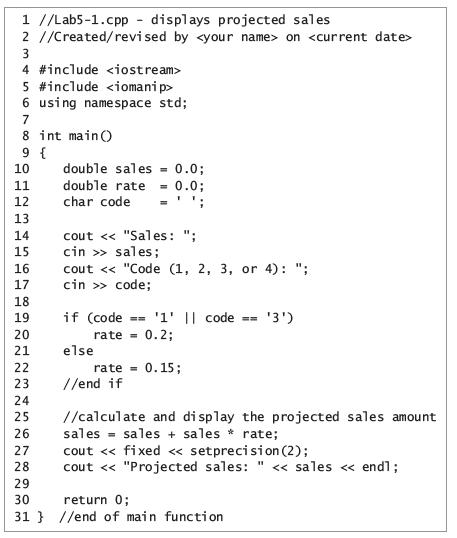
1 //Lab5-1.cpp - displays projected sales 2 //Created/revi sed by on 4 #include 5 #include 6 using namespace std; 7 8 int main() 9 { 10 double sales 0.0; double rate - 0.0; = ' '; 11 12 char code 13 cout < < "Sales: "; cin >> sales; cout < < "Code (1, 2, 3, or 4): "; cin >> code; 14 15 16 17 18 if (code == '1' || code 0.2; 19 '3') 20 21 rate = else 22 rate = 0.15; //end if %3D 23 24 //calculate and di splay the projected sales amount sales = sales + sales * rate; cout
Step by Step Solution
3.39 Rating (165 Votes )
There are 3 Steps involved in it
ModifyThis10cpp displays projected sales Createdrevised by on include include using namespace std ... View full answer

Get step-by-step solutions from verified subject matter experts
 Study Help