







Question: In this exercise, you will modify the program from Lab10-2. If necessary, create a new project named Intermediate20 Project, and save it in the Cpp8Chap10
In this exercise, you will modify the program from Lab10-2. If necessary, create a new project named Intermediate20 Project, and save it in the Cpp8\Chap10 folder. Copy the instructions from the Lab10-2.cpp file into a source file named Intermediate20.cpp. (Alternatively, you can enter the instructions from Figure 10-22 into the Intermediate20.cpp file.) Change the filename in the first comment to Intermediate20.cpp. Patterson Windows is now offering another pricing option: BOGOHO (buy one, get one half-off). Modify the program to allow for this new pricing option. Use a void function named getBoGoHo. Test the program appropriately.
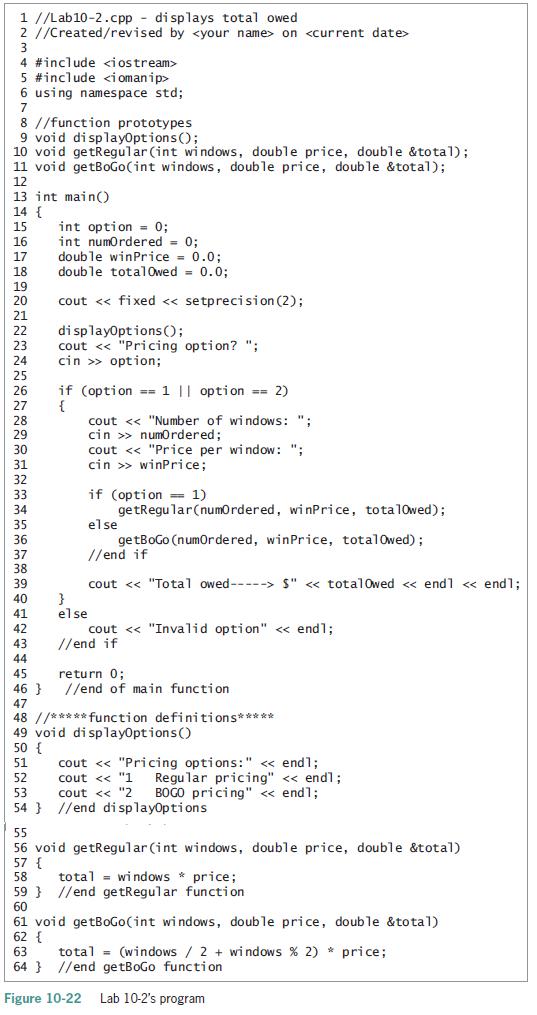
1 //Lab10-2.cpp - displays total owed 2 //Created/revised by on 3 4 #include 5 #include 6 using namespace std; 7 8 //function prototypes 9 void displayOptions(); 10 void getRegular (int windows, double price, double &total1); 11 void getBoGo(int windows, double price, double &total); 12 13 int main() 14 { int option - 0; int numordered = 0; double winPrice = 0.0; double totalOwed = 0.0; 15 16 17 18 19 20 cout < < fixed < < setprecision (2); 21 di splayopt ions(); cout < < "Pricing option? "; cin >> option; 22 if (option == 1 || option = 2) { cout < < "Number of windows: ": cin >> numordered; cout < < "Price per window: "; cin >> winPrice; if (option = 1) getRegular(numordered, winPrice, total0wed); else ge tBoGo (numordered, winPrice, totalOwed); //end if 35 36 37 38 cout < < "Total owed-----> S"
Step by Step Solution
3.33 Rating (168 Votes )
There are 3 Steps involved in it
Intermediate20cpp displays total owed Createdrevised by on include include using namespace std funct... View full answer

Get step-by-step solutions from verified subject matter experts
 Study Help