







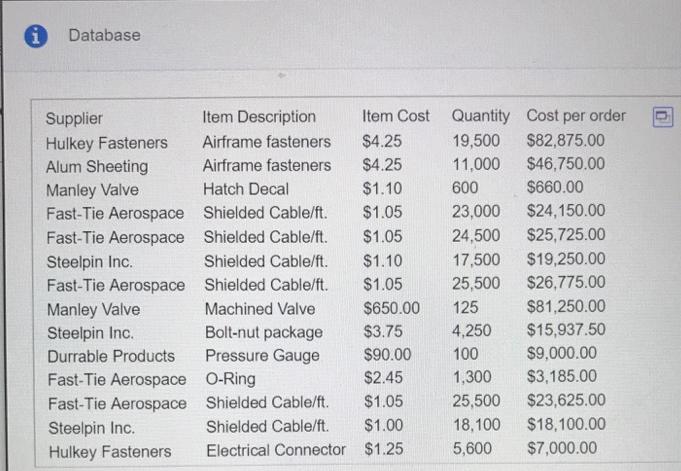
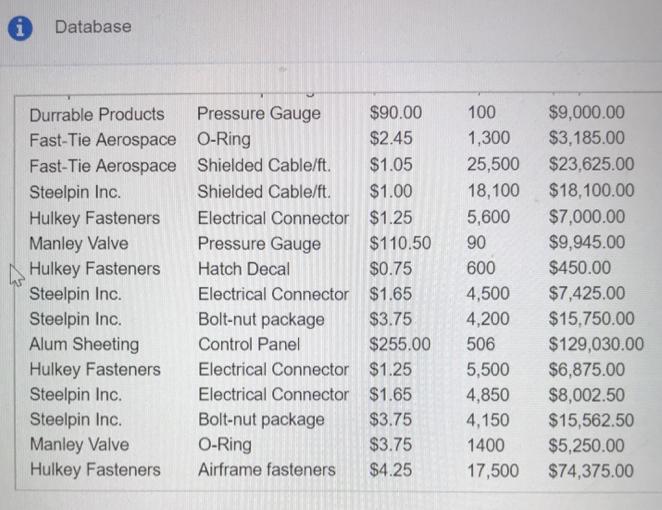
Question: Convert the Order Specifications database to an Excel table. Use the techniques described in Example 2.4 to find: a. The total cost of all orders.
Convert the Order Specifications database to an Excel table. Use the techniques described in Example 2.4 to find:
a. The total cost of all orders.
b. The total cost of all orders placed with Multipurpose Fasteners.
c. The total quantity of airframe bolts purchased.
EXAMPLE 2.4 Table-Based Calculations Suppose that in the Credit Risk Data table, we wish to calculate the total amount of savings in col- umn C. We could, of course, simply use the function =SUM(C4:C428). However, with a table, we could use the formula = SUM(Table 1 [Savings]). The table name, Table1, can be found (and changed) in the Properties group of the Table Tools Design tab in Windows or in the Table tab on a Mac. Note that Savings is the name of the header in column C. One of the advantages of doing this is that if we add new records to the table, the calculation will be updated automatically, and we don't have to change the range in the formula or get a wrong result if we forget to. As another example, we could find the number of home owners using the function =COUNTIF(Table1[Housing], "Own").
Step by Step Solution
3.44 Rating (147 Votes )
There are 3 Steps involved in it
To convert the Order Specifications database to an Excel table and calculate the requested totals you would perform the following steps 1 Conversion t... View full answer

Get step-by-step solutions from verified subject matter experts
 Study Help