







Question: Write a program that converts a Java file into an HTML file. In the HTML file, the keywords, comments, and literals are displayed in bold
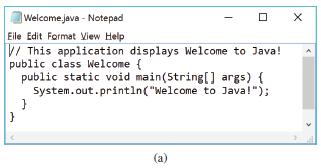
Write a program that converts a Java file into an HTML file. In the HTML file, the keywords, comments, and literals are displayed in bold navy, green, and blue, respectively. Use the command line to pass a Java file and an HTML file. For example, the following command java Exercise21_05 Welcome.java Welcome.html converts Welcome.java into Welcome.html. Figure 21.8a shows a Java file. The corresponding HTML file is shown in Figure 21.8b.
![Welcome to Java! public class Welcome { public static void main(String[] args)](https://dsd5zvtm8ll6.cloudfront.net/si.question.images/images/question_images/1620/0/3/1/796608fb934c43ac1620031796353.jpg)
Welcome.java - Notepad Eile Edit Format View Help V/ This application displays Welcome to Java! public class Welcome { public static void main(String[] args) { System.out.println("Welcome to Java!"); (a)
Step by Step Solution
3.31 Rating (169 Votes )
There are 3 Steps involved in it
Usage Copy this class to the folder run it with java JavaToHTMLftim to generate HTM file for all the java file in this folder The generated htm files ... View full answer

Get step-by-step solutions from verified subject matter experts
 Study Help