







Question: Write a program that displays two circles with radius 10 at location (40, 40) and (120, 150) with a line connecting the two circles, as
Write a program that displays two circles with radius 10 at location (40, 40) and (120, 150) with a line connecting the two circles, as shown in Figure 15.30b. The distance between the circles is displayed along the line. The user can drag a circle. When that happens, the circle and its line are moved, and the distance between the circles is updated.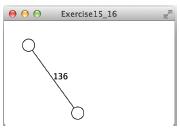
Exercise15 16 36
Step by Step Solution
3.39 Rating (183 Votes )
There are 3 Steps involved in it
import javafxapplicationApplication import javafxgeometryPoint2D import javafxsceneScene import javafxscenelayoutPane import javafxscenepaintColor import javafxsceneshapeCircle import javafxsceneshapeLine import javafxscenetextText import javafxstageStage public class Exercise1516 extends Application Override Override the start method in the Application class public void startStage primaryStage Pane pane new Pane Circle circle1 new Circle40 40 10 circle1setFillColorWHITE circle1setStrokeColorBLACK Circle circle2 new Circle120 150 10 circle2setFillColorWHITE circle2setStrokeColorBLACK Line line new Linecircle1getCenterX circle1getCenterY circle2getCenterX circle2getCenterY double distance new Point2Dcircle1getCenterX circle1getCenterYdistancecircle2getCenterX circle2getCenterY Text text new Textcircle1getCenterX circle2getCenterX 2 circle1getCenterY circle2getCenterY 2 intdistance panegetChildrenaddAllline circle1 circle2 text circle1setOnMouseDraggede circle1setCenterXegetX circle1setCenterYegetY linesetStartXegetX linesetStartYegetY double d new Point2Dcircle1getCenterX circle1getCenterYdistancecircle2getCenterX circle2getCenterY textsetXcircle1getCenterX circle2getCenterX 2 textsetYcircle1getCenterY circle2getCenterY 2 textsetTextd circle2setOnMouseDraggede circle2setCenterXegetX circle2setCenterYegetY linesetEndXegetX linesetEndYegetY double d new Point2Dcircle1getCenterX circle1getCenterYdistancecircle2getCenterX circle2getCenterY textsetXcircle1getCenterX circle2getCenterX 2 textsetYcircle1getCenterY circle2getCenterY 2 textsetTextintd Create a scene and place it in the stage Scene scene new Scenepane 400 250 primaryStagesetTitleExercise1516 Set the stage title primaryStagesetScenescene Place the scene in the stage primaryStageshow Display the stage The main method is only needed for the IDE with limited JavaFX support Not needed for running from the command line public static void mainString args launchargs import javafxapplicationApplication import javafxsceneScene import javafxsceneinputMouseButton import javafxscenelayout import javafxsceneshapeCircle import javafxsceneshape ... View full answer

Get step-by-step solutions from verified subject matter experts
 Study Help