







Question: Given a gender.css file with the following contents: And the following desired initial display: Finish the skeleton program below so that the female and male
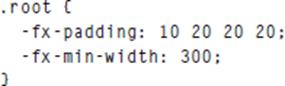
Given a gender.css file with the following contents:
And the following desired initial display:
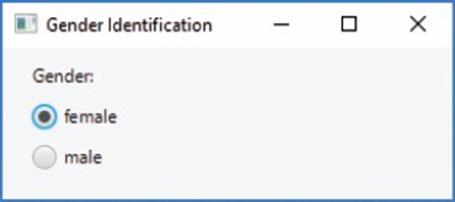
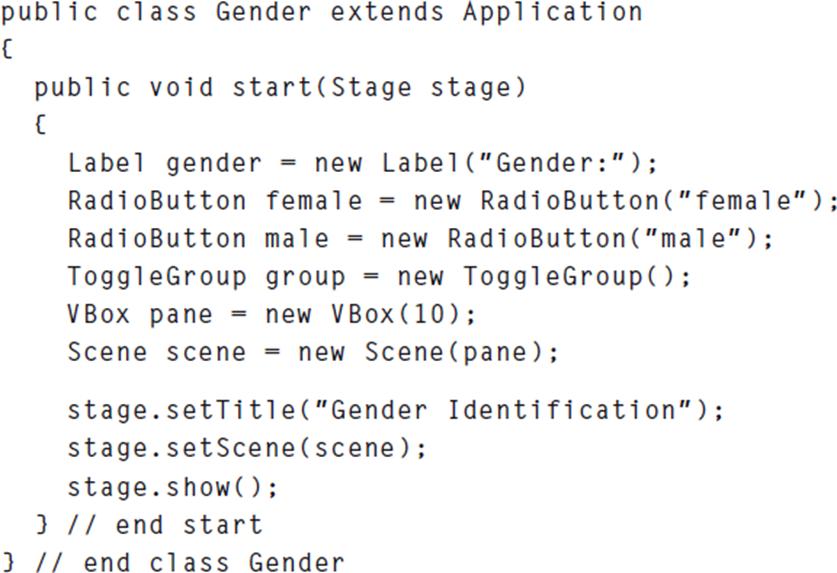
Finish the skeleton program below so that the female and male radio buttons behave in the normal fashion—when one is selected, the other is unselected. Note that the female button is selected when the window initially displays. Here is starting skeleton:
.root ( -fx-padding: 10 20 20 20: 300; -fx-min-width:
Step by Step Solution
★★★★★
3.44 Rating (154 Votes )
There are 3 Steps involved in it
1 Expert Approved Answer
Step: 1 Unlock

import javafxapplicationApplication import javafxsceneScene import javafxscenecontrol... View full answer
Question Has Been Solved by an Expert!
Get step-by-step solutions from verified subject matter experts
Step: 2 Unlock
Step: 3 Unlock
 Study Help