







Question: In JavaFX CSS, you can form a color by specifying certain amounts of red, green, and blue, with each colors amount ranging from 0% to
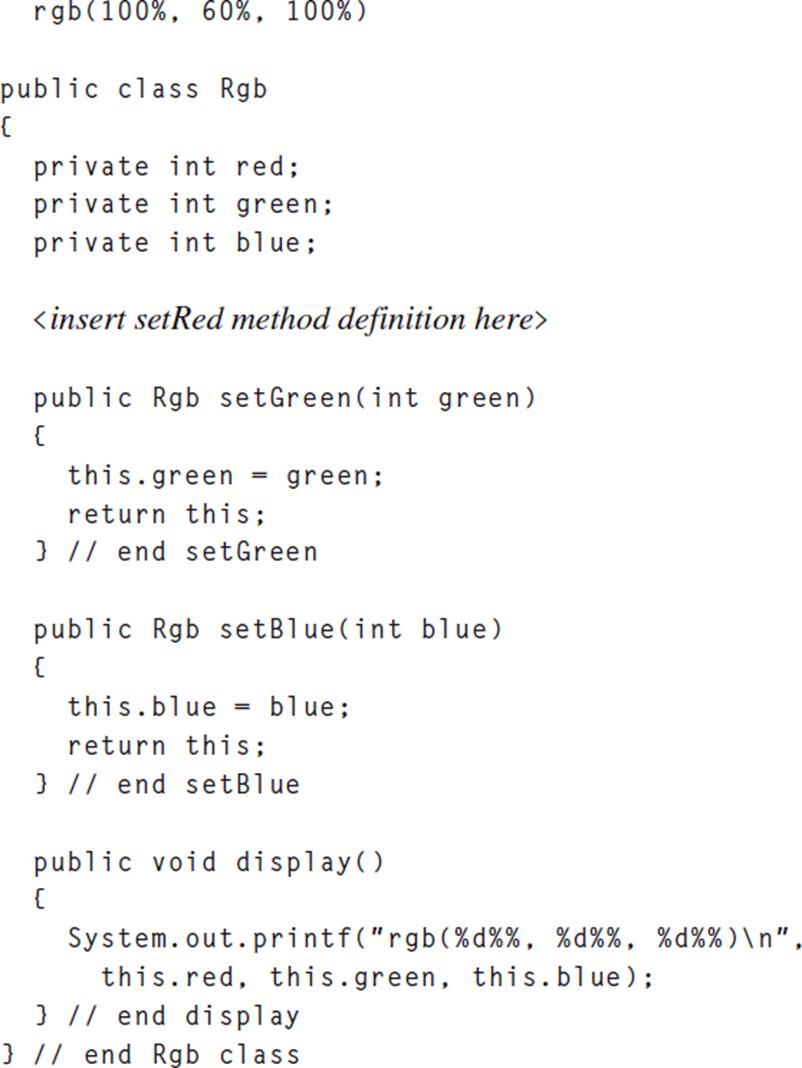
- In JavaFX CSS, you can form a color by specifying certain amounts of red, green, and blue, with each color’s amount ranging from 0% to 100%. For example, to specify purple, you could use this code:

The rgb stands for red, green, and blue. With 100% for red and blue, the resulting color is purple. In the following Rgb and RgbDriver class skeletons, replace the insert…> lines with appropriate code such that the program operates properly. More specifically:
(a) In the Rgb class, provide a method definition for the setRed method such that setRed can be called as part of a method-call chain.
(b) In the RgbDriver class, provide a single statement that chains calls to the setRed, setGreen, setBlue, and display methods. For your method- call arguments, pass 100 to setRed, 60 to setGreen, and 100 to setBlue. With those argument values, your method-call-chaining statement should print this:
![public class RgbDriver { public static void main(String[] args) { Rgb rgb = new Rgb(); } } // end RgbDriver](https://dsd5zvtm8ll6.cloudfront.net/images/question_images/1704/7/8/8/456659d01e8a66181704788454387.jpg)
rgb(100%. 60%. 100% )
Step by Step Solution
3.48 Rating (161 Votes )
There are 3 Steps involved in it
Based on the provided images and the assignment questions heres how you can complete the Rgb and Rgb... View full answer

Get step-by-step solutions from verified subject matter experts
 Study Help