







Question: Modify the texts slider-driven LunarEclipse program to make it simulate a solar eclipse. The main change will be adding a corona shape on top of
Modify the text’s slider-driven LunarEclipse program to make it simulate a solar eclipse. The main change will be adding a corona shape on top of the sun shape. The sun’s corona is the atmosphere surrounding the sun’s surface. Normally, one cannot view it (or the sun) directly. But during a solar eclipse, it becomes more apparent. Here’s what your resulting window should look like:
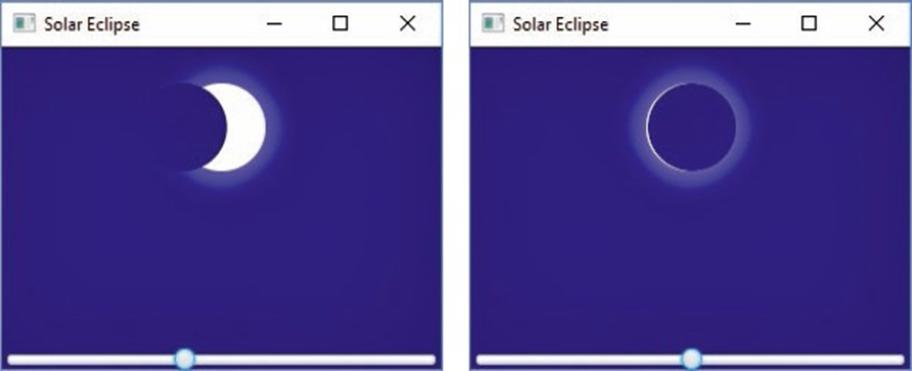
Make the sun’s radius equal to 0.1 times the primary pane’s width, and put it where the LunarEclipse program’s moon was. Make the new program’s moon have the same diameter as its sun and make this moon’s vertical position match the sun’s vertical position. Use a slider to control the horizontal position of the new program’s moon. Use the following constructors for the sun, the sun’s corona, and the moon:

And use this method call to blur the sun’s corona:
corona.setEffect(new BoxBlur(sunR, sunR, 1));
Solar Eclipse Solar Eclipse 1 DX
Step by Step Solution
3.40 Rating (156 Votes )
There are 3 Steps involved in it
It appears that youre asking how to modify an existing program for simulating a lunar eclipse to now simulate a solar eclipse using a graphical user i... View full answer

Get step-by-step solutions from verified subject matter experts
 Study Help