







Question: a. In Chapter 9, you created a Tic Tac Toe game in which you used a 2D array of characters to hold Xs and Os
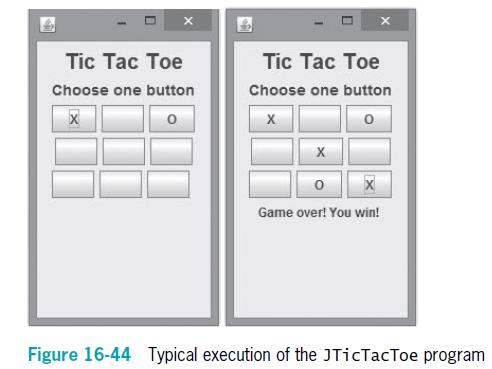
a. In Chapter 9, you created a Tic Tac Toe game in which you used a 2D array of characters to hold Xs and Os for a player and the computer. Now create a JPanel that uses an array of nine JButtons to represent the Tic Tac Toe grid. When the user clicks a button that has not already been taken, place an X on the button and then allow the computer to place an O on a different button. Announce the winner when either the computer or the player achieves three marks in sequence, or announce that the game was a tie. Figure 16-44 shows a typical game in progress and after the player has won. Save the game as JTicTacToe.java.
b. Add a graphic that displays a large letter representing the winning player of the JTicTacToe game. Draw a large X, O, or, in case of a tie, an overlapping X and O in different colors. Save the game as JTicTacToe2.java.
Tic Tac Toe Tic Tc Toe Choose one button Choose one button X Game over! You win! Figure 16-44 Typical execution of the JTicTacToe program
Step by Step Solution
3.44 Rating (157 Votes )
There are 3 Steps involved in it
a import javaxswing import javaawt import javaawtevent public class JTicTacToe extends JPanel implements ActionListener JLabel greeting new JLabelTic Tac Toe JLabel promptLabel new JLabelChoose one bu... View full answer

Get step-by-step solutions from verified subject matter experts
 Study Help