







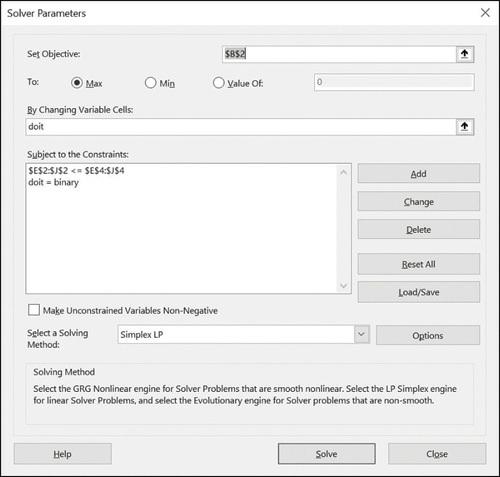
Question: For the capital budgeting example discussed in conjunction with Figures 70-1 through 70-3, use conditional formatting to highlight in yellow fill each row corresponding to
For the capital budgeting example discussed in conjunction with Figures 70-1 through 70-3, use conditional formatting to highlight in yellow fill each row corresponding to a selected project.
Figure 70.1
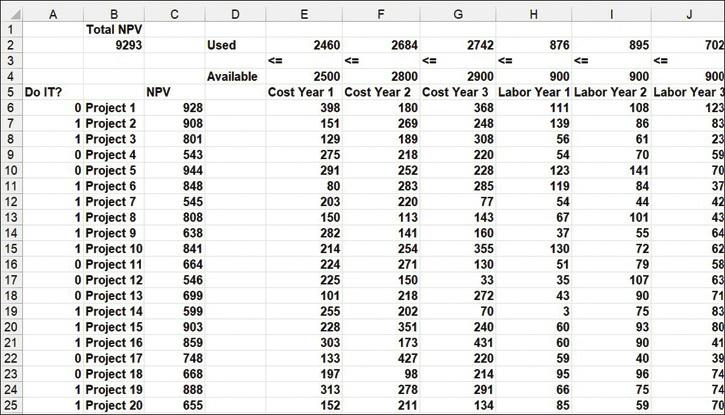
Figure 70.2
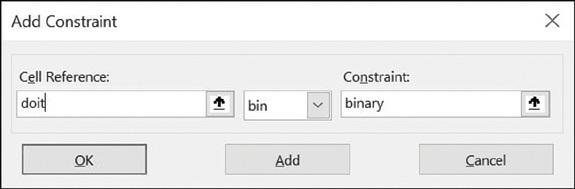
Figure 70.3
123456SHSSHR2272222 5 Do IT? 8 9 10 11 18 19 A 20 B Total NPV 9293 0 Project 1 1 Project 2 1 Project 3 0 Project 4 0 Project 5 1 Project 6 1 Project 7 1 Project 8 1 Project 9 1 Project 10 0 Project 11 0 Project 12 0 Project 13 1 Project 14 1 Project 15 1 Project 16 0 Project 17 0 Project 18 1 Project 19 1 Project 20 C NPV 928 908 801 543 944 848 545 808 638 841 664 546 699 599 903 859 748 668 888 655 D Used Available E 2460 203 150 282 LL 214 224 225 101 255 228 303 133 197 313 152 F 2684 254 271 150 218 202 351 173 427
Step by Step Solution
3.47 Rating (154 Votes )
There are 3 Steps involved in it
The task is to use conditional formatting in Microsoft Excel to highlight rows in yellow for selected projects in a capital budgeting example The Do IT column is used to indicate whether a project is ... View full answer

Get step-by-step solutions from verified subject matter experts
 Study Help