







Question: In the file named Tableexample.xlsx, set things up so that each salespersons rank with regard to total revenue and units sold is included in the
In the file named Tableexample.xlsx, set things up so that each salesperson’s rank with regard to total revenue and units sold is included in the worksheet. Of course, if new data is included, your ranks should automatically update. You might find it convenient to use the RANK.EQ function. The syntax of the RANK.EQ function is =RANK.EQ(number,array,0). This function yields the rank of a number in a range array, with rank=1 being the largest number.
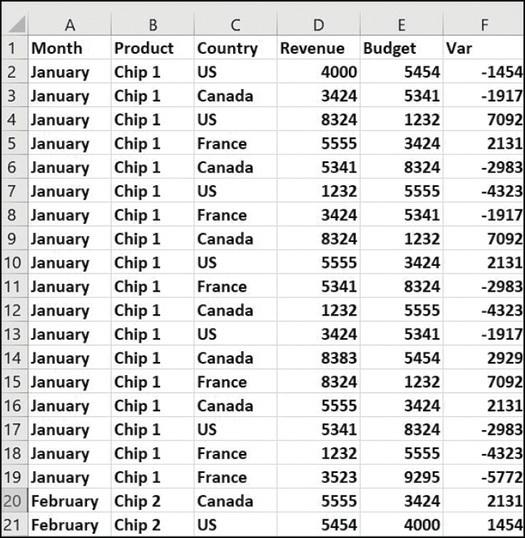
B Product Chip 1 Chip 1 A Month 1 2 January 3 January 4 January Chip 1 5 January Chip 1 6 January Chip 1 7 January Chip 1 8 January Chip 1 9 January Chip 1 10 January Chip 1 11 January Chip 1 12 January Chip 1 13 January Chip 1 14 January Chip 1 15 January Chip 1 16 January Chip 1 17 January Chip 1 18 January Chip 1 19 January Chip 1 20 February Chip 2 21 February Chip 2 C Country US Canada US France Canada US France Canada US France Canada US Canada France Canada US France France Canada US D Revenue 4000 3424 8324 5555 5341 1232 3424 8324 5555 5341 1232 3424 8383 8324 5555 5341 1232 3523 5555 5454 E Budget Var 5454 5341 1232 3424 8324 5555 5341 1232 3424 8324 5555 5341 5454 1232 3424 8324 5555 9295 3424 4000 F -1454 -1917 7092 2131 -2983 -4323 -1917 7092 2131 -2983 -4323 -1917 2929 7092 2131 -2983 -4323 -5772 2131 1454
Step by Step Solution
3.38 Rating (154 Votes )
There are 3 Steps involved in it
To set up each salespersons rank with regard to total revenue and units sold in the Tableexamplexlsx ... View full answer

Get step-by-step solutions from verified subject matter experts
 Study Help