







Question: In the Makeupsort.xlsx file, sort the sales data alphabetically by location, then by product type, then by name, then by date of sale, and finally
In the Makeupsort.xlsx file, sort the sales data alphabetically by location, then by product type, then by name, then by date of sale, and finally by units sold.
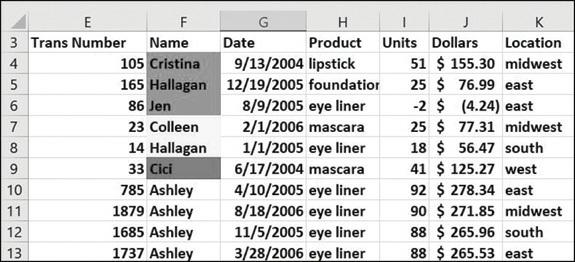
E 3 Trans Number 4 5 6 7 8 9 10 11 12 13 F Name 105 Cristina 165 Hallagan 86 Jen 23 Colleen 14 Hallagan 33 Cici 785 Ashley 1879 Ashley 1685 Ashley 1737 Ashley J H Product Units Dollars 9/13/2004 lipstick 12/19/2005 foundatior 8/9/2005 eye liner 2/1/2006 mascara 1/1/2005 eye liner 6/17/2004 mascara 4/10/2005 eye liner 8/18/2006 eye liner 11/5/2005 eye liner 3/28/2006 eye liner Date K Location 51 $ 155.30 midwest 25 $76.99 east -2 $ (4.24) east 25 $77.31 midwest 18 $ 56.47 south 41 $125.27 west 92 $278.34 east 90 $271.85 midwest 88 $265.96 south 88 $265.53 east
Step by Step Solution
3.45 Rating (164 Votes )
There are 3 Steps involved in it
The following process will be followed 1To sort the data in terms of the various categories select a... View full answer

Get step-by-step solutions from verified subject matter experts
 Study Help