







Question: The algorithm shown in Figure 2-42 should calculate and display the total amount due, but it is not working correctly. Correct the algorithm, and then
The algorithm shown in Figure 2-42 should calculate and display the total amount due, but it is not working correctly. Correct the algorithm, and then desk-check it using 20, $0.25, and .045 (the decimal equivalent of 4.5%) as the number of folders purchased, folder price, and sales tax rate, respectively.
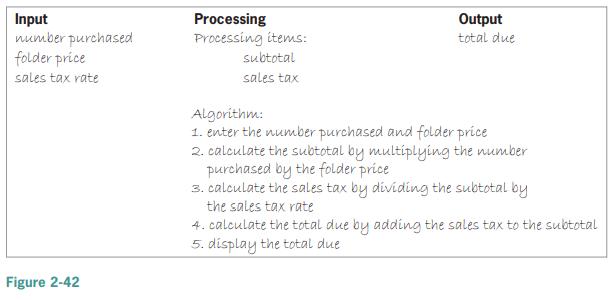
Input number purchased folder price Processing Processing items: subtotal Output total due sales tax rate sales tax Algorithm: 1. enter the number purchased and folder price 2. calculate the subtotal by multiplying the number purchased by the folder price 3. calculate the sales tax by dividing the subtotal by the sales tax rate 4. calculate the total due by adding the sales tax to the subtotal 5. display the total due Figure 2-42
Step by Step Solution
3.39 Rating (161 Votes )
There are 3 Steps involved in it
Input number purchased folder price sales tax rate n... View full answer

Get step-by-step solutions from verified subject matter experts
 Study Help