



Question: Based on your experiences, add as many as possible common errors to the list presented in Table 10-11. TABLE 10-11 Common Errors When Designing the
Based on your experiences, add as many as possible common errors to the list presented in Table 10-11.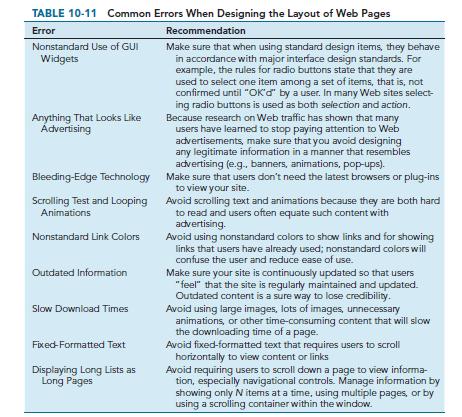
TABLE 10-11 Common Errors When Designing the Layout of Web Pages Error Recommendation Make sure that when using standard design items, they behave in accordance with major interface design standards. For example, the rules for radio buttons state that they are used to select one item among a set of items, that is, not confirmed until "OK"d" by a user. In many Web sites select- ing radio buttons is used as both selection and action. Because research on Web traffic has shown that many users have learned to stop paying attention to Web advertisements, make sure that you avoid designing any legitimate information in a manner that resembles advertising (e.g., banners, animations, pop-ups). Make sure that users don't need the latest browsers or plug-ins to view your site. Nonstandard Use of GUI Widgets Anything That Looks Like Advertising Bleeding-Edge Technology Scrolling Test and Looping Animations Nonstandard Link Colors Outdated Information Slow Download Times Fixed-Formatted Text Displaying Long Lists as Long Pages Avoid scrolling text and animations because they are both hard to read and users often equate such content with advertising. Avoid using nonstandard colors to show links and for showing links that users have already used; nonstandard colors will confuse the user and reduce ease of use. Make sure your site is continuously updated so that users "feel" that the site is regularly maintained and updated. Outdated content is a sure way to lose credibility. Avoid using large images, lots of images, unnecessary animations, or other time-consuming content that will slow the downloading time of a page. Avoid fixed-formatted text that requires users to scroll horizontally to view content or links Avoid requiring users to scroll down a page to view informa- tion, especially navigational controls. Manage information by showing only N items at a time, using multiple pages, or by using a scrolling container within the window.
Step by Step Solution
3.46 Rating (159 Votes )
There are 3 Steps involved in it
Based on my experiences here are some additional common errors in web page layout Poor use of typography This includes using too many fonts font sizes ... View full answer

Get step-by-step solutions from verified subject matter experts