







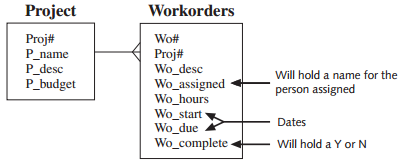
Question: Create two tables based on the E-R model shown in Figure 4-41 and the business rules in the following list for a work order tracking
Figure 4-41:
€¢ Use your judgment for column datatypes and sizes.
€¢ Proj# and Wo# are used to uniquely identify rows in these tables.
€¢ Each project added must be assigned a name, and no duplicate project names are allowed.
€¢ Each work order must be assigned to a valid project when added and be assigned a description and number of hours.
€¢ Each work order added must have a different description.
€¢ The number of hours assigned to a work order should be greater than zero.
€¢ If data is provided for the Wo_complete column, only Y or N are acceptable values.
Create and execute the SQL statements needed to enforce the data relationships among these tables.
Project Workorders Proj# P_name P_desc P_budget Wo# Proj# Wo_desc Wo_assigned Wo_hours Wo_start Wo_due Will hold a name for the person assigned Dates Wo_complete- Will hold a Y or N
Step by Step Solution
3.49 Rating (166 Votes )
There are 3 Steps involved in it
CREATE TABLE project proj NUMBER4 pname VARCHAR220 NOT NULL ... View full answer

Get step-by-step solutions from verified subject matter experts
Document Format (2 attachments)

1803_60b8c12123051_716107.pdf
180 KBs PDF File

1803_60b8c12123051_716107.docx
120 KBs Word File
 Study Help