







Question: 19. Write an assembler for Pep/9 assembly language. Complete the following milestones in the order they are listed. (a) Write class Tokenizer with method getToken(),
19. Write an assembler for Pep/9 assembly language. Complete the following milestones in the order they are listed.
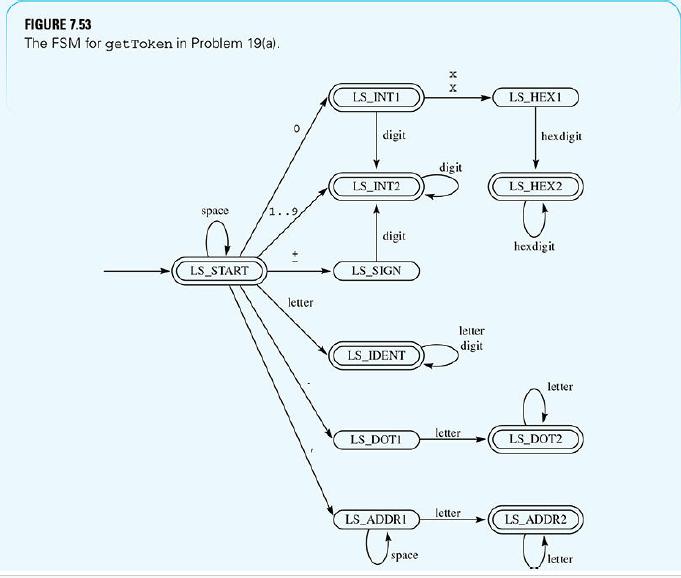
(a) Write class Tokenizer with method getToken(), to implement the FSM of FIGURE 7.53 . Use class InBuffer from Figure 7.30. Implement method getDescription() for each concrete token and output the tokens with a nested do loop as in actionPerformed() of Figure 7.36.
Integers are stored in two bytes. When considered unsigned, the range is 0..65535.
When considered signed, the range is –32768..32767. Your program must accept integers in the range –32768..65535. Each time you scan a decimal digit and update the total value, check it against this range. If inputting a decimal digit makes the total value go out of this range, return the invalid token.
Hexadecimal constants are also stored in two bytes and are never signed. The maximum value that a hexadecimal constant can have is 65535. Each time you scan a hex digit and update the total value, check its decimal value against this upper limit. If inputting a hex digit makes the total greater than this upper limit, return the invalid token.
You should check the limit every time you scan a hexadecimal digit. Do not test that the number of hexadecimal digits is less than five, because, for example, 0x00F4B7 is valid.
Addressing modes must be stored with a Java String attribute as with identifiers. The parser will convert the identifiers to enumerated types by table lookup.
A common mistake is to call advanceInput() within the switch statement. Make sure you do not do that .advanceInput() must be called from only one place, namely as the first statement in the body of the do loop.
Following is an example input/output. All the tokens are valid according to the FSM.
For example, there is no dot command .beta, nor is there an addressing mode cat.
However, the corresponding tokens are valid. The parser detects the errors later in the translation.
Input alpha .beta b7 0x23ab,SfX ,i , cat -32768 65535 Output Identifier = alpha Dot command = beta Empty token Identifier = b7 Hexadecimal constant = 9131 Addressing Mode = SfX Empty token Addressing Mode = i Addressing Mode = cat Empty token Integer = -32768 Integer = 65535 Empty token
(b) Design the state transition diagram for the FSM of the Pep/9 parser that corresponds to the FSM of Figure 7.46. Assume that each transition is on one of the tokens in Figure 7.53.
(c) This phase of the project is to write the parser based on your FSM of part (b). Complete the generateListing() methods of the code classes, and output the formatted listing of the source program but not the object code. Here is the list of instructions your program should process:
› Unary instructions—STOP, ASLA, ASRA › Nonunary instructions—BR, BRLT, BREQ, BRLE, CPWA, DECI, DECO, ADDA, SUBA, STWA, LDWA › Dot commands—.BLOCK, .END › Constants—decimal, hexadecimal Design an abstract argument AArg with two subclasses for a hexadecimal constant and a decimal constant, each with an integer attribute, analogous to Figure 7.40. Design your abstract code class ACode analogous to the code class in Figure 7.44. The class for a nonunary mnemonic must have an abstract argument for its instruction specifier and an addressing mnemonic for its addressing mode, which must be enumerated as described in part (a). Do not combine the addressing mode enumerated types with any other enumerated type. They must be separate. Set up separate Java maps for looking up unary mnemonic identifiers, nonunary mnemonic identifiers, dot commands, and addressing modes. For your code classes, do not use a Boolean attribute to distinguish unary from nonunary instructions. Instead, have separate classes for unary and nonunary instructions.
Do not use the names OneArgInstr or TwoArgInstr from the Figure 7.44 example to describe your instructions. In Pep/9 assembly language, instructions are either unary or nonunary. Do not use the names firstArg or secondArg from the figure to describe the items that follow the mnemonic. For nonunary instructions, the items following the mnemonic are the operand specifier and the addressing mode.
If you detect an illegal addressing mode or other error, you must generate an error code object to handle the error. For example, do not use the nonunary code object to generate any error messages.
The output should conform to the standard pretty-printing format of the Pep/9 assembler when you select Format From Listing in the Edit menu. For hexadecimal constants, the %X format placeholder will output an integer value in hexadecimal format.
Research the Java documentation for the field width and leading zero options. For strings, the %s format placeholder has options to either left justify or right justify in a field padded with spaces.
(d) Complete the generateCode() methods of your code classes to emit the hexadecimal object code for the assembly language program in a format suitable for use by the Pep/9 loader.
Following is an example input/output. Your code generator should emit one line of hex pairs for each line of source code to make it easy to visually compare the object with the source.
Input BR 0x0007, i .BLOCK 4 deci 0x2 ,d LDWA +2,d AdDa -5, i STWA 0x0004,d DECO 0x04,d STOP .END Output Object code:
12 00 07 00 00 00 00 31 00 02 C1 00 02 60 FF FB E1 00 04 39 00 04 00 zz Program listing:
BR 0x0007 .BLOCK 4 DECI 0x0002,d LDWA 2,d ADDA -5,i STWA 0x0004,d DECO 0x0004,d STOP .END To get a decimal value into hex, you can use the fact that n/256 is an eight-bit right shift of n. Use it to output the first byte of integer n. Also, n%256 is an eight-bit remainder. Use it to output the second byte of integer n.
All hex digit pairs in the object code must be separated by exactly one space, no lines in the object code may contain a trailing space at the end of the line, and the entire sequence must terminate with lowercase zz. To test your object code, copy the hex code from the Java console, paste it into the object code pane of the Pep/9 application, and execute your program.
(e) Extend the assembler by including all 40 instructions in the Pep/9 instruction set.
(f) Extend the assembler by producing a listing that shows the object code next to the source line that produced it. Print the source line with the standard spacing conventions and uppercase and lowercase conventions of the Pep/9 assembler.
(g) Extend the assembler by permitting character constants enclosed in single quotes.
(h) Extend the assembler by permitting the dot commands .WORD and .BYTE.
(i) Extend the assembler by permitting the .ASCII dot command with strings enclosed in double quotes.
(j) Extend the assembler by permitting a source line to contain a comment prefixed by a semicolon. A line may contain only a comment, or a valid instruction followed by a comment.
(k) Extend the assembler by permitting symbols.
FIGURE 7.53 The FSM for get Token in Problem 19(a). x X LS_INT1 LS HEX1 digit hexdigit digit LS_INT2 LS HEX2 space digit hexdigit LS_START LS_SIGN letter letter digit LS IDENT letter letter LS DOTI LS_DOT2 letter LS_ADDRI LS_ADDR2 space letter
Step by Step Solution
There are 3 Steps involved in it

Get step-by-step solutions from verified subject matter experts
 Study Help