







Question: 10. Create an application, using the following names for the solution and project, respectively: Gross Solution-Sub and Gross Project. The applications interface is shown in
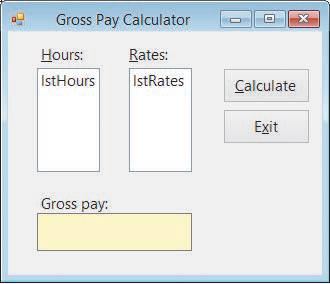
10. Create an application, using the following names for the solution and project, respectively: Gross Solution-Sub and Gross Project. The application’s interface is shown in Figure 7-30. The lstHours control should display the number of hours worked from 1 to 60 in increments of 1. The lstRates control should display pay rates from 10.00 to 30.00 in increments of 0.5. The default selections in the lstHours and lstRates controls should be 40 and 10.00, respectively. The application should use a Sub procedure to calculate an employee’s gross pay, which is based on the number of hours worked and the pay rate selected in the list boxes. However, employees receive double-time for hours worked over 40. Test the application appropriately.
Gross Pay Calculator Hours: Rates: IstHours IstRates Calculate Gross pay: Exit
Step by Step Solution
There are 3 Steps involved in it

Get step-by-step solutions from verified subject matter experts
 Study Help