







Question: 12. Open the VB2015Chap05Bonus SolutionBonus Solution (Bonus Solution.sln) file. Use the Select Case statement to finish coding the Calculate buttons Click event procedure. Use the
12. Open the VB2015\Chap05\Bonus Solution\Bonus Solution (Bonus Solution.sln) file.
Use the Select Case statement to finish coding the Calculate button’s Click event procedure.
Use the partial flowchart shown in Figure 5-38 as a guide. Test the application appropriately.
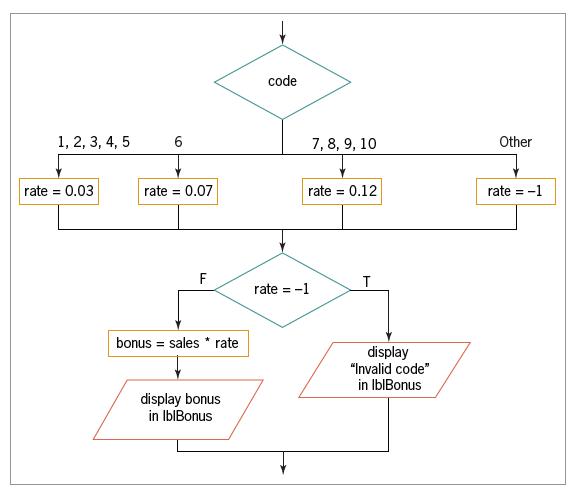
code 1, 2, 3, 4, 5 6 7, 8, 9, 10 Other rate = 0.03 rate = 0.07 rate = 0.12 rate = -1 F T rate = -1 bonus sales * rate display "Invalid code" in IblBonus display bonus in IblBonus
Step by Step Solution
There are 3 Steps involved in it
1 Expert Approved Answer
Step: 1 Unlock

Question Has Been Solved by an Expert!
Get step-by-step solutions from verified subject matter experts
Step: 2 Unlock
Step: 3 Unlock
 Study Help