







Question: 2. Create a Visual Basic Windows application. Use the following names for the solution and project, respectively: Valley Solution and Valley Project. Save the application
2. Create a Visual Basic Windows application. Use the following names for the solution and project, respectively: Valley Solution and Valley Project. Save the application in the VB2015\Chap01 folder. Change the form file’s name to Main Form.vb. Change the form’s Font property to Segoe UI, 9pt. Create the user interface shown in Figure 1-29.
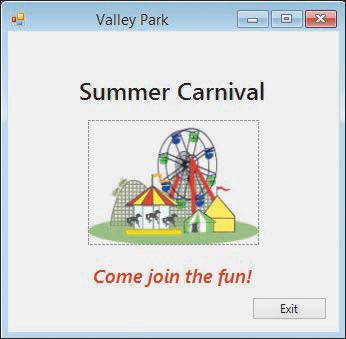 The picture box should display the image stored in the VB2015\Chap01\Carnival.png file. You can use any font style, size, and color for the label controls. The form should be centered on the screen when the application is started. Code the Exit button so that it closes the application when it is clicked. Use the Project Designer window to verify that the name of the startup form is correct, and to change the executable file’s name to Valley Park. Save the solution and then start the application. Use the Exit button to stop the application. Close the Code Editor window and then close the solution. Use Windows to open the project’s bin\Debug folder, and then run the project’s executable file.
Valley Park Summer Carnival Come join the fun! Exit
Step by Step Solution
There are 3 Steps involved in it

Get step-by-step solutions from verified subject matter experts
 Study Help