







Question: 2. Create an application, using the following names for the solution and project, respectively: Lottery Solution and Lottery Project. Save the application in the VB2015
2. Create an application, using the following names for the solution and project, respectively:
Lottery Solution and Lottery Project. Save the application in the VB2015\
Chap05 folder. Create the interface shown in Figure 5-70. The image for the picture box is stored in the VB2015\Chap05\BagOfMoney.png file. The Select Numbers button should display six lottery numbers. Each lottery number can range from 1 through 54 only. An example of six lottery numbers would be: 4 8 35 15 20 3. For now, do not worry if the lottery numbers are not unique. You will learn how to display unique numbers in Chapter 9. Test the application appropriately.
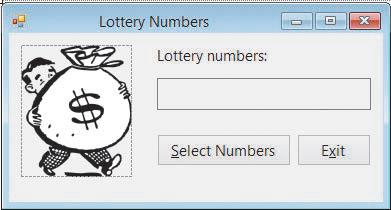
Lottery Numbers Lottery numbers: Select Numbers Exit
Step by Step Solution
There are 3 Steps involved in it

Get step-by-step solutions from verified subject matter experts
 Study Help