







Question: 2. Create an empty Web Site application named Tips and save it in the VB2015 Chap12 folder. Add a new Web page named Default.aspx to
2. Create an empty Web Site application named Tips and save it in the VB2015\
Chap12 folder. Add a new Web page named Default.aspx to the application. Change the DOCUMENT object’s Title property to Tip Calculator. Use Figure 12-45 as a guide when designing the Web page. In the Code Editor window, enter comments to document the application’s name and purpose as well as your name and the current date. Also enter the appropriate Option statements. Code the Calculate Tip button’s Click event procedure. Display the tips with a dollar sign and two decimal places. Save the application, and then start and test it. Close the browser window. Close the Code Editor window and then close the application.
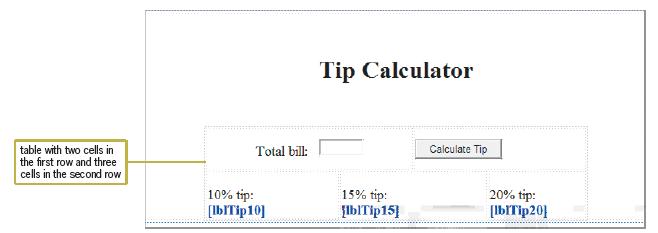
Tip Calculator table with two cells in the first row and three cells in the second row Total bill: 10% tip: [lb/Tip10] 15% tip: [lb]Tip15] Calculate Tip 20% tip: [lb/Tip20]
Step by Step Solution
There are 3 Steps involved in it

Get step-by-step solutions from verified subject matter experts
 Study Help