







Question: 2. Open the VB2015Chap09Pay SolutionPay Solution (Pay Solution.sln) file. The application should allow the user to select a pay code from the list box. The
2. Open the VB2015\Chap09\Pay Solution\Pay Solution (Pay Solution.sln) file. The application should allow the user to select a pay code from the list box. The btnCalc_ Click procedure should display the gross pay, using the number of hours worked and the pay rate corresponding to the selected code. The pay codes and rates are listed in Figure 9-42. Code the application, using a class-level array to store the pay rates. Test the application appropriately.
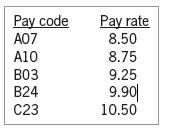
Pay code Pay rate A07 8.50 A10 8.75 B03 9.25 B24 9.90 C23 10.50
Step by Step Solution
There are 3 Steps involved in it
1 Expert Approved Answer
Step: 1 Unlock

Question Has Been Solved by an Expert!
Get step-by-step solutions from verified subject matter experts
Step: 2 Unlock
Step: 3 Unlock
 Study Help