







Question: 3. Create a Visual Basic Windows application. Use the following names for the solution and project, respectively: Characters Solution and Characters Project. Save the application
3. Create a Visual Basic Windows application. Use the following names for the solution and project, respectively: Characters Solution and Characters Project. Save the application in the VB2015\Chap01 folder. Change the form file’s name to Main Form.vb. Create the interface shown in Figure 1-35. The picture boxes should display the images stored in the Darth.png and Trooper.png files contained in the VB2015\
Chap01 folder. Include a timer that ends the application after five seconds have elapsed. Now, use the Project Designer window to change the executable file’s name to Characters.
Save the solution and then start the application. Close the Code Editor window and then close the solution. Use Windows to open the project’s bin\Debug folder, and then run the project’s executable file.
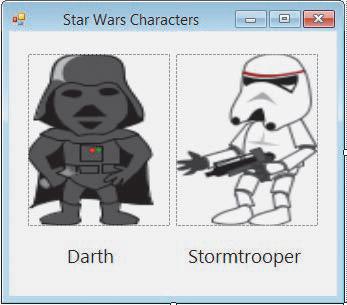
Star Wars Characters X Darth Stormtrooper
Step by Step Solution
There are 3 Steps involved in it

Get step-by-step solutions from verified subject matter experts
 Study Help