







Question: 4. The Internet contains a vast amount of code snippets that you can use in your Visual Basic applications. And in many cases, you can
4. The Internet contains a vast amount of code snippets that you can use in your Visual Basic applications. And in many cases, you can use the snippet without fully understanding each line of its code. In this exercise, you will use a code snippet that rounds the corners on a splash screen.
a. Open the Rounded Corners Solution (Rounded Corners Solution.sln) file contained in the VB2012\Chap01\Rounded Corners Solution folder. If necessary, open the designer window.
b. For the code snippet to work properly, the splash screen cannot have a border.
Therefore, change the form’s FormBorderStyle property to None.
c. Change the form’s BackColor property to black.
d. Save the application and then start the solution. Notice that the splash screen contains the standard corners, which are not rounded. Click the Exit button to end the application.
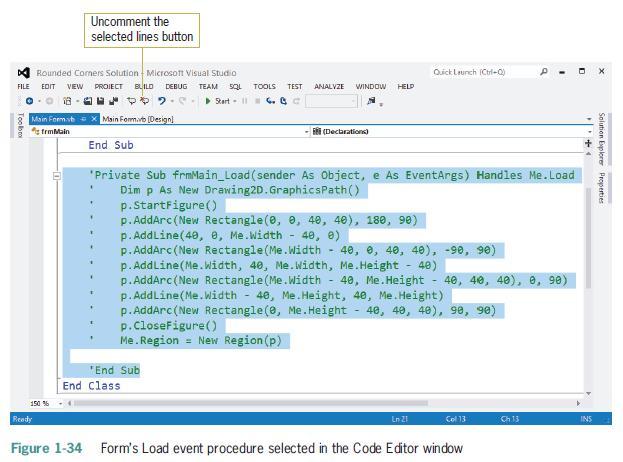
e. Open the Code Editor window. Select (highlight) the lines of code contained in the form’s Load event procedure, which is processed when the application is run and the form is loaded into the computer’s internal memory. See Figure 1-34.
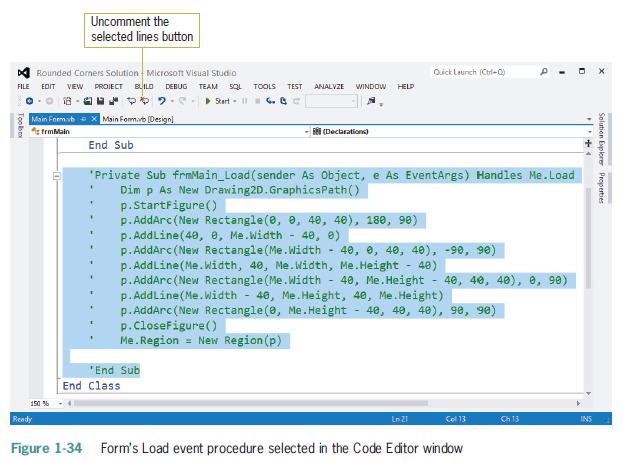
f. Click the Uncomment the selected lines button on the Standard toolbar. (Refer to Figure 1-34 for the button’s location.) Save the solution and then start the application.
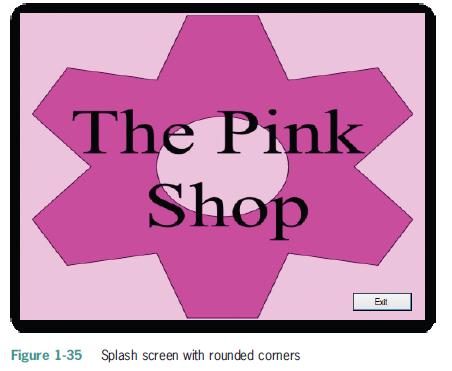
 The splash screen now has rounded corners. See Figure 1-35.
g. Click the Exit button to end the application. Close the Code Editor window and then close the solution.
Uncomment the selected lines button Quick Launch (Ctrl+Q) SQL TOOLS TEST ANALYZE WINDOW HELD Rounded Comers Solution Microsoft Visual Studio FILE EDIT VIEW PROJECT BUILD DEBUG TEAM 08 Start-11. Toolbo Main Formvb X Main Form.vb (Designl frmMain End Sub (Declarations) x the Solution Explorer Properties 150 % 'Private Sub frmMain_Load(sender As Object, e As EventArgs) Handles Me.Load Dim p As New Drawing2D. GraphicsPath() p.StartFigure() p.AddArc (New Rectangle(0, 0, 40, 40), 180, 90) p. AddLine(40, 0, Me.Width - 40, 0) p.AddArc (New Rectangle (Me. Width - 40, 0, 40, 40), -90, 90) p.AddLine(Me.width, 40, Me.width, Me.Height - 40) p.AddArc (New Rectangle (Me. Width 40, Me.Height 40, 40, 40) p.AddLine(Me. Width 40, Me.Height, 40, Me.Height) - p.AddArc (New Rectangle (e, Me.Height 40, 40, 40), 98, 90) p.CloseFigure() Me.Region = New Region (p) *End Sub End Class 8, 90) En 21 Col 13 Ch.13 INS Figure 1-34 Form's Load event procedure selected in the Code Editor window Ready
Step by Step Solution
There are 3 Steps involved in it

Get step-by-step solutions from verified subject matter experts
 Study Help