







Question: 5. In this exercise, you modify the Modified Savings Account application from this lesson. Use Windows to make a copy of the Modified Savings Solution
5. In this exercise, you modify the Modified Savings Account application from this lesson.
Use Windows to make a copy of the Modified Savings Solution folder. Rename the copy Modified Savings Solution-Intermediate. Open the Savings Solution (Savings Solution.sln) file contained in the Modified Savings Solution-Intermediate folder. The btnCalc_Click procedure should now display the amounts by rate within year (rather than by year within rate). Figure 6-70 shows a sample run of the application. Make the appropriate modifications to the code. Test the application appropriately.
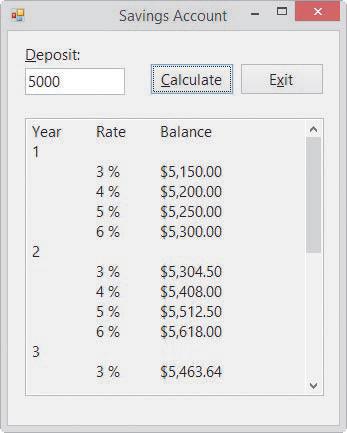
Deposit: Savings Account 5000 Calculate Exit Year Rate Balance 1 3% $5,150.00 4% $5,200.00 5% $5,250.00 6% $5,300.00 2 3% $5,304.50 4% $5,408.00 5% $5,512.50 6% $5,618.00 3 3% $5,463.64 x
Step by Step Solution
There are 3 Steps involved in it

Get step-by-step solutions from verified subject matter experts
 Study Help