







Question: 7. Create an application that can be used to teach the Italian words for the colors red, yellow, and green. Use the following names for
7. Create an application that can be used to teach the Italian words for the colors red, yellow, and green. Use the following names for the solution and project, respectively:
Colors Solution and Colors Project. Save the application in the VB2015\Chap04 folder.
Create the interface shown in Figure 4-57. The interface contains three text boxes, five buttons, and one label. Use the Internet to research the appropriate Italian words.
After entering the Italian word corresponding to a button’s color, the user will need to click the button to verify the entry. If the Italian word is correct, the button’s Click event procedure should change the color of the text box to match the button’s color.
(Hint: Assign the button’s BackColor property to the text box’s BackColor property.)
Otherwise, the Click event procedure should display the appropriate Italian word in a message box. The Clear button should change each text box’s background color to white and clear the contents of each text box. Test the application appropriately.
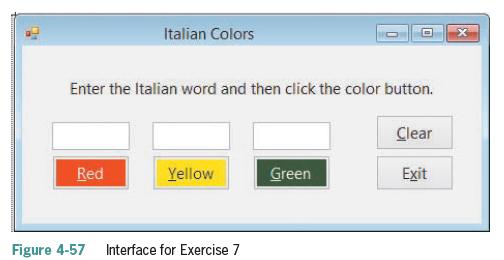
Italian Colors Enter the Italian word and then click the color button. Clear Red Yellow Green Exit Figure 4-57 Interface for Exercise 7
Step by Step Solution
There are 3 Steps involved in it

Get step-by-step solutions from verified subject matter experts
 Study Help