







Question: 7. In this exercise, you modify the Chopkins Toys application from Exercise 2. Use Windows to make a copy of the Chopkins Solution folder. Rename
7. In this exercise, you modify the Chopkins Toys application from Exercise 2. Use Windows to make a copy of the Chopkins Solution folder. Rename the copy Modified Chopkins Solution. Open the Chopkins Solution (Chopkins Solution.sln) file contained in the Modified Chopkins Solution folder. Modify the interface as shown in Figure 3-57.
The interface will now display the sale totals for each of the different packs. For example, if the customer purchased five 12 packs, the label that appears next to the associated text box should display 74.95 (5 * 14.99). Modify the btnCalc_Click procedure appropriately.
The procedure should also allow the user to enter the shipping charge, which should be added to the total sale amount. Save the solution, and then start and test the application.
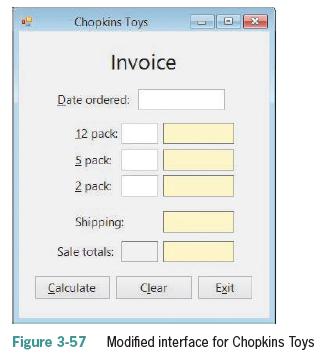
Chapkins Toys Invoice Date ordered: 12 pack: 5 pack: x 2 pack: Shipping: Sale totals: Calculate Clear Exit Figure 3-57 Modified interface for Chopkins Toys
Step by Step Solution
There are 3 Steps involved in it

Get step-by-step solutions from verified subject matter experts
 Study Help