







Question: 8. In this exercise, you create an application that allows the user to enter the gender (either F or M) and GPA for any number
8. In this exercise, you create an application that allows the user to enter the gender (either F or M) and GPA for any number of students. The application’s interface is shown in Figure 6-53. The application should calculate the average GPA for all students, the average GPA for male students, and the average GPA for female students. The list box should list GPAs from 1.0 through 4.0 in increments of 0.1 (e.g., 1.0, 1.1, 1.2, 1.3, and so on). Create the application, using the following names for the solution and project, respectively: GPA Solution and GPA Project. Save the application in the VB2015\
Chap06 folder. Test the application appropriately.
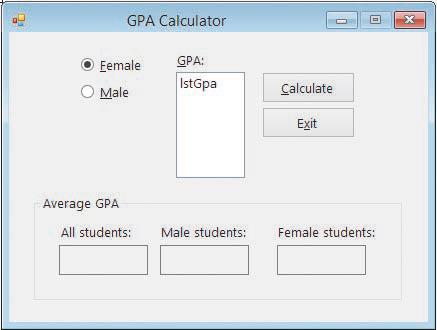
GPA Calculator GPA: Eemale O Male IstGpa Calculate Exit Average GPA All students: Male students: Female students: x
Step by Step Solution
There are 3 Steps involved in it

Get step-by-step solutions from verified subject matter experts
 Study Help