







Question: 9. Create an application, using the following names for the solution and project, respectively: Marshall Solution and Marshall Project. Save the application in the VB2015
9. Create an application, using the following names for the solution and project, respectively:
Marshall Solution and Marshall Project. Save the application in the VB2015\
Chap05 folder. Create the interface shown in Figure 5-75. Each salesperson at Marshall Sales Corporation receives a commission based on the amount of his or her sales. The commission rates are included in Figure 5-75. If the salesperson has worked at the company for more than 10 years, he or she receives an additional $500. If the salesperson is classified as a traveling salesperson, he or she receives an additional $700. The text box should accept only numbers, the period, and the Backspace key, and its text should be selected when it receives the focus. Make the appropriate calculations only when the sales amount can be converted to a Double number; otherwise, display an appropriate message. (Hint: Although you are allowing the text box to accept only numbers, the period, and the Backspace key, the user might inadvertently enter more than one period in the sales amount. An entry that contains more than one period cannot be converted to a number.) The calculated amounts should be cleared when a change is made to any of the input items. Test the application appropriately.
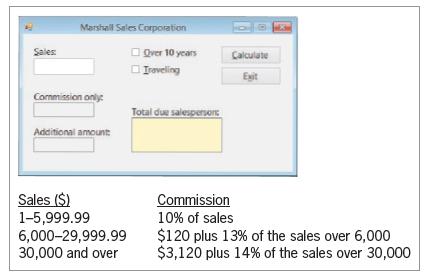
Sales: Marshall Sales Corporation Commission only: Additional amount: Over 10 years Traveling Calculate Exit Total due salesperson Sales ($) 1-5,999.99 6,000-29,999.99 30,000 and over Commission 10% of sales $120 plus 13% of the sales over 6,000 $3,120 plus 14% of the sales over 30,000
Step by Step Solution
There are 3 Steps involved in it

Get step-by-step solutions from verified subject matter experts
 Study Help